
256GB SD Card Guide: Avoid Common Buying Pitfalls
Buying a 256GB SD card? Easy, just grab the cheapest one with the largest capacity, right? Wrong. Too many users end up with an unsuitable card, leading to choppy video or premature failure. As a product expert at Joybuy, my mission is to help you decode the technical jargon to make an informed choice. Let's break down the common traps and the criteria that truly matter.
The 3 Traps to Avoid When Buying a Memory Card
Marketing praises storage capacity, but performance is hidden in technical details that are often overlooked. Here are the three most common mistakes.
- The Advertised Speed Trap: A high read speed (e.g., 150 MB/s) is great for offloading your card's content onto a computer, but it doesn't guarantee smooth video recording. For filming, it's the sustained write speed that matters most, a figure that manufacturers sometimes tend to downplay.
- The Endurance Trap: Not all cards are created equal. Using a standard model as a dash cam memory card or a security camera memory card is a costly mistake. These devices record continuously, 24/7, and require "high endurance" cards capable of handling intense write cycles. Under these conditions, a standard card will fail much faster.
- The Wrong Format Trap: Buying a standard SD card for a device that only accepts microSD (or vice versa) is a simple but common mistake. It's better to opt for versatility from the start.
Key Specs for an Informed Choice
To make the right choice, keep an eye on these three indicators. They determine whether the card will be compatible and performant for your specific use case.
1. Speed Classes: U, V, and A
These letters and numbers aren't just for decoration. They indicate the guaranteed minimum write speed, an absolutely essential point for video recording.
- UHS Speed Class (U): Indicated by a U with a number inside (1 or 3). A U3 card guarantees a minimum write speed of 30 MB/s, the ticket for stable 4K video recording.
- Video Speed Class (V): More specific, this class ranges from V6 to V90. A V30 card corresponds to the same minimum speed as U3 (30 MB/s) and has become the standard for 4K. For 8K or high-bitrate pro video, a V60 or V90 card is required.
- Application Performance Class (A): The A1 or A2 class is essential if you plan to install apps on the card from a smartphone or tablet. An A2 card offers better random read/write speeds, which makes launching and running apps much smoother.
2. Format: SDXC vs. microSDXC
The difference is primarily physical. SD cards are larger and used in cameras, while 256GB microSD cards are the standard for smartphones, drones, and now most action or surveillance cameras.
The smart move? Opt for a microSDXC card that comes with an SD adapter. You gain maximum versatility to switch between your devices without sacrificing performance. Just verify that your hardware is SDXC compatible (for cards larger than 32GB), which is the case for the vast majority of recent devices.
3. Endurance for Intensive Use
If your card is destined for a dash cam or security camera, endurance isn't an option—it's a requirement. These cards are specifically designed to withstand thousands of hours of recording and rewriting. They are also more robust against extreme temperatures, an undeniable advantage for in-car use.
Our Recommendations for Every Profile
Instead of a one-size-fits-all list, here are our tailored recommendations, designed to avoid the pitfalls and meet specific needs.
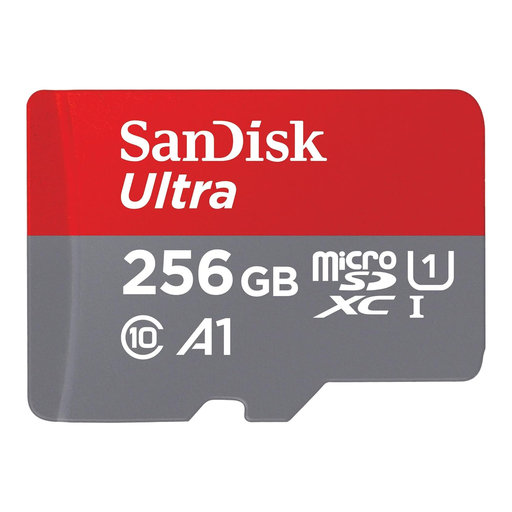
SanDisk Ultra microSDXC 256GB + SD Adapter
Why we chose it: The perfect card for expanding the storage on your Android smartphone, tablet, or gaming console. Its versatility, thanks to the included SD adapter, makes it a practical and budget-friendly solution for the whole family.
Its A1 class ensures good responsiveness for apps, while the included adapter protects you from format errors.
An excellent balance of capacity, versatility, and price for common uses like photos and Full HD video.
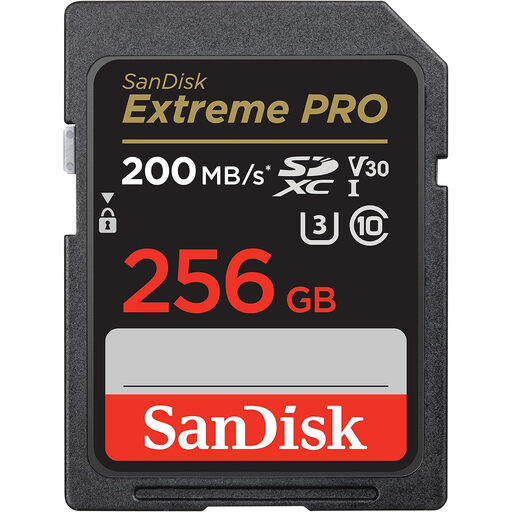
SanDisk Extreme PRO 256GB SDXC Memory Card
Why we chose it: Built for photographers and videographers using DSLR or mirrorless cameras. It excels at both burst mode shooting and 4K UHD video recording.
With its U3 and V30 certifications and write speeds up to 140 MB/s, it ensures a constant, smooth stream for your 4K videos. Goodbye, dropped frames!
SanDisk QuickFlow Technology boosts transfer speeds (up to 200 MB/s read) for lightning-fast offloading and post-production.
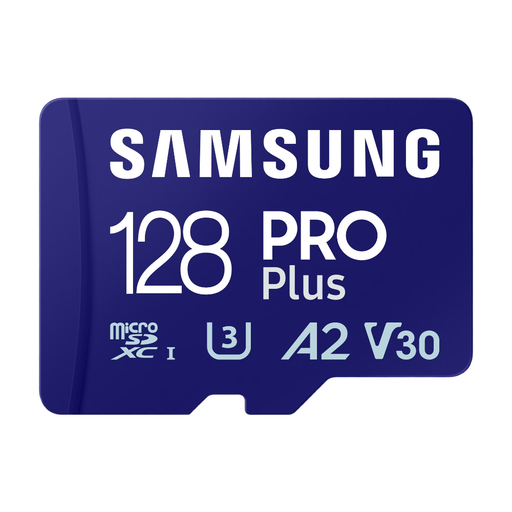
Samsung PRO Plus MicroSDXC (2023) 128GB + SD Adapter
Why we chose it: The rugged choice for drones, action cams, and surveillance systems. Samsung guarantees it against water, temperature, X-rays, magnets, drops, and wear. A true workhorse.
It's the answer to the endurance trap: designed for extreme conditions and intensive write cycles where a standard card would fail.
Its robust protection and top-tier performance (U3, V30) make it the ideal partner for filming in 4K in the most demanding situations.
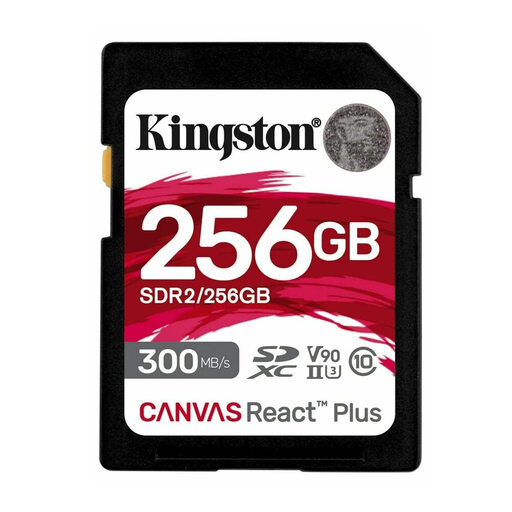
Kingston Canvas React Plus 256GB SDHC UHS-II
Why we chose it: The benchmark for pro cinematographers and photographers who swear by high-end gear. It's designed for 8K video, high-bitrate 4K, and RAW format burst shooting.
Thanks to its UHS-II interface and V90 certification (90 MB/s minimum write speed), it eliminates bottlenecks, even with the most massive data streams.
Stratospheric speeds (up to 300/260 MB/s) let you capture without compromise and cut file offload times in half.
Still haven't found the right card?
Explore our full selection of memory cards, all rigorously chosen by our experts for their performance and reliability.
Frequently Asked Questions (FAQ)
Should I format a new SD card before using it? Yes, it's highly recommended. Formatting a new card directly in the device that will use it (camera, camcorder, etc.) ensures perfect file system compatibility and prevents read or write errors. You can usually find the format option in your device's settings or configuration menu.
What is the lifespan of a 256GB SD card? A card's lifespan is measured in write cycles and varies dramatically depending on your usage. For casual photography, it can last for years. However, for intensive use like in a dash cam, a standard model will show signs of failure in less than a year. This is where a "high endurance" card makes all the difference, as it's designed to last for several years under those same conditions.
Is a microSD card with an adapter as fast as a standard SD card? Absolutely. For cards with identical specs (same speed class, same model), the performance is exactly the same. The adapter is a simple, passive pass-through that doesn't throttle read or write speeds. It's an equally reliable and much more versatile solution.