
3D Printing Accessories for Flawless Creations
By our product expert at Joybuy, July 17, 2026
Are your 3D prints ruined by "stringing" (those infamous wispy threads), grainy surfaces, or brittle filament? These issues, often blamed on the printer, actually stem from another weak link: your accessories. Damp filament or sloppy post-processing can ruin hours of work.
As a product expert at Joybuy, my mission is to help you navigate this landscape. This article presents a curated selection of 3D printing accessories designed to end these frustrations and take your creations to the next level, from spool to finished object.
How to Choose the Right Accessories for Your 3D Printer
Before diving into our selection, let's review the key criteria for making an informed choice that suits your projects.
1. Moisture Management: A Key Factor for Success
Moisture is the number one enemy of many filaments, especially hygroscopic materials like TPU, Nylon, PETG, or even the less-sensitive PLA. Filament that has absorbed moisture from the air generates steam bubbles during extrusion, leading to fragile prints, uneven surfaces, and nozzle clogs.
Investing in a filament dryer, also known as a filament dry box, is a remarkably effective solution. This device heats the spool to a controlled temperature to extract moisture, restoring the material's original properties. It not only helps salvage spools you thought were lost but also ensures consistent print quality.
2. The Post-Processing Step: The Finishing Touch
A print is rarely perfect right off the build plate. 3D print post-processing is an often-underestimated step that makes all the difference between a prototype and a finished part. This includes removing supports, deburring, sanding, and polishing.
To smooth a 3D print and achieve clean surfaces, a versatile 3D print finishing tool is your best ally. A multi-functional rotary tool with various attachments (for sanding, cutting, engraving, and polishing) allows you to perform most of these tasks with a single device, saving you considerable time and space.
Our Recommended Accessory Picks
We've selected products that directly tackle these problems, chosen for their effectiveness and smart design.
For Multi-Spool Drying: Creality Space Pi Filament Dryer Plus
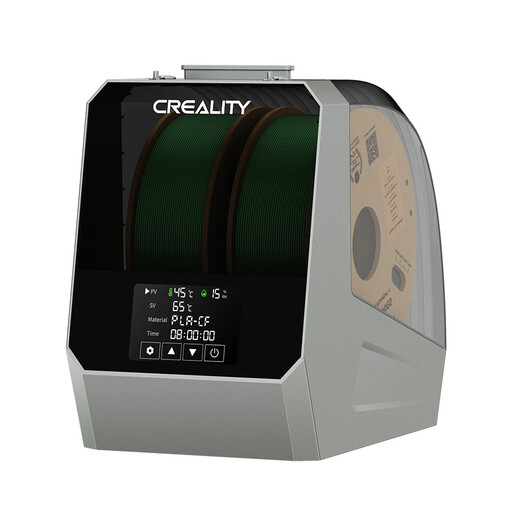
Why it stands out: The Creality Space Pi Filament Dryer Plus is designed for users who juggle multiple materials or printers. Its capacity to hold two spools simultaneously and its 360° heating system ensure even and rapid drying. The LCD touchscreen simplifies setup, offering presets for 12 filament types or manual adjustments for temperature (45-70°C) and duration (0-48h).
Advantages:
- High Capacity: Dries two 1 kg spools at the same time, a real productivity booster.
- Fast and Uniform Heating: The 360° PTC heating technology ensures the spool is treated perfectly evenly.
- Intuitive to Use: The touchscreen and presets make it very easy to operate, even for beginners.
- Dry While Printing: Filament outlets allow it to be used as an active storage box while printing.
Who is it for? Power users, small workshops, or anyone juggling multiple printers who wants to keep their materials in peak condition without interruption.
For Compact and Efficient Drying: Creality Space Pi Filament Dryer
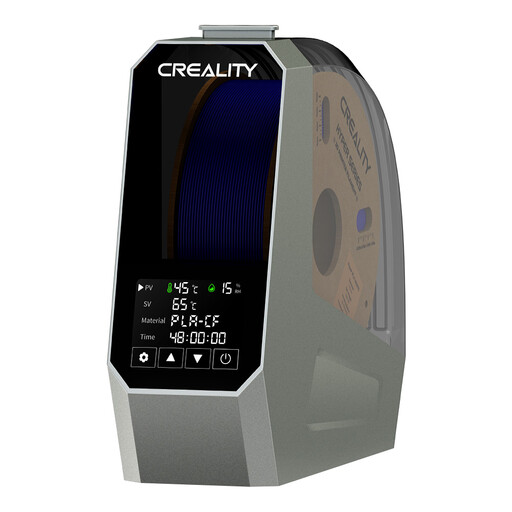
Why it stands out: This standard version of the Creality Space Pi offers the same 110W PTC heating technology and 360° hot air circulation as its larger counterpart, but in a more compact, single-spool form factor. It's compatible with a wide range of 1.75 mm and 2.85 mm filaments (PLA, ABS, PETG, TPU, Nylon), making it a highly versatile filament dry box solution.
Advantages:
- Compact and Powerful: Takes up less space while delivering top-tier drying performance.
- Powerful PTC Heating: The 110W heating core ensures a fast and stable temperature ramp-up.
- Material Versatility: Its wide compatibility makes it suitable for the vast majority of FDM printing projects.
Who is it for? For hobbyists and makers looking for a reliable and effective solution to care for their filament without any hassle.
For a Polished Finish: Tilswall 160W Multi-Tool
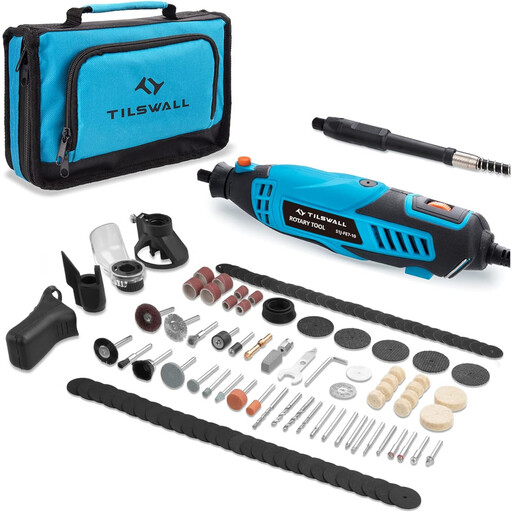
Why it stands out: This rotary tool stands out as the perfect ally for 3D print post-processing. Featuring a 160W motor and 6 variable speeds (8,000-33,000 RPM), it has the power and precision needed to work on various plastics. It comes with an ultra-comprehensive kit of 145 accessories, allowing you to do everything right out of the box: cut, sand, polish, drill, and engrave.
Advantages:
- All-Inclusive Set: The 145 included accessories let you tackle any finishing task right from the get-go.
- Power and Control: The variable speed allows you to adapt the rotation to the material (for example, a lower speed for PLA to avoid melting it).
- User Comfort: The auxiliary handle and integrated LED light improve grip and visibility for precision work.
Who is it for? For all makers, from beginners to seasoned pros, who are looking for an all-in-one, affordable solution to elevate their prints and achieve a truly professional finish.
Looking for Other Options?
Our selection covers the essentials, but the world of 3D printing accessories is vast. If you're looking for specific nozzles, upgraded build plates, or other tools, feel free to explore our full catalogue.
? Explore our full range of 3D printer accessories
Frequently Asked Questions (FAQ)
1. Why is my filament brittle and bubbling during printing? This is a classic symptom of filament that has absorbed moisture. When heated in the nozzle, the water turns to steam, creating micro-explosions that ruin the extrusion quality and weaken the object's structure. Using a filament dryer before printing is the ideal solution to fix this problem.
2. How do you smooth a 3D print in PLA or PETG? Mechanical smoothing is the most accessible method. It involves sanding the object's surface with sandpaper of progressively finer grits. A rotary tool like the Tilswall model greatly speeds up the process. Start with a coarse grit to remove layer lines, then move to a fine grit to get a smooth surface, before a final polish for a mirror finish.
3. Is a filament dryer really necessary? It all depends on your environment and the materials you use. If you live in a very humid region or regularly print with materials like Nylon, TPU, or polycarbonate, a dryer is highly recommended for consistent and reliable results. For PLA in a dry environment, it's less critical but remains an excellent way to ensure the proper storage and long-term performance of your spools.