
Buyer's Guide to 8K Wireless Gaming Mice: Make the Right Choice
In the competitive gaming arena, every millisecond counts. The promise of an 8K wireless gaming mouse is an alluring one: near-instantaneous responsiveness, that slight edge that can mean the difference between victory and defeat. The problem: the market is flooded with technical jargon and marketing claims designed to confuse you. Before you pull the trigger, it's essential to know how to distinguish true innovation from a superfluous gimmick. Our mission? To help you see things more clearly. Let's break down the pitfalls to avoid and the criteria that truly matter to make an informed choice.
High Performance: The 3 Pitfalls to Avoid Before Buying Your Gaming Mouse
The excitement of a new purchase can sometimes make you overlook the essentials. Here are the three most common mistakes to avoid.
- The 8000 Hz Polling Rate Mirage: An 8K "polling rate," or an 8000?Hz mouse, means the mouse reports its position to the computer 8000 times per second. That's eight times more than a standard 1000?Hz mouse. While the latency gain is real (0.125?ms vs. 1?ms), it's only noticeable under very specific conditions. Without a very high refresh rate monitor (240?Hz or higher) and a processor powerful enough to handle this flood of data, this advantage remains purely theoretical. Worse, in some cases, it can even bog down your machine's performance.
- The Race for Ultra-Lightweight at the Expense of Durability: An ultra-lightweight gaming mouse facilitates quick movements and reduces fatigue. The catch? Some models achieve this feather-light weight by sacrificing material quality, shell rigidity, or, more critically, battery capacity. A mouse that creaks under pressure or whose battery can't last a full day of intense gaming is a purchase you'll quickly regret.
- The Obsession with Excessive DPI: Manufacturers love to showcase astronomical DPI (dots per inch) figures: 20,000, 30,000, and beyond. In practice, most professional gamers set their sensitivity between 400 and 1600 DPI. It's better to have a high-quality sensor with flawless tracking than a stratospheric number you'll never actually use.
The Real Criteria That Make a Difference
To avoid making a mistake, focus on these three essential points that define an excellent wireless gaming mouse.
1. The Sensor and Native Polling Rate
The heart of the mouse is its sensor. Prioritise models equipped with optical sensors renowned for their precision and lack of hardware acceleration. For the 8000?Hz polling rate, ensure it's a native capability and not a software-based extrapolation. Native performance is the guarantee of a stable connection and minimal latency, provided, of course, that your PC can keep up.
2. The Balance of Weight, Ergonomics, and Battery Life
The ideal mouse is one you forget is even there, perfectly fitting your hand and grip style.
- Weight: A weight below 70 grams is generally considered light. Models around 50-60 grams are often preferred for fast-paced shooters (FPS).
- Ergonomics: The shape should match your grip type (palm, claw, or fingertip grip). An ambidextrous mouse may suit many, but an ergonomic shape for right- or left-handed users will offer better long-term comfort.
- Battery Life: For peace of mind during gameplay, a long-lasting wireless mouse is essential. Check the advertised battery life, especially at the polling rate you intend to use (battery life drops drastically at 8000?Hz). Some models include low-power modes for desktop use.
3. Customisation and Durability
A programmable e-sports mouse allows you to tailor it to your needs and adapt it to each game. The number of programmable buttons, the ability to create macros, and the option to save profiles to the mouse's onboard memory are major assets. Finally, the durability of the switches is a guarantee of longevity. Optical switches, for example, offer a longer lifespan than traditional mechanical switches and eliminate the risk of unintentional double-clicks.
Recommended Gear for Demanding Gamers
Here are a few models that check all the boxes, designed for different types of gamers.
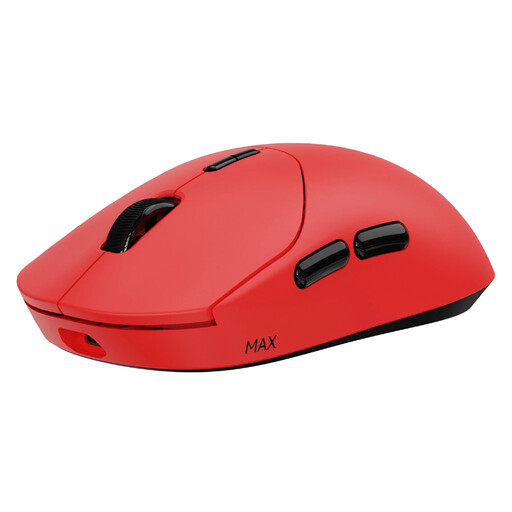
RAPOO VT2 MAX Wireless Gaming Mouse
Why this one? Designed for pure performance, it delivers the e-sports winning trifecta: a feather-light 53g weight for lightning-fast movements, a native 8000 Hz wireless polling rate for absolute responsiveness, and record-breaking battery life to power through gaming sessions without interruption.
It ends the weight vs. battery life dilemma. Thanks to an ultra-efficient Nordic chip, it offers up to 750 hours of battery life (at 1000 Hz) while weighing only 53g. Compromise is a thing of the past.
A native 8000 Hz wireless polling rate without an additional dongle, and 10 programmable buttons with onboard memory.
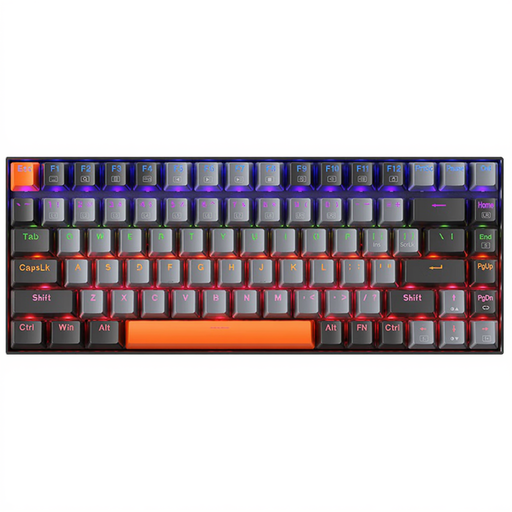
Machenike K500A-B84 75% Wired Keyboard
Why this one? A good mechanical keyboard is the perfect partner for a precision mouse. This compact model (75% layout) frees up valuable desk space for wide mouse movements, a decisive advantage in FPS games. Its red switches ensure a smooth and responsive keystroke.
It gets straight to the point: reliable mechanical switches and an optimised layout. No superfluous gimmicks that drive up the price and clutter your desk, unlike many oversized "gaming" keyboards.
Compact 84-key layout for maximum space, and red mechanical switches for fast, quiet actuation.
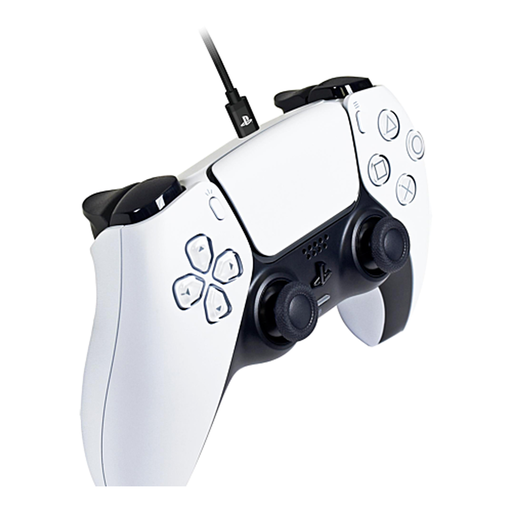
Hori USB-C Charging Cable for Dualsense PS5 Controller
Why this one? For those who juggle between PC and PlayStation 5, cable management is a real issue. This 3-meter model, officially licensed by Sony, lets you charge your DualSense controller mid-game or use it wired on PC for a zero-latency connection.
No more frustration with low-quality cables that fail after a few weeks or don't support a wired connection. Its braided sheath and metal connectors are built to last.
Its 3-meter length offers great freedom of movement. Its tangle-free design and official Sony license guarantee a hassle-free experience.
Need More Ideas?
Explore our complete selection of products, all approved by our experts for their performance and reliability.
Frequently Asked Questions
Is an 8000 Hz mouse really useful for all gamers?
No, not necessarily. The benefit of an 8000?Hz mouse is most noticeable for competitive or professional level gamers using very high refresh rate monitors (240?Hz and up) and seeking the lowest possible latency. For a casual gamer on a 60 or 144?Hz monitor, a 1000?Hz mouse is already excellent and will be much less demanding on your PC.
How can I optimise the battery life of a wireless gaming mouse?
Several tricks can help extend battery life. The first is to lower the polling rate when you're not gaming (e.g., switching from 8000?Hz to 1000?Hz). The second is to dim or turn off the RGB lighting, which is very power-hungry. Finally, many models offer a power-saving mode that activates after a period of inactivity.
Does the weight of a gaming mouse have a real impact on performance?
Yes, and it's significant, especially in games that require quick and precise movements like FPS. An ultra-lightweight gaming mouse requires less effort to start and stop moving, which can improve aiming accuracy and reduce wrist fatigue over long sessions. However, the ideal weight is a matter of personal preference: some players prefer the more stable feel of a slightly heavier mouse.