
Android Tablet Buying Guide: How to Choose the Right Tablet
Navigating the jungle of Android tablets can quickly become a headache. Between jargon-filled spec sheets and tempting marketing promises, it's easy to make the wrong turn and end up regretting your purchase a few months down the line. As the head of product selection at Joybuy, my role is to give you the keys to decipher this information and make an informed choice that truly fits your needs and budget.
This guide focuses on the most common pitfalls and the essential criteria to check before you buy your next Android tablet.
The 3 Traps to Avoid When Buying a Budget Tablet
The affordable tablet market is full of great deals, but also traps that can turn a smart saving into a real headache. Here are the three most common mistakes.
- The "Extended" RAM Mirage: Many models boast impressive RAM figures (12 GB, 20 GB...). Be careful, as this is often a marketing trick that combines real physical RAM with virtual RAM (a portion of the storage used as supplemental memory). To be clear: a tablet with 4 GB of physical RAM + 8 GB of virtual RAM will never perform as well as a model with 8 GB of 100% physical RAM. For a smooth experience in 2026, aim for a minimum of 4 GB of physical RAM. The ideal for comfortable use remains 6 or 8 GB.
- The Disappointing "HD" Screen: The term "HD" is a catch-all marketing buzzword. A 10-inch or larger screen with a mere 1280x800 pixel resolution (sometimes labelled as HD) will display a visibly pixelated image that sorely lacks sharpness. For good visual comfort, especially for streaming and reading, demand a Full HD (1920x1080) resolution at a minimum, or ideally 2K.
- Incomplete Connectivity: All tablets have Wi-Fi, but not all chips are created equal. Wi-Fi 5 (802.11ac) or Wi-Fi 6 offers significantly higher speeds and stability than the older Wi-Fi 4 standard. Likewise, if you need a connection on the go, make sure the model is a 4G tablet with a SIM card slot.
The Technical Specs That Really Matter
To find the hidden gem, focus on the features that truly make a difference in daily use.
Screen Size and Quality
The screen size determines your tablet's primary use case.
- A 10-inch tablet is the versatile standard, perfect for web browsing, emails, and watching videos.
- A large-screen tablet (11 to 13 inches) offers superior comfort for multitasking, immersive entertainment, or for use as a drawing tablet.
Beyond size, check the panel technology (IPS for good viewing angles) and Widevine L1 certification. Without this key feature, you can't stream Netflix or Prime Video in HD, even if your screen is 2K-ready! This is a crucial detail.
Processor and Memory
The processor is the engine of your tablet. An octa-core (8-core) processor is the standard today. Chips like the MediaTek Helio G99 or those from the Unisoc T series offer an excellent balance of performance and battery life for daily use.
As mentioned earlier, physical RAM is a non-negotiable criterion. For a student tablet that needs to juggle multiple research tabs, a word processor, and a video conferencing app, 6 GB of physical RAM is highly recommended to avoid slowdowns.
Accessories and Battery Life
A tablet with a keyboard and stylus can transform into a light-duty laptop for simple tasks. Ensure that the included accessories are well-made. A stylus with high pressure sensitivity (e.g., 4096 levels) is a bonus for handwritten notes or drawing.
Finally, battery life is the name of the game. A 6000 mAh battery is a good starting point for a day of moderate use, while models with 8000 mAh or more will offer you greater peace of mind.
Top Android Tablets to Consider
To illustrate our points, here are a few models that tick all the right boxes for different user profiles.

TECLAST ArtPad Pro Tablet — 12.7-inch 2K Display
Why it's a perfect match: Engineered for productivity and creativity, this tablet combines a large 12.7-inch 2K display, perfect for multitasking and drawing. Its included stylus (4096 pressure levels) and keyboard make it a formidable all-in-one solution for a student or digital artist.
It packs 8 GB of 100% physical RAM for flawless fluidity, and its 2K screen eliminates the risk of a disappointing image on such a large panel. The complete bundle prevents unpleasant surprises and additional costs.
High-performance Helio G99 chip, an extra-large 10,000 mAh battery for record-breaking autonomy, and 4G LTE connectivity to stay productive anywhere.
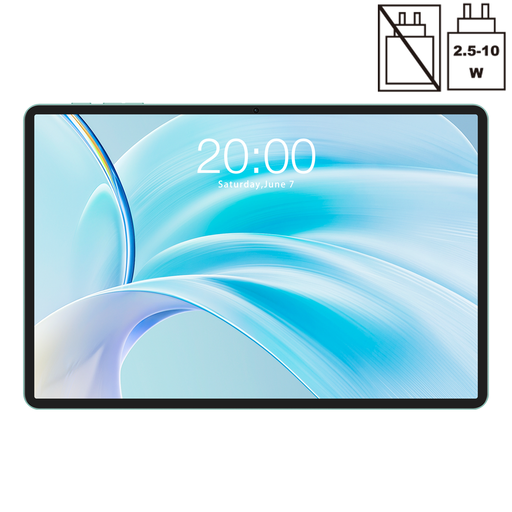
Teclast P50 11-inch Tablet
Why it's a perfect match: The ideal all-rounder for family use. Its 11-inch 90 Hz screen makes browsing and viewing incredibly smooth. The Widevine L1 certification is your guarantee for successful family streaming nights.
This model goes all-in on screen quality with its high refresh rate, a rare luxury at this price point. Its 8 GB of physical RAM effortlessly handles the whole family's apps.
Stunningly smooth 90 Hz display, comprehensive connectivity (4G LTE + Wi-Fi 5), and an up-to-date operating system (Android 15).
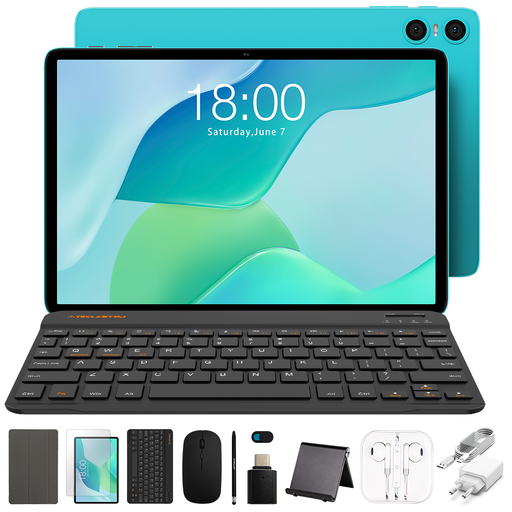
TECLAST P33 Tablet with Android 15
Why it's a perfect match: Perfect for a first device or a tight budget. This 10.1-inch tablet comes with a complete bundle (case, keyboard...), making it ready to go out of the box for essential tasks: emails, browsing, and videos.
While it does use virtual RAM, its physical RAM base is respectable for its intended tasks. Most importantly, its all-in-one bundle avoids the hidden costs of buying accessories separately—a classic entry-level trap.
Unbeatable value for money, an 11-in-1 accessory pack included, and a versatile 10.1-inch form factor.
Looking for other options?
We have curated a full range of products that meet our selection criteria and current standards.
Frequently Asked Questions
What is the lifespan of an entry-level Android tablet?
Its longevity depends on two factors: hardware and software support. On the hardware side, a well-maintained tablet can function for 3 to 5 years for basic use. On the software side, manufacturers on this segment typically provide updates (security and new Android versions) for 2 to 3 years. Beyond that, the tablet will still work but may lose compatibility with the latest apps.
Do I really need a 4G tablet?
A 4G tablet is essential if you are often on the move: commuting, travelling, or in any location without reliable Wi-Fi. It guarantees you a constant connection. If you mainly use it at home, at the office, or in places with Wi-Fi, a Wi-Fi-only model will be more economical and just as effective.
Is 4 GB of RAM enough for a tablet in 2026?
For simple use (checking emails, browsing a few websites, watching a video), 4 GB of physical RAM can still get the job done. However, for more comfort, for juggling multiple apps, or simply to invest in a more future-proof model, we strongly recommend upgrading to 6 or 8 GB of physical RAM. It's a wiser choice for the long run.