
How to Choose the Right Android Tablet With Keyboard
The idea of an Android tablet with a keyboard is an appealing one: the portability of a tablet, the productivity of a laptop, and often at a much friendlier price point. The problem? The market is a real jungle where it's easy to get lost. Between over-inflated spec sheets and mediocre accessories, making a poor purchase is all too common.
Before you dive in, it's crucial to know how to avoid the most common marketing traps that lead to disappointing products.
- The "Extended" RAM Mirage: Beware of spec sheets that flaunt dizzying RAM figures (20 GB, for example). In reality, this is often a trick that combines real physical RAM with virtual RAM (a portion of storage used as supplemental memory). A tablet with 8 GB of physical RAM and 12 GB of virtual RAM will never be as responsive as a model with 20 GB of 100% physical RAM. It's a detail that makes all the difference in daily use.
- The Fragile "All-in-One Bundle" Syndrome: On paper, a
tablet + keyboard bundleseems like the deal of the century. But be warned, the quality of the accessories is often the weak link in the equation. A mushy keyboard, a finicky Bluetooth connection, or a case that offers no real protection can quickly turn your bargain into a nightmare. - The Confusion Between Screen Size and Quality: Don't be blinded by a large diagonal measurement. A 12 or 13-inch screen is absolutely no guarantee of quality. If it's paired with a low resolution (below Full HD), you'll get a blurry, pixelated image—a torment for your eyes, whether you're reading or watching a series.
The Essential Criteria for an Informed Choice
To avoid these disappointments, let's get back to basics: a few objective technical specifications. These are the real arbiters for evaluating the performance and durability of your future tablet.
The Processor and RAM Duo: The Real Engine
The processor (CPU) is the tablet's brain. An Octa-Core (eight-core) model is the bare minimum today to ensure smooth navigation and multitasking.
As for RAM, only trust the amount of physical RAM. For comfortable use, especially for a student tablet or light office work, a baseline of 6 GB to 8 GB of physical RAM is recommended. This allows you to juggle a browser, a word processing app, and Netflix without frustrating slowdowns.
Screen Size and Resolution: A Matter of Clarity
Screen size is a matter of taste, but resolution is non-negotiable. The 10-inch format is a versatile all-rounder, but don't accept anything less than Full HD (1920 x 1080 pixels) resolution. This guarantees a sharp and clear display, which is essential for your visual comfort. For larger screens (12 inches and up), a 2K resolution becomes almost indispensable to maintain fine detail.
Connectivity and Accessories: The Coherence of the Bundle
A good bundle is judged by the coherence of the whole package. The keyboard should offer a pleasant typing experience and a reliable connection (usually Bluetooth). The case should not only protect the tablet but also serve as a stable and well-designed stand.
Finally, consider your mobility. If you plan to use your tablet on the go, away from a Wi-Fi network, opting for a 4G tablet with a SIM card slot will free you from many constraints.
Top Tablet Keyboard Picks
Enough theory, let's get practical. Here is our selection of models that check all the right boxes, for different profiles and budgets.
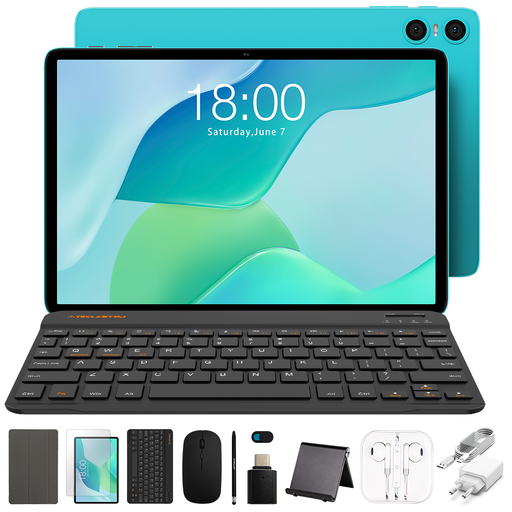
TECLAST P33 Android 15 Tablet, 10.1" Display, 9GB RAM, 64GB Storage, 11-Piece Bundle with Case & Keyboard
Why we chose it: This is the ideal starter solution. For a student or family looking for a complete yet budget-friendly tablet, this bundle provides everything you need right out of the box. Its 10.1-inch format is an excellent compromise between portability and user comfort.
It solves the problem of poorly made bundles by providing a complete set of 11 accessories, including a custom-designed keyboard and case, ensuring flawless compatibility and protection.
Its price-to-feature ratio. The user gets a ready-to-use solution without needing to budget for additional essential accessories.

TECLAST ArtPad Pro 12.7" 2K Tablet, T-Pen Stylus, Helio G99, 20GB RAM, 256GB Storage
Why we chose it: For those who want to do much more than just basic office work. Its large 2K screen and support for a pressure-sensitive stylus make it a highly relevant tool for drawing, handwritten note-taking, or light photo editing.
It doesn't fall into the virtual RAM trap, relying instead on a high-performance processor (Helio G99) and a solid base of 8 GB of physical RAM, ensuring true fluidity. The 2K screen provides the clarity essential for creative use.
The combination of a large, high-resolution screen and compatibility with a 4096-level pressure-sensitive stylus—a spec sheet worthy of much more expensive models.
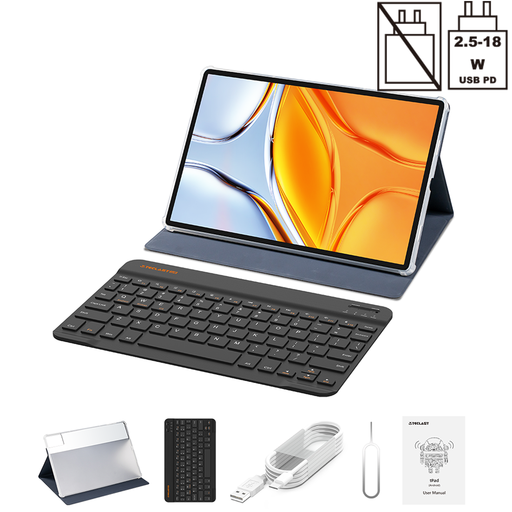
TECLAST T70 14" Android Tablet, Helio G99, 20GB RAM, 256GB, 4G LTE with Case & Keyboard
Why we chose it: For those who want an immersive experience for streaming, gaming, or split-screen work. Its 14-inch screen offers a truly captivating experience, while 4G LTE connectivity makes it perfectly autonomous for working or entertainment anywhere.
This model doesn't sacrifice performance for size. It pairs its large screen with an FHD+ resolution (1920x1200) and the Helio G99 processor, thus avoiding the pitfall of large, slow tablets with disappointing displays.
The combination of a very large 14-inch screen and 4G LTE connectivity, which offers rare versatility for both immersive entertainment and mobile productivity.
Looking for other options?
We have compiled a complete list of products that meet these same selection criteria and current safety standards.
What is the lifespan of an Android tablet with a keyboard?
A tablet's lifespan depends on its usage and the care it receives. On average, you can expect 3 to 5 years. To extend it, a few good habits are all it takes: avoid letting the battery fully discharge too often, protect the device from thermal shock, and install security updates. The durability of the keyboard and case is also a key point; a quality bundle from the start will save you from premature wear and tear.
Can a tablet + keyboard bundle really replace a laptop?
For many uses, the answer is a resounding yes. For web browsing, emails, word processing, presentations, and streaming, an Android tablet with a keyboard is a very effective and far more portable alternative. However, for tasks requiring specific software (pro video editing, 3D modeling, intensive coding) or significant computing power, a laptop remains essential.
How can I check keyboard compatibility with a tablet?
The simplest and safest way is to opt for a tablet + keyboard bundle sold by the manufacturer itself. Compatibility is then guaranteed: the keyboard is designed to fit the tablet perfectly, and the Bluetooth connection is optimized. If you buy a keyboard separately, check that it is a universal model compatible with Android and that its dimensions match your tablet's for easy transport.