
Which Android Tablet Should You Choose? A Guide to Leading Models
By our Joybuy Product Expert, July 14, 2026
The tablet market is a crowded space where it's easy to get lost. Between screen sizes, processor power, and storage capacity, tracking down the perfect Android tablet for your needs and budget can quickly become a headache. And yet, whether you need a tool for work, a screen for family movie nights, or a digital sketchbook, the perfect device is out there.
This guide is here to light the way. As a Product Expert at Joybuy, my mission is to decode the spec sheets for you and focus only on what matters: relevant models with an unbeatable price-to-performance ratio.
The Decisive Criteria for Choosing the Right Tablet
Before you dive in, let's review the key points that will guide your choice.
1. The Display: Size and Resolution for Your Needs
Screen size is arguably the first choice you'll make. A large-format tablet (over 12 inches) offers unparalleled viewing comfort for watching movies, multitasking, or drawing. Conversely, a more compact format (around 10 inches) is lighter and easier to handle, making it an excellent tablet for kids or a prime companion for your travels.
Resolution is just as important. A Full HD definition (1920 x 1080 pixels) is a good starting point, but a 2K resolution (around 2000 pixels wide) guarantees a much sharper and more detailed picture. It's a real asset for both reading and graphic design.
2. Performance and Storage: The Winning Combination for Fluidity
A tablet's smoothness depends on the processor and RAM combination. For a perfectly fluid experience in 2026, aim for a minimum of 6 to 8 GB of RAM. Some models even include virtual RAM expansion, a clever software trick that borrows a portion of the storage to boost multitasking.
On the storage side, 128 GB is the bare minimum to be comfortable today. However, if you're a heavy user of games, movies, or pro apps, a 256 GB tablet will save you a lot of headaches. Also, check for a microSD port: it's the easiest and most cost-effective way to expand memory. Most recent models run on Android 15, ensuring a modern and secure interface.
3. Connectivity and Accessories: To Go Even Further
Is your tablet meant to stay at home or follow you on all your adventures? A 4G LTE tablet frees you from Wi-Fi networks and ensures an almost permanent internet connection. This is a decisive advantage for mobile professionals and students.
Finally, don't underestimate the power of accessories, which can transform your tablet. A tablet with a keyboard turns into a secondary ultraportable, perfect for taking notes in class or answering emails. A precise stylus, on the other hand, opens up the world of digital drawing and document annotation.
Recommended Android Tablets to Consider
We have selected three models that stand out from the pack, each catering to a specific user profile.
Teclast ArtPad Pro 12.7-Inch 2K
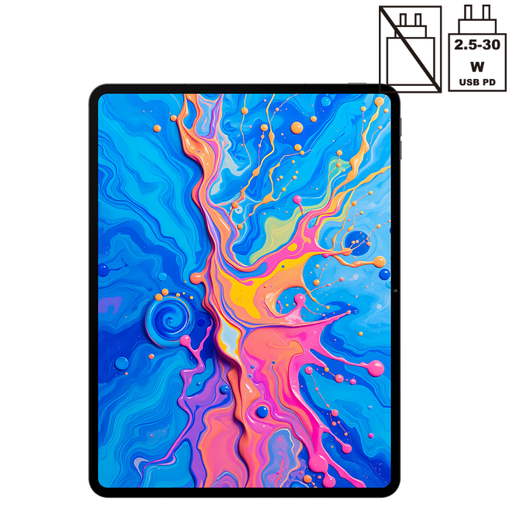
Its Key Feature The Teclast ArtPad Pro is built for creativity and multimedia. Its large 12.7-inch 2K screen provides a comfortable workspace and an immersive image quality. Its compatibility with the T-Pen stylus (4096 pressure levels) makes it an ideal candidate for drawing or taking handwritten notes with high precision.
Key Strengths
- Large 12.7-inch 2K display for total immersion.
- Support for the T-Pen stylus with 4096 pressure levels.
- Power and fluidity with the Helio G99 processor and 20 GB of RAM (8 GB + 12 GB virtual).
- Ample 256 GB of storage.
- Full connectivity: 4G LTE and Wi-Fi 5.
- Excellent battery life with its 10,000 mAh battery.
Who is it for?? For creatives, art students, and anyone who wants a high-performance tablet for entertainment, drawing, and note-taking.
TECLAST T70 14-Inch with Keyboard
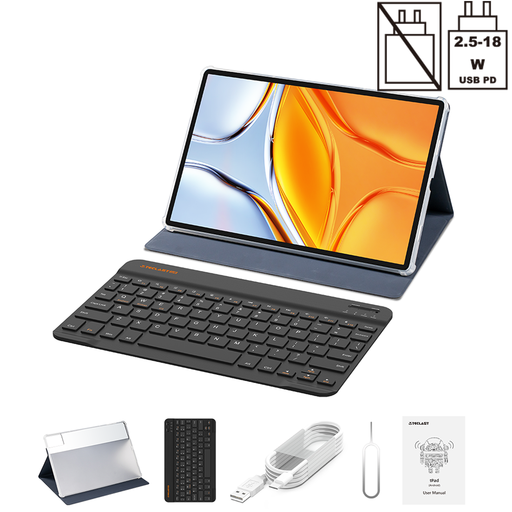
Its Key Feature With its giant 14-inch screen and included keyboard, the Teclast T70 tablet positions itself as a true laptop alternative for productivity. A large-format tablet designed for comfortable typing and intensive multitasking.
Key Strengths
- Very large 14-inch screen (1920 x 1200) for maximum comfort.
- Keyboard and case included for out-of-the-box productivity.
- Solid performance thanks to the Helio G99 processor and 20 GB of RAM.
- 256 GB of internal storage, expandable via microSD.
- 4G LTE connectivity to stay productive anywhere.
- Endurance guaranteed by the 10,000 mAh battery.
Who is it for?? For mobile professionals, students who spend their time writing, and anyone looking to replace an old laptop with a large, versatile screen.
TABWEE K10 10.1-Inch for Kids
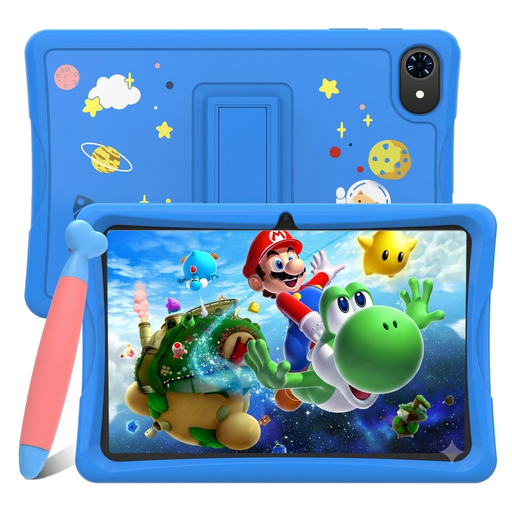
Its Key Feature The TABWEE K10 is a budget-friendly tablet designed specifically for children. It features the Google Kids Space interface, a safe and fun environment filled with age-appropriate content. Its rock-bottom price makes it the perfect choice for a first tablet.
Key Strengths
- Unbeatable price, especially with launch offers.
- Google Kids Space interface for easy and reassuring parental controls.
- Widevine L1 certification for watching Netflix and Disney+ in HD.
- Stylus included for drawing and having fun.
- Compact and lightweight 10.1-inch format, easy to handle.
Who is it for?? For families looking for a safe and affordable first kids' tablet, or as a secondary tablet without breaking the bank.
Check the offer on the TABWEE K10
Looking for Other Options for Creatives??
Is digital drawing your priority? If you're looking for a model specifically optimized for this use, take a look at our dedicated selection.
Discover our range of graphics tablets with stylus
Frequently Asked Questions (FAQ)
1. What's the difference between an Android tablet and an iPad?? It all comes down to the operating system. Android is an open system that shines with its flexibility, customization options, and a huge catalog of models at all price points. Conversely, iPadOS (Apple) is a closed ecosystem, renowned for its perfect hardware-software optimization and its more premium positioning. The choice will depend on your habits and your existing devices (if you already have an iPhone, for example).
2. How much RAM and storage should I plan for a tablet in 2026?? For peace of mind, aim for 6 to 8 GB of RAM. This is what you need to juggle multiple apps without the tablet slowing down. For storage, 128 GB is a good baseline. But if you plan to store a lot of photos, videos, or install demanding games, go directly for a 256 GB tablet. You'll save yourself the chore of constantly clearing out space.
3. Is a 4G tablet really useful?? It all depends on your usage. If you're often on the go (commuting, traveling) and need constant internet access for work or entertainment, then yes, 4G is a real bonus. However, for use primarily at home or in the office, where Wi-Fi is available, a Wi-Fi-only model will be more than enough and more budget-friendly.