
CarPlay and Android Auto Head Units: A Complete Buying Guide
Fumbling with a smartphone on the passenger seat or clipped to a wobbly mount is neither practical nor safe. When your car's multimedia system is showing its age, using Waze, Spotify, or hands-free calling can quickly become a headache. Fortunately, simple, modern solutions exist to bridge the gap between your phone and your vehicle.
As a Product Expert at Joybuy, my mission is to guide you through this tech jungle. This guide breaks down the different ways to integrate a CarPlay and Android Auto head unit into your car?: a full system, a portable screen, or a simple adapter.
Our Tips for Choosing the Right CarPlay & Android Auto System
Before diving in, it's crucial to understand the three main product categories. Your final choice will depend on your car model, your budget, and the type of installation you're considering (from temporary to permanent).
1. Solution Type?: Integrated, Portable, or Adapter??
- The integrated head unit (1-DIN or 2-DIN format)?: This is the most complete solution. It fully replaces your old car radio. A 2-DIN head unit offers a large touchscreen and integrates perfectly into the dashboard for a factory-fitted look. Installation is more involved, but the result is seamless and built to last.
- The portable car display?: The ideal solution if you don't want to modify your dashboard. This portable car display mounts to the dashboard or windscreen and plugs into the cigarette lighter. It communicates wirelessly with your smartphone and plays audio through the car's speakers (via an FM transmitter or an auxiliary jack). It's a flexible, portable, and incredibly easy-to-install option.
- The wireless adapter?: If your car already has a wired version of CarPlay or Android Auto, this CarPlay adapter is for you. It plugs into your vehicle's USB port and transforms your wired connection into wireless CarPlay or wireless Android Auto. It's the simplest way to say goodbye to cables.
2. Compatibility with Your Vehicle and Phone
This is the point you should never overlook?: always check for compatibility before you buy. For an integrated head unit, make sure the format (1-DIN or 2-DIN) matches the available slot. For adapters, carefully review the list of compatible vehicles provided by the manufacturer. On the smartphone side, CarPlay is exclusive to iPhones, while Android Auto is the domain of Android phones. Most modern solutions use a Bluetooth car stereo connection for the initial pairing.
3. Connectivity?: Wired or Wireless??
The trend is clearly towards wireless. Wireless CarPlay and wireless Android Auto are a real game-changer for daily use?: your phone connects automatically as soon as you get in the car, without you even taking it out of your pocket. Integrated and portable solutions often offer both options (wired and wireless), while adapters are specifically designed for making the leap to wireless.
Recommended CarPlay and Android Auto
Here are three clever products that cater to very different needs, all selected for their quality and performance.
Junsun 8163 Series - 7-inch 2-DIN Head Unit
Why it stands out
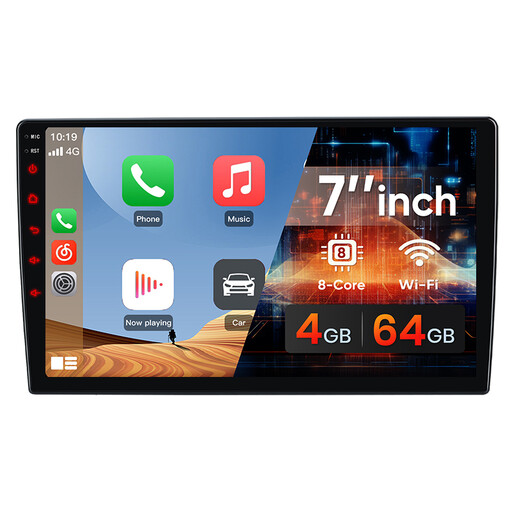
The Junsun 8163 is a full integration solution that radically modernises your car's interior. Running on Android 10.0, it does more than just offer CarPlay and Android Auto?: it turns your dashboard into a true connected tablet.
Key features
- Android Operating System?: Allows you to install your favourite apps (Waze, Spotify, etc.) directly from the Play Store.
- Complete Connectivity?: Compatible with CarPlay and Android Auto, in both wired and wireless modes.
- High-Quality Screen?: The 7-inch IPS display (1024x600) ensures excellent readability and vibrant colours.
- Smooth Performance?: With 4 GB of RAM and 64 GB of storage, navigating menus and apps is perfectly responsive.
Who is it for??
For drivers who want a permanent and seamlessly integrated upgrade, offering maximum functionality beyond simple smartphone mirroring.
Carpuride W702 Pro - Portable Screen for Motorcycles and Cars
Why it stands out
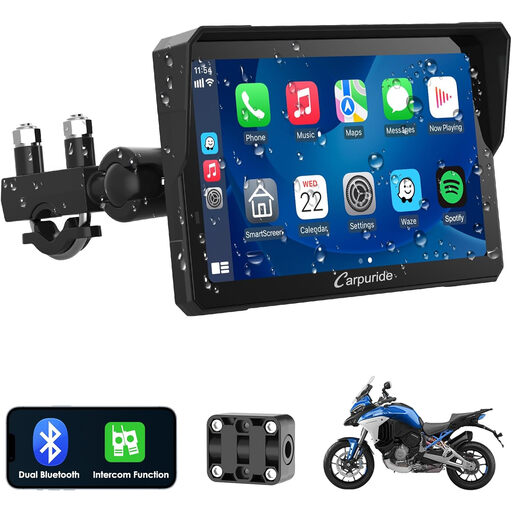
The Carpuride W702 Pro is the champion of versatility. Rugged and waterproof, it's suitable for both cars and motorcycles. Its installation requires no vehicle modifications, making it the ultimate plug-and-play solution.
Key features
- Quick Installation?: Mounts on the dashboard or handlebars and is powered by a 12V socket.
- Rugged and Waterproof?: Its design protects it from the elements, a decisive advantage for motorcyclists.
- Dual Bluetooth?: Allows you to connect your smartphone and a helmet or external audio system at the same time.
- Bonus Features?: Includes a built-in compass and barometer, handy tools for adventurers.
Who is it for??
For drivers and riders looking for a flexible, non-permanent, and easily transferable solution. It's also the perfect alternative if your dashboard cannot accommodate a 2-DIN head unit.
OTTOCAST Mini - Wireless CarPlay & Android Auto Adapter

Why it stands out
The OTTOCAST Mini solves one specific problem?: it eliminates the cable from your existing CarPlay or Android Auto setup. Its tiny size and incredible simplicity make it an accessory that's as discreet as it is effective.
Key features
- Go Wireless?: Converts a wired connection to wireless Android Auto or wireless CarPlay in seconds.
- Compact and Discreet?: Barely larger than a USB stick, it's easy to forget it's there in your car's interior.
- Stable Connection?: The 5 GHz Wi-Fi ensures reliable data and audio transmission with minimal latency.
- Set It and Forget It?: After the initial setup, it automatically reconnects to your phone every time you start the car.
Who is it for??
For owners of recent vehicles (generally post-2016) that are already equipped with wired CarPlay or Android Auto and just want to treat themselves to the convenience of wireless.
Looking for something else??
Your car has taken a leap into the future. Why not the rest of your life?? Joybuy offers a vast selection of items to inspire you. For example, take a look at our collection of elegant tops for women's nights out to refresh your wardrobe.
Frequently Asked Questions (FAQ)
What's the difference between Apple CarPlay and Android Auto??
They are two systems designed to mirror key functions from your smartphone onto your car's screen in a simple and safe manner. Apple CarPlay is developed by Apple for iPhones, while Android Auto is Google's solution for Android phones. The interface and available apps vary slightly, but the goal is the same?: to give you hands-free access to navigation, music, messages, and calls.
Can I install a 2-DIN head unit myself??
Installing a 2-DIN head unit is within reach for an experienced DIYer, but it requires a good understanding of car electronics. You'll need to dismantle part of the dashboard, manage the wiring (power, speakers, antenna), and ensure everything is securely fastened. If you're not comfortable with these steps, it is highly recommended to hire a professional for a reliable and safe installation.