
Choosing a Mechanical Keyboard in 2026: Our Guide and Top Picks
Whether you're a hardcore gamer, a writing professional, or simply an enthusiast with an eye for premium hardware, the mechanical keyboard is one of those upgrades that truly makes a daily difference. A world away from standard membrane keyboards, it promises surgical precision, rock-solid endurance, and unparalleled comfort. But faced with a jungle of layouts, switches, and features, making the right choice can quickly become a daunting task.
This guide is here to demystify the topic, explain the criteria that really matter, and present our selection of the most compelling models for 2026.
Buyer's Guide: The 3 Key Criteria for Making the Right Choice
Before diving into our top picks, three characteristics define the DNA of a mechanical keyboard: its layout, its switches, and its connectivity.
1. Layout: A Matter of Space and Habit
The size of your keyboard directly impacts your comfort and your desk setup.
- Full-size (100%): The traditional keyboard, complete with its number pad. Essential for those who crunch numbers daily (accounting, spreadsheets, etc.).
- TKL (Tenkeyless, 80%): This highly popular layout sacrifices the number pad for a more compact design, freeing up valuable space for your mouse. It's the perfect middle ground for a gaming keyboard and versatile office use.
- Compact (75% or less): These models, like the 75% compact keyboard, maximise space by tightening the key arrangement. They are perfect for minimalist setups or for tossing in a backpack.
2. Switches: The Heart of the Machine
Located under each key, the switches are what truly determine the feel and sound of your keyboard.
- Linear (e.g., Red switch): These offer smooth, fast, and quiet travel with no tactile feedback. Gamers favour them for their responsiveness, which allows for chaining actions seamlessly.
- Tactile (e.g., Brown switch): These have a slight bump halfway through the press that confirms key activation, but without the audible "click." It's the most versatile choice, equally at home for typing as it is for gaming.
- Clicky (e.g., Blue switch): Similar to tactiles, they add a distinct audible "click" upon activation. Very satisfying for writing, but a no-go if you work in an open-plan office!
The enthusiast's secret weapon? The hot-swappable mechanical keyboard. This technology gives you the freedom to change the switches yourself, without any soldering, to create a 100% custom typing feel.
3. Connectivity and Features: Wired or Wireless?
- Wired: Zero latency, maximum reliability. This is the gold standard for competitive gaming, where every millisecond counts.
- Wireless: A wireless keyboard means a clean desk and freedom of movement. Modern technologies (Bluetooth, 2.4Ghz) have virtually eliminated latency, making them perfectly viable for all uses, including casual or semi-pro gaming.
- Backlighting: More than just a gimmick, white backlighting improves typing comfort in the evening. A fully customisable RGB keyboard, on the other hand, becomes the aesthetic centrepiece of your setup.
Our Selection of the Best Mechanical Keyboards for 2026
Here are a few models that stand out from the crowd, designed for different needs and budgets.
Machenike K500B-B87: The Mechanical Essentials, No Frills
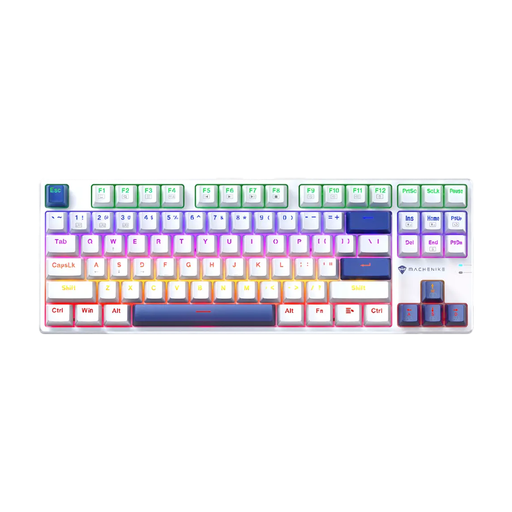
What we like: The K500B-B87 is an excellent entry point for anyone looking to discover the joys of mechanical typing. Its TKL (87-key) layout is a smart choice, combining efficiency and compactness.
-
The pros:
- TKL Layout: Frees up space for the mouse without sacrificing the F1-F12 function keys.
- Red Switches: These linear switches ensure a smooth and responsive keystroke, ideal for both gaming and marathon typing sessions.
- Robust Construction: It's built to last and withstand long gaming or work sessions.
- Mixed-Colour Lighting: A splash of colour to liven up your desk.
-
Who is it for?: Gamers and professionals looking for a high-performance, responsive mechanical keyboard with a QWERTY layout, without getting lost in wireless options.
Machenike K500A-B84: Minimalism at its Finest
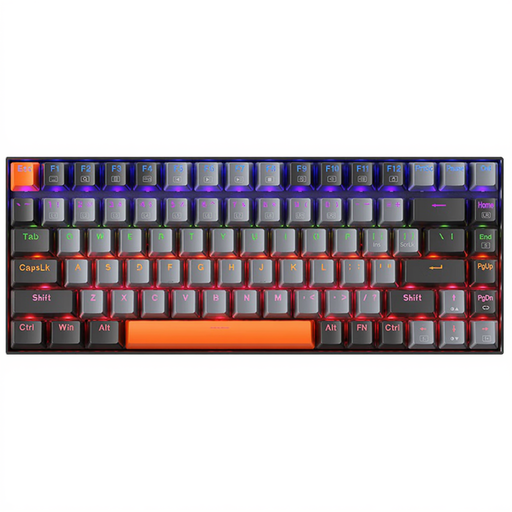
What we like: With its 75% layout, the K500A-B84 is the champion of optimisation. It retains the function keys and arrow keys in an ultra-dense arrangement, perfect for desks where every centimetre counts.
-
The pros:
- Compact Keyboard (75%): Maximum space saving for total freedom of mouse movement.
- Red Switches: Like its bigger brother, it benefits from the smoothness and speed of linear switches.
- Clean Design: Its light grey colour and white backlighting give it a clean, modern aesthetic.
- QWERTY Layout: An international standard, perfect for coding, gaming, and numerous software applications.
-
Who is it for?: Digital nomads, fans of minimalist setups, and anyone with a small workspace who refuses to sacrifice the quality of mechanical typing.
AJAZZ AK980 V2: The Customisable Swiss Army Knife
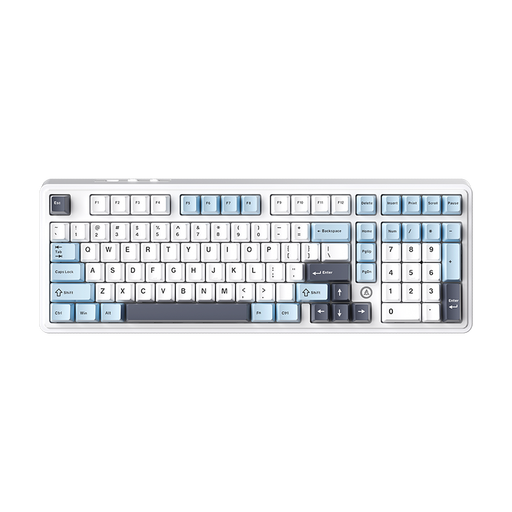
What we like: The AJAZZ AK980 V2 is for enthusiasts who want it all: wireless versatility, deep customisation, and a high-end typing experience.
-
The pros:
- Triple Connectivity: Switch between wired, Bluetooth, or 2.4G in the blink of an eye for absolute flexibility.
- Hot-swappable mechanical keyboard: Swap out switches on the fly to evolve your keyboard to your liking.
- XXL Battery Life: Its enormous battery (up to 10000 mAh) will make you forget the charging cable even exists.
- Premium Acoustic Comfort: It incorporates five layers of sound-dampening material for a muted and incredibly satisfying typing sound.
- Multifunction Knob: A handy metal knob to manage volume or assign your own shortcuts.
-
Who is it for?: Enthusiasts, content creators, and demanding users who want an ultra-versatile wireless keyboard, a customisable RGB keyboard, and the freedom to experiment.
Want to go further?
Our selection is just a glimpse into the vast universe of peripherals. To fine-tune your setup with other keyboards, mice, or even lighting and cable management solutions, explore our dedicated category.
Discover our full range of peripherals and accessories
Frequently Asked Questions
What's the difference between a mechanical and a membrane keyboard?
Imagine the difference between closing a premium car door and a creaky one. The mechanical keyboard is all about precision: each key has its own spring-loaded mechanism, offering crisp feedback, reliable travel, and exceptional durability. The more budget-friendly membrane keyboard uses a rubber dome that collapses to make contact. The feel is "mushier" and its lifespan is much shorter.
Are red switches really suitable for typing?
Absolutely! While gamers love them for their responsiveness, their smooth, hitch-free travel is also a delight for long writing sessions as it reduces finger fatigue. Ultimately, it's purely a matter of preference: some people swear by the tactile feedback of a brown switch to feel every letter, while others prefer the perfect glide of a red one.
Can a QWERTY keyboard be used in a country that uses AZERTY?
Yes, without any problem—it's actually very common. You just need to set your operating system's language (Windows, macOS) to "French." Your computer will then interpret the keystrokes as if it were an AZERTY keyboard. If you touch-type, the adjustment is almost instantaneous. And for the purists, the advantage of a hot-swappable mechanical keyboard is that you can even swap out the physical keycaps for an AZERTY set.