
Compact Mechanical Gaming Keyboard in 2026: How to Choose the Right Format for Gaming and Work
A compact mechanical gaming keyboard frees up space for your mouse, is easy to transport, and helps keep your desk better organised. But product listings often focus on RGB or the number of modes, without always clarifying what really matters day to day: key layout, connectivity, noise level, battery life and how easy it is to replace the switches.
Before you place an order, here are the most common pitfalls to avoid, along with a selection of models suited to different uses.
Common Pitfalls Before You Buy
1. Confusing a Compact Format with an Incomplete Keyboard
A 60% or 65% keyboard takes up very little space, but some functions are only accessible by holding down the Fn key. The arrow keys, the F row or navigation keys may have disappeared or be combined with other keys.
A 75% mechanical keyboard generally keeps the arrow keys and most of the usual functions, in a more compact chassis. A TKL mechanical keyboard, also known as an 80% or 87-key format, essentially removes the numeric keypad. It will suit people who type regularly or use lots of shortcuts.
2. Overlooking the AZERTY Layout
A reference in US QWERTY or German QWERTZ does not place the letters, accents and symbols in the same positions. Even if Windows allows you to change the keyboard language, the markings on the keys will not necessarily match what you type.
For everyday use in the UK, explicitly check for the mention of AZERTY French or a UK QWERTY layout. Many compact models sold on the market are in US QWERTY: they may suit a gamer used to that layout, but they require an adjustment period.
3. Relying Only on the Stated Battery Life
The battery life of a wireless mechanical keyboard varies depending on the backlighting, its brightness, how often you use it and the connection mode. The figures given by manufacturers are usually maximum values, measured under very specific conditions.
A tri-mode keyboard with Bluetooth, 2.4 GHz and USB-C is more versatile. However, do remember to check for the presence of the 2.4 GHz receiver, the charging time and whether you can continue using it in wired mode while it charges.
The Parameters to Check Before You Choose
Format and Available Space
Measure the depth of your desk as well as the distance between the keyboard and your mouse. A 75% or TKL format leaves more room for lateral movements in shooting games. A 65% keyboard is even shorter, but often requires you to rely on more secondary shortcuts.
The numeric keypad remains handy for spreadsheets, accounting data entry and certain software. In that case, a 96% or 98% model can offer a good compromise between footprint and features.
Switches and Typing Comfort
Linear switches, such as red or yellow models, offer a smooth press with no tactile bump or audible click. They are often preferred for gaming and fast typing. Tactile switches provide a more distinct feedback, while clicky switches produce a more noticeable sound.
The actuation force, expressed in grams-force, is a useful indicator, but it is not enough to predict the feel. The total travel distance, switch lubrication and internal design also influence comfort and noise. A hot-swap keyboard lets you replace compatible switches without soldering, as long as you check the number of pins supported, usually 3 or 5.
Connectivity, Software and Compatibility
On a gaming PC, the 2.4 GHz mode with a USB receiver is generally more practical than Bluetooth. The latter is most useful with a laptop, tablet or smartphone. A wired USB-C connection remains handy to avoid recharging or to enjoy a perfectly stable link.
If you game on a console, check the stated compatibility with your model of PlayStation or Xbox. Customisation software may also be reserved for Windows. Finally, a physical volume wheel makes adjustments simpler during a game, a video call or video editing.
Our Selection According to Your Profile
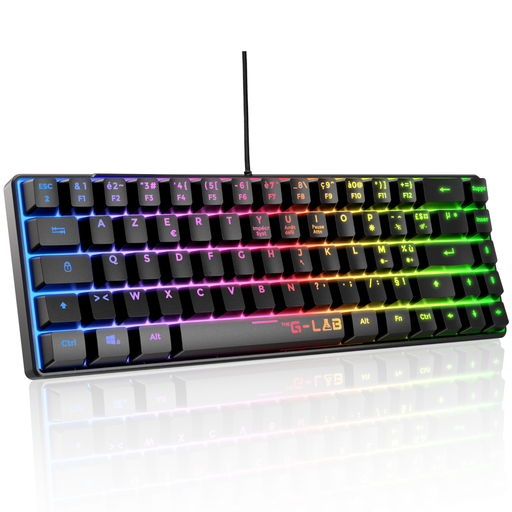
THE G-LAB Keyz Mercury Mechanical TKL AZERTY
Why this model suits this profile: its USB connection, French layout and 87-key format make it a good first mechanical gaming keyboard for PC or console.
The listing specifies the TKL format, AZERTY layout, red switches and wired connection. So you have no battery to monitor and no foreign layout to decipher.
87 keys, 20 lighting modes, 32 macros and stated compatibility with PC, PS4, PS5 and Xbox.

KEYSME Lunar 01 80% Tri-Mode
Why this model suits this profile: it is aimed at users who want to customise the feel, lighting and controls of their keyboard, on PC, Mac or mobile device.
The Bluetooth, 2.4 GHz and USB-C connections are clearly stated. The hot-swap supports 5-pin switches, allowing you to evolve the keyboard without soldering.
80% format, 4,000 mAh battery, PBT keycaps and programmable wheel, with removable light bar.
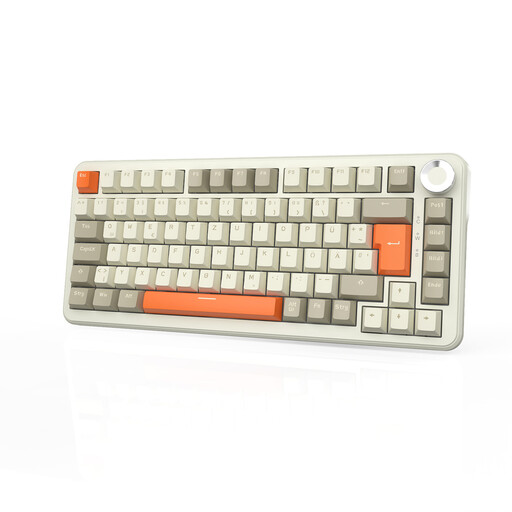
AJAZZ AK820 MAX Mechanical 75% Tri-Mode
Why this model suits this profile: its compact format, volume wheel and three connection modes adapt to frequent switches between gaming, work and then your tablet.
The listing details the Bluetooth, 2.4 GHz and USB-C modes, as well as the hot-swap function. However, please note: this version is stated as German QWERTZ, not French AZERTY.
82 keys, stated 8,000 mAh battery, per-key RGB lighting and aluminium volume wheel.
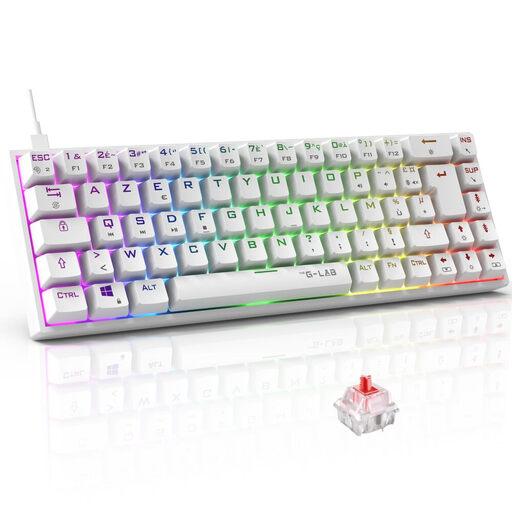
THE G-LAB Keyz Titanium Mechanical 65% AZERTY
Why this model suits this profile: its wired connection means you do not have to worry about the battery, while its 65% format frees up space for large mouse movements.
The AZERTY layout is clearly stated and the main functions remain accessible via the software and shortcuts. The USB cable also limits the latency variations inherent to wireless.
Outemu red switches stated at 45 g, NKRO anti-ghosting, 18 RGB modes and compatibility with PC, PS4, PS5 and Xbox.
Looking for more options?
We have gathered an updated selection of products that meet these selection criteria and the safety requirements applicable in the European Union.
Frequently Asked Questions
Is a compact mechanical keyboard suitable for remote work?
Yes, as long as you choose a suitable layout and a noise level that works with your environment. A 75% or TKL format keeps more dedicated keys than a 60% model. In a shared office, opt for linear switches and check the keyboard's construction as well as its sound-dampening features.
What lifespan can I expect from a mechanical keyboard?
It depends on the switches, usage, maintenance and the quality of the cable or battery. Manufacturers sometimes state several tens of millions of keystrokes, but these figures correspond to theoretical specifications and do not guarantee the same lifespan in all conditions. With a hot-swap model, maintenance is simpler because worn switches can be replaced.
Does RGB significantly increase the power consumption of a wireless keyboard?
Yes, backlighting puts more strain on the battery. The stated battery life with RGB enabled is therefore often lower than that achieved with the lighting off. To space out recharges, reduce the brightness, disable unnecessary effects or use the USB-C connection when the keyboard stays on your desk.