
Compact Mechanical Keyboard Guide: Find Your Perfect Desk Fit
By the Joybuy Product Recommendation Officer | July 14, 2026
A cluttered desk is a nightmare for productivity and gaming comfort. Between your monitor, mouse, and various accessories, space quickly becomes a precious commodity. This is precisely where the compact mechanical keyboard comes into its own. Favoured by gamers, professionals, and students alike, it packs a premium typing experience into a mini form factor, freeing up vital desk space.
But with a jungle of options (60% keyboard, 75% keyboard, Red switches, Blue switches, wired or wireless...), it's hard to know where to start. This guide is here to clear the path, decode the jargon, and present our selection of the best models. Our goal: to help you make the right choice—the one that truly fits your needs.
How to Choose a Compact Mechanical Keyboard
Before diving into our top picks, let's review the three essential criteria for choosing your compact mechanical keyboard.
1. Form Factor: 60%, 75%, or Something Else?
The keyboard's size, also known as its "form factor", defines the layout and the number of available keys.
- 60% Keyboard: The most minimalist layout, this form factor omits the function row (F1-F12), the number pad, and, in most cases, the dedicated arrow keys (which remain accessible via a key combination). It's the format of choice for FPS gamers, as it frees up maximum space for wide mouse movements.
- 75% Keyboard: The perfect middle ground. It brings back the precious arrow keys and some of the navigation/function keys in an ultra-condensed layout. This mini mechanical keyboard is a true Swiss Army knife, equally at home in gaming and intensive office work.
2. The Heart of the Keyboard: Which Switch Type to Choose?
Mechanical switches are the heart of the keyboard. They are what define the typing feel. Each colour has its own personality!
- Red Switches (Linear): These switches offer smooth and quiet travel with no perceptible tactile feedback. Their rapid actuation makes them a gaming favourite, where every millisecond counts.
- Brown Switches (Tactile): They provide a slight tactile bump at the actuation point, confirming the keystroke without generating an audible 'click'. This is the ideal all-rounder, perfect for an office keyboard and shared spaces.
- Blue Switches (Clicky): Here, each press is accompanied by a distinct audible 'click' and sharp tactile feedback. While satisfying for writing, they should be avoided in open-plan offices or if you live with light sleepers!
3. Connectivity: Wired or Wireless?
- A wired keyboard, connected via USB, guarantees a flawless, latency-free connection without ever worrying about the battery. It's the sensible choice for competitive gamers.
- A wireless keyboard is the king of the clean desk setup and flexibility. Connected via Bluetooth or a 2.4 GHz dongle, it frees you from cables. The only catch: you have to remember to recharge it from time to time.
Top Compact Mechanical Keyboard Picks
Let's move on to our selection of models that caught our eye, which should help you see things more clearly. Please note: these models are generally offered with a QWERTY (US) layout, a de facto standard in this niche market.
MageGee MK-Box 60% - Red Switches
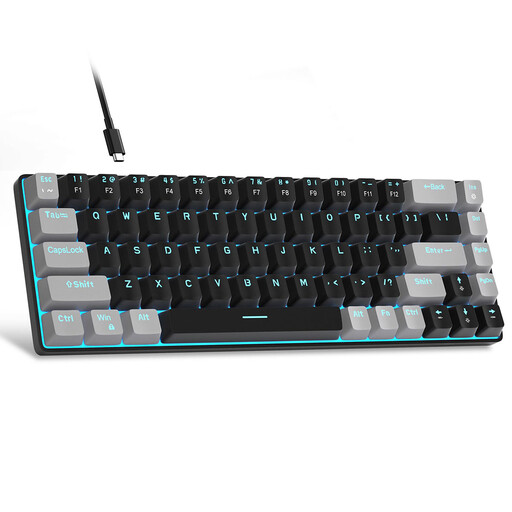
- Why we love it: This keyboard's feat is packing 68 keys into an ultra-compact chassis while retaining dedicated arrow keys—a real bonus on such a small form factor. Equipped with Red switches, it's built for responsiveness.
- Key features:
- Ultra-compact form factor: Frees up maximum desk space.
- Linear switches: The Red switches are designed for fast, quiet actuation, ideal for gaming.
- Full anti-ghosting: All keys can be pressed simultaneously without conflict.
- Practical: Removable USB-C cable for transport and customisable LED backlighting.
- Who is it for?: Gamers and anyone looking for an ultra-compact and high-performance mini mechanical keyboard, prioritising pure speed and maximum mouse space.
MageGee MK-Box 60% - Blue Switches
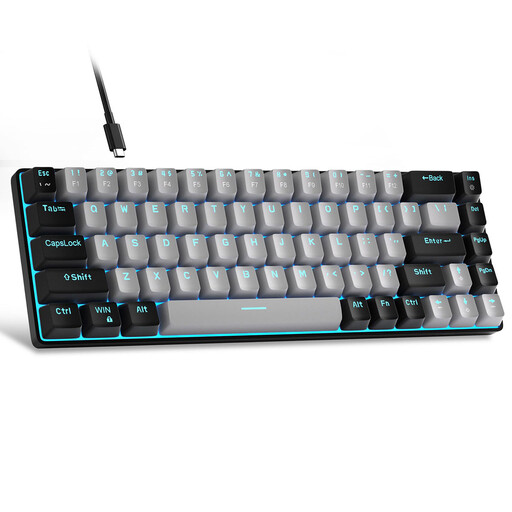
- Why we love it: It shares the same compact chassis as its Red switch twin but differs radically in its typing feel. Its Blue switches deliver very distinct tactile feedback and an audible click.
- Key features:
- Tactile and audible feedback: The Blue switches provide that famous 'typewriter' feel, so satisfying for writing.
- Thoughtful ergonomics: The keycaps have a stepped profile for natural typing comfort.
- Well-equipped: Comes with a keycap puller and spare keycaps for easy customisation.
- LED backlighting: Around fifteen lighting modes to match your setup.
- Who is it for?: Typing enthusiasts, developers, and anyone who loves to 'feel' their keystrokes. Best reserved for a home office or an environment where noise isn't an issue.
Lofree OE921 75% Tri-Mode - Low-Profile
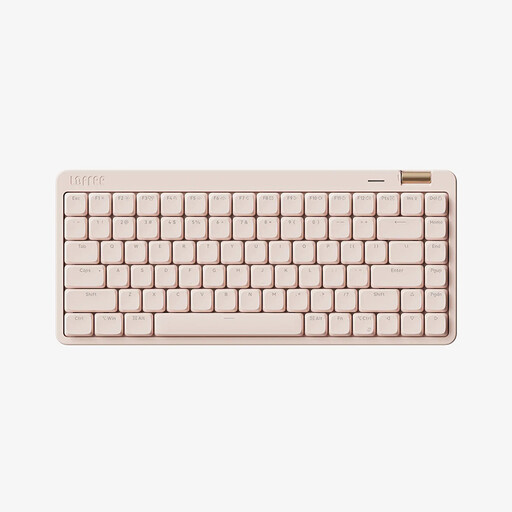
- Why we love it: The ultimate portable and versatile keyboard. It ticks all the right boxes: a perfectly balanced 75% form factor, comprehensive tri-mode connectivity (wired, Bluetooth 5.4, 2.4G), and low-profile switches that combine the short travel of a laptop with the precision of a mechanical keyboard.
- Key features:
- Total connectivity: Switch between your PC, Mac, and tablet in a flash thanks to its three connection modes.
- Low-Profile Switches: Its Kailh Light Glide (linear) switches ensure a smooth, fast, and quiet typing experience with very short travel.
- Premium features: Aluminium volume knob, durable PBT keycaps, and a 2000 mAh battery for great wireless battery life.
- Sleek design: Its minimalist look and understated white backlighting fit perfectly into a modern office environment.
- Who is it for?: Professionals, creatives, and digital nomads who juggle multiple devices. Ideal for those who want a high-performance, elegant, and portable keyboard with a fast, quiet typing feel.
Looking for Other Options?
Our selection is just a glimpse of the possibilities in the world of compact mechanical keyboards. If you haven't found your perfect match here, or if you want to explore other types of peripherals, the choice is vast.
To discover an even wider range and find the gear that will meet all your requirements, feel free to explore our complete Desktop Electronics category.
FAQ: Everything About Compact Mechanical Keyboards
What's the main difference between a 60% and a 75% keyboard?
It's all a matter of trade-offs. The 60% keyboard is the most extreme: it sacrifices the function row and navigation keys for maximum space savings. The 75% keyboard is more versatile: it brings back most of these keys in a condensed format, offering more functions that are directly accessible.
A switch type for every use?
Absolutely. Each switch colour corresponds to a specific feel. To sum up:
- Red (Linear): Ideal for gaming: smooth and responsive.
- Brown (Tactile): The most versatile: good for both typing and gaming, with discreet tactile feedback.
- Blue (Clicky): The king of typing: very distinct audible and tactile feedback, but potentially noisy for those around you.
QWERTY or AZERTY Keyboard: Which to Choose?
This is the great dilemma! A large portion of niche mechanical keyboards are only available in QWERTY (US). It takes a short adjustment period to adapt, but rest assured: both Windows and macOS allow you to switch the keyboard layout to AZERTY at the system level. In practice, even if the keys show a QWERTY layout, your computer will react as if you were typing on an AZERTY keyboard. It's a small sacrifice that opens the door to a much wider selection of models.