
Gaming Accessories Buying Guide: Choose the Right Gear With Confidence
Feeling overwhelmed by the jungle of gaming accessories? We get it. In a market saturated with marketing promises, it's tough to know what's what. While the right gear can transform your gaming sessions, a bad purchase means frustration and money down the drain. This guide is here to break down the essentials and help you make the right choice.
Before we dive in, let's review the three most common pitfalls when buying gamer gear:
- The universal compatibility mirage: Don't blindly trust the 'multi-platform' label: it doesn't guarantee an optimal experience on all your devices. An Xbox controller might work with limited functionality on a Switch, and a PS5 headset could lose its 3D audio when plugged into a PC. The 3.5mm jack remains the simplest solution, but it often sacrifices advanced features.
- The 'Pro' feature bloat: Terms like 'esports-grade' or 'competition-calibrated' are mostly marketing buzzwords designed to drive up the price. Let's be clear: for the average gamer, ultra-high-end specs like an polling rate of 8000Hz on a mouse offer no tangible advantage over a well-designed standard model.
- The fragility of entry-level gear: A rock-bottom price often means sacrificed durability. A headset cable that frays in six months, keycaps on a gaming keyboard that wear off, or controller plastic that creaks with the slightest movement... these are all telltale signs of a product's premature demise.
Technical Criteria You Shouldn't Overlook
To avoid falling into these traps, rely on objective criteria. These technical specifications are far more indicative of a product's quality than any advertising slogan.
- Connectivity and Platform: This is fundamental. Ensure the accessory is fully compatible with your platform of choice: PC, PS5, Xbox Series X|S, or Switch.
- Wired (3.5mm jack or USB): Guarantees a stable connection with no latency or battery issues. The 3.5mm jack is a universal solution, while USB opens the door to better audio quality and advanced options (like 7.1 surround sound on PC).
- Wireless (2.4GHz Dongle or Bluetooth): The 2.4GHz dongle has become the standard for low-latency wireless gaming. Bluetooth, which is more universal and convenient for portable devices, can introduce slight audio lag (latency), which is a deal-breaker for fast-paced games.
- Drivers (for a gaming headset): These are the speakers inside the earcups. Their diameter (often 40mm or 50mm) impacts the sound reproduction. While a larger diameter can produce deeper bass, the final quality depends primarily on the acoustic design. Some models, for example, separate the bass, mids, and highs for a clearer, more detailed sound.
- Key Switch Type (for a gaming keyboard):
- Membrane: Quieter and more affordable, they provide a soft typing feel.
- Mechanical: Praised for their tactile feedback, responsiveness, and durability. There is a wide variety of switches (Blue, Red, Brown, etc.) that offer distinct typing experiences.
- Mecha-Membrane: A hybrid that aims to mimic the feel of a mechanical keyboard using a membrane base. A good budget-friendly compromise.
Recommended Gaming Accessories
Instead of an endless list, we've selected a few standout products and matched them with gamer profiles to help you find the right fit.
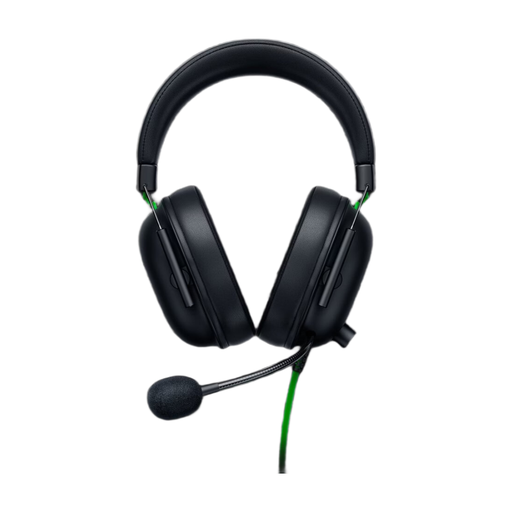
Razer BlackShark V2 X Wired Gaming Headset - Xbox Licensed - Black
Why we chose it: The sensible choice for anyone looking for a reliable, high-performance headset without breaking the bank. Its wired 3.5mm jack connection ensures near-universal compatibility (PC, consoles, mobile). Simple and effective.
It skips complex connection protocols in favour of a universal jack. It focuses on the essentials: quality sound, without the extra cost of often gimmicky 'pro' features.
Triforce 50mm drivers for precise sound. Feather-light 240g weight for long sessions. Good passive noise isolation.
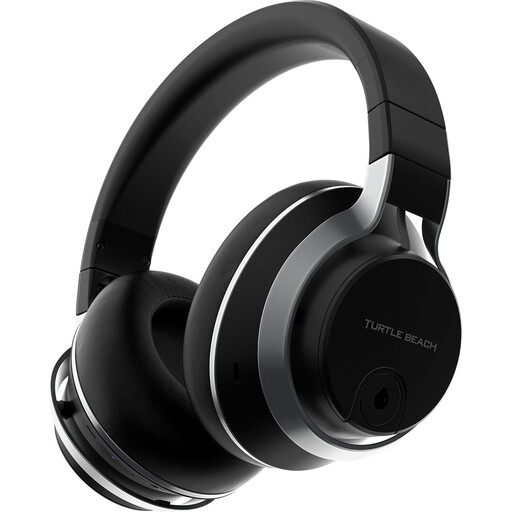
Turtle Beach Stealth Pro Wireless Gaming Headset - PS5, PC, Mac
Why we chose it: For the gamer who refuses to compromise. This headset checks all the boxes: premium wireless, active noise cancellation for total immersion, and broad compatibility.
Its high price is justified by genuinely useful innovations, like active noise cancellation and dual connectivity (2.4GHz wireless + Bluetooth), not by empty marketing claims.
High-performance Active Noise Cancellation (ANC). Hand-picked Nanoclear 50mm drivers. Dual microphones (removable boom or built-in).
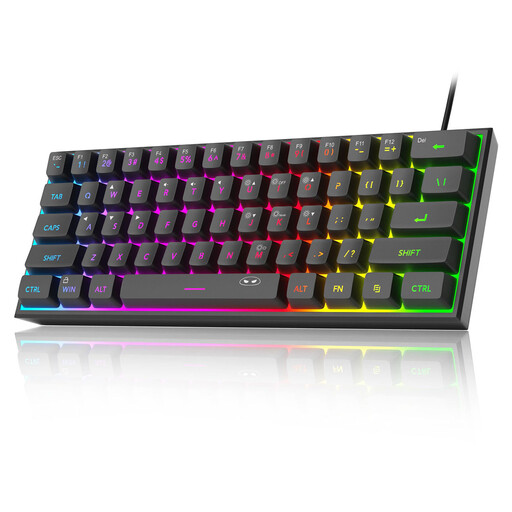
MageGee TS91 60% Wired Gaming Keyboard
Why we chose it: The perfect ally for small desk spaces. Its compact 60% layout ditches the number pad to free up maximum space for your mouse—a decisive advantage in FPS games.
It addresses a real need—saving space—rather than just following a trend. No more bulky keyboards with a number pad you never use.
Ultra-compact 61-key (60%) format. Mechanical-style feel at a budget-friendly price. Customisable RGB backlighting.
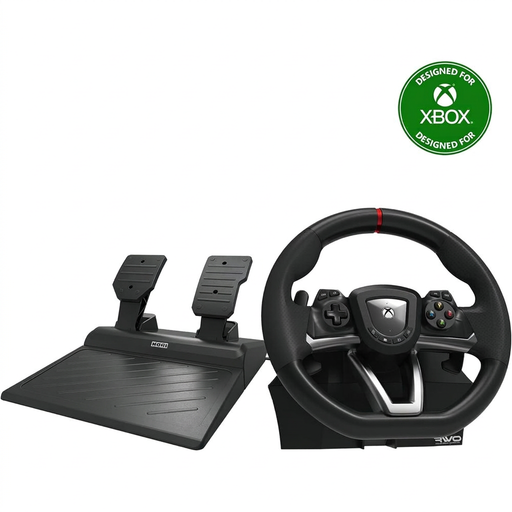
Hori Overdrive Racing Wheel PC/Xbox Series X|S/Xbox One
Why we chose it: For any racing game fan, the racing wheel is an almost essential upgrade for immersion and precision. This model, officially licensed by Microsoft, is an excellent entry point into the world of *sim racing*.
It ends the frustration of driving with a controller, which can be a nightmare for precision. It's a dedicated, immersive solution without demanding the budget of professional-grade equipment.
Official Microsoft licence for seamless compatibility. 270-degree rotation angle. Two-pedal set included.
Looking for the perfect gaming setup?
Your new peripherals deserve a machine that can keep up. If you're thinking about upgrading your console, check out our bundles to be ready to play right out of the box.
Frequently Asked Questions
What is the lifespan of a gaming accessory?
It all depends on the build quality and how you use it. A good wired PC peripheral or console accessory from a reputable brand can last 3 to 5 years, sometimes longer. For wireless devices, the weak link is always the battery, which often shows signs of wear after 2 or 3 years of heavy use. Our advice: look for braided cables, robust materials, and read user reviews about longevity.
Wired or wireless headset: which one to choose?
There's no right or wrong answer; it all comes down to your priorities.
- Wired: Zero latency, zero battery worries. It's the choice for peace of mind and raw performance.
- Wireless: Complete freedom of movement and a cleaner desk. Modern models with a 2.4GHz dongle offer nearly imperceptible latency, but that freedom comes at a price, which is usually higher.
Is a mechanical keyboard essential for gaming?
No, it's not a requirement, but many gamers swear by them for their precise tactile feedback and responsiveness. However, a good membrane or mecha-membrane keyboard will do the job perfectly well, especially if you're on a tight budget. Ultimately, it's a matter of personal feel and how much you want to invest.