
Gaming Controller Buying Guide: How to Choose the Right One
Choosing a new gaming controller can sometimes feel like a daunting task. Between marketing jargon and opaque technical specs, it's easy to end up with a disappointing accessory, or one that becomes unusable after just a few months. Our mission? To help you see clearly and make the right choice.
Before diving in headfirst, watch out for two classic pitfalls that can be costly:?
- The plague of "stick drift"?: This issue, where your character moves on its own, is most often caused by the premature wear of the joysticks' internal components (potentiometers). Even a high-end controller can suffer from it in less than a year, turning precision games into a real nightmare.
- An overload of gimmicky features?: A plethora of programmable buttons, complex RGB lighting... These additions drive up the price, but are they truly useful for your playstyle? A pro controller is only worthwhile if its options genuinely match your favourite games and your style.
The Criteria That Really Matter to Avoid Buyer's Remorse
To avoid these disappointments, a few technical specifications need close attention. They are the true guarantors of your future controller's quality and durability.
1. Stick Technology: The Importance of Hall Effect
This is THE number-one criterion for your controller's longevity. The majority of models on the market use potentiometers. These sensors work by physical contact to detect movement. The problem: over time, this friction wears down the components and causes the infamous stick drift.
The long-term solution? The Hall effect controller. This technology uses magnetic sensors that measure movement without any physical contact. The result? No mechanical wear, unwavering precision over time, and near-total immunity to drift. If you're looking for an anti-drift controller, the "Hall effect sticks" label is the key feature to look for.
2. Connectivity: Wired or Wireless?
The wired controller versus wireless controller debate comes down to your priorities.
- Wired: A USB connection guarantees near-zero latency (input lag) and a continuous power supply. It's the preferred choice for competitive play and esports, where every millisecond is crucial. No batteries to recharge, no risk of interference.
- Wireless: Comfort and freedom of movement above all. Modern 2.4?GHz models (via a USB dongle) offer very low latency, almost indistinguishable from wired. Bluetooth, which is more universal, can introduce slightly higher latency, sometimes noticeable in the most fast-paced games.
3. Modularity and Customisation: ? La Carte Gaming
A modular controller allows you to swap out some of its components: joysticks, D-pad, or even entire button clusters. This offers two major advantages:
- Adaptability: You can tailor your controller to a specific game genre. For example, install a 6-button arcade stick module for fighting games.
- Repairability: A joystick wearing out? Simply replace the faulty module instead of throwing away the entire controller. A real plus for durability and a smarter investment.
Our Recommendations Based on Your Player Profile
Instead of an endless list, here is a targeted selection of controllers that excel in their field, based on our criteria for durability and performance.
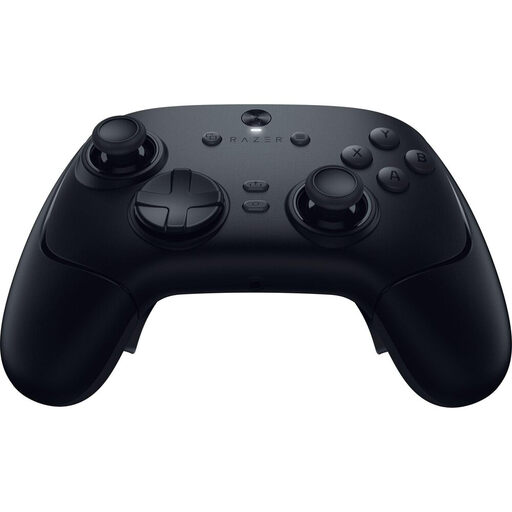
Razer Wolverine V3 Tournament Edition Wired eSport Controller
Why this one: Built for competitive PC gaming, it goes all-in on responsiveness with its wired connection and 8000 Hz HyperPolling technology that crushes latency. Its mecha-tactile switches provide crisp, precise feedback worthy of a gaming mouse.
It features TMR magnetic sticks advertised as anti-drift, a solid alternative to potentiometers. Its wired design inherently eliminates any uncertainty related to interference or battery life.
Near-zero latency (8000 Hz polling rate on PC) and 6 remappable buttons for absolute control in competition.
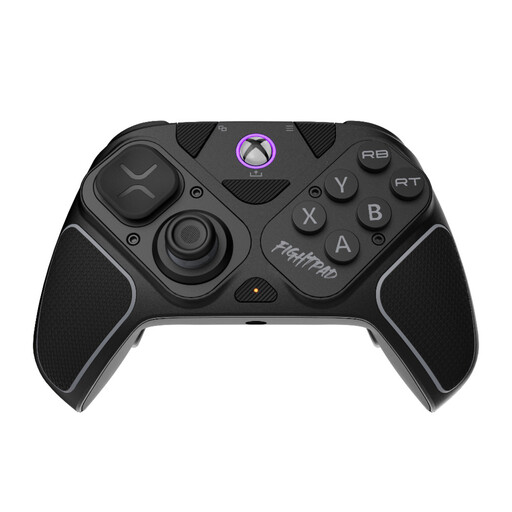
Turtle Beach Victrix Pro BFG Reloaded Wireless Modular Controller (Xbox/PC)
Why this one: It's the ultimate Swiss Army knife. This modular controller lets you swap everything: the position of the D-pad and sticks, and even install a 6-button Fightpad module. Compatible with Xbox and PC, it can be used both wired and wirelessly.
It comes fully equipped with Hall effect sticks and triggers, making it a champion in the anti-drift controller category. Its modularity ensures excellent repairability: a worn-out component can be replaced, and the controller lives on.
Total modularity to adapt to any game and Hall effect technology for rock-solid durability.
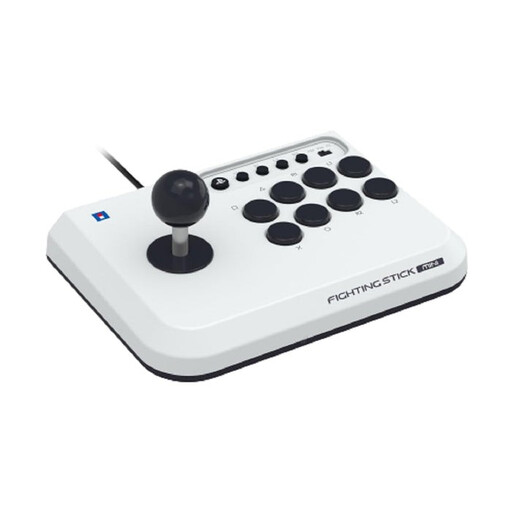
Hori Wired Fighting Stick Mini for PC/PS4/PS5
Why this one: For fighting games, nothing beats the feel of a good arcade stick. This compact model features the classic 8-button layout and a micro-switch joystick, ensuring the surgical precision needed to execute combos. It's compatible with PS5, PS4, and PC.
It doesn't try to do everything. It's a specialised, robust, and wired tool that gets straight to the point: responsiveness and the arcade feel. It avoids the unnecessary complexity of "pro" controllers that are often ill-suited for this genre.
Authentic yet portable arcade format, with a micro-switch joystick for flawless precision and responsiveness.
Need Even More Options?
Explore our full selection of products that meet our demanding selection criteria and current standards.
Frequently Asked Questions
What is "stick drift" and how can you avoid it?
Stick drift is a defect that causes your character or cursor to move on screen even when you aren't touching the joysticks. The main cause is the wear and tear of potentiometer-based sensors. To guard against it, the most reliable solution is to opt for a Hall effect controller, whose magnetic sensors operate without physical contact and therefore without wear.
Is a wired controller really faster than a wireless one?
In theory, yes. A wired controller offers the most direct and stable connection, with minimal latency (or input lag). However, modern 2.4?GHz wireless controllers are so high-performing that the difference is imperceptible to almost all players. The choice, therefore, comes down to user comfort and your level of demand (casual gaming vs. esports).
How do I know if a controller is compatible with my PC or console?
It's simple: always check the product page. Compatibility is clearly stated there: "Xbox Series X|S, Xbox One & PC," "PS5, PS4 & PC," etc. For a PC controller, most Xbox-licensed models are natively recognised by Windows (plug-and-play). For PlayStation controllers like the DualSense, a wired connection or third-party software (like DS4Windows) is sometimes necessary for full support on PC.