
Gaming Mouse Buyer’s Guide: How to Choose the Right One
Navigating the jungle of gaming peripherals is a real challenge. Between the hundreds of models and spec sheets packed with jargon, it's easy to get lost. As a product expert at Joybuy, my mission is to help you see things more clearly. This article breaks down the essential features of a gaming mouse and guides you toward a smart choice, far from the marketing hype that's often disconnected from real-world gaming.
The 3 Pitfalls to Avoid When Buying a Gaming Mouse
Before diving into the technical details, let's review the classic mistakes that lead to buyer's remorse.
- The Myth of Stratospheric DPI: Brands love to promote astronomical DPI (Dots Per Inch) figures, sometimes exceeding 20,000. In reality, almost all gamers, including pros, set their mice to much lower sensitivities (usually between 800 and 3200 DPI). An excessively high number is no guarantee of quality; on the contrary, it can make the mouse simply uncontrollable. What really matters is having adjustable DPI to find the sensitivity that's right for you.
- Ergonomics Sacrificed for Aesthetics: An RGB gaming mouse with an aggressive design certainly looks impressive. But what about comfort after three hours of intense gaming? A shape that doesn't fit your hand or grip style (palm, claw, fingertip) is a surefire way to experience discomfort and a drop in performance. An ergonomic mouse isn't a luxury; it's a long-term investment in your comfort.
- Going Wireless at All Costs: A wireless gaming mouse promises complete freedom of movement, it's true. But be warned, not all models are created equal. Entry-level technologies often suffer from crippling latency or abysmal battery life—two deal-breakers in competitive play. The wired gaming mouse remains a reliable choice: perfect responsiveness and never a dead battery in the middle of a match.
The Technical Specs That Really Matter
To make the right choice, focus on the few features that will have a direct impact on your gaming experience.
Sensor, DPI, and Polling Rate
The sensor is the heart of the mouse. A good optical sensor ensures precise tracking of your movements with flawless performance. As mentioned, rather than the maximum DPI, aim for an adjustable DPI range that will allow you to find the perfect setting for every game. Another key indicator is the polling rate, measured in Hertz (Hz). It defines how quickly the mouse reports its position to the computer. Today, a 1000 Hz rate is the standard for near-instantaneous responsiveness.
Weight, Shape, and Buttons
Weight is primarily a matter of preference, but a clear trend is emerging:
- Lightweight gaming mouse (under 80g): Ideal for FPS games that require quick, sweeping movements. It also reduces wrist fatigue.
- Mid-weight mouse (80-110g): Versatile and offers an excellent balance between stability and agility.
The shape, meanwhile, must be perfectly suited to your grip. Finally, the number of programmable buttons is a criterion not to be overlooked. For an FPS, 2 to 4 extra buttons are sufficient. MMO or MOBA fans, however, will want many more to assign their macros and abilities.
Gaming Mice for Every Profile
There's a mouse for every gamer. Here is our selection for different profiles, based on performance and common-sense criteria.
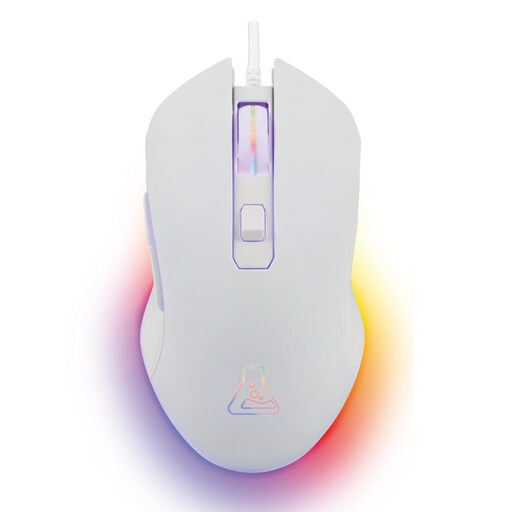
THE G-LAB KULT-HELIUM Wired Gaming Mouse - 6400 DPI, 6 Buttons - White
Why it's a great choice: Perfect for those who want the essentials without breaking the bank. This wired mouse ensures reliable performance for casual sessions and for starting out in esports. Bonus: it's compatible with PC and consoles.
This mouse gets straight to the point, without useless marketing numbers. Its DPI range of up to 6400 is more than enough for 99% of gamers and avoids the trap of the specs race.
Plug & Play: Plug it in and play. No drivers to install. Its ambidextrous design is suitable for both right- and left-handed users.
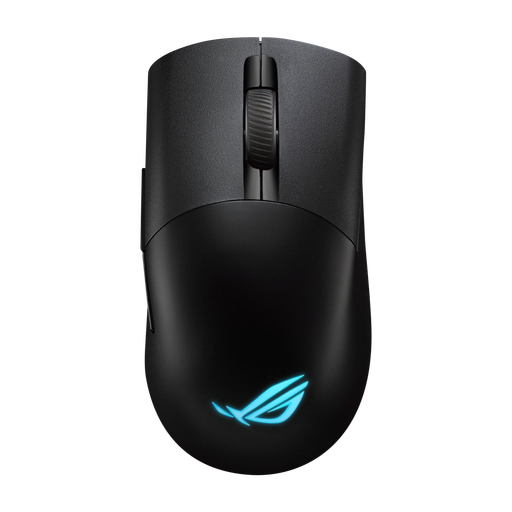
ASUS ROG Keris Wireless Aimpoint Gaming Mouse - 36000 DPI, 5 Buttons - Black
Why it's a great choice: Built for competition, this mouse combines a feather-light 75g weight with ultra-low-latency wireless technology. A true precision tool for gamers who leave nothing to chance.
It settles the "wired vs. wireless" debate with ROG SpeedNova technology. The goal: wireless performance as reliable and responsive as a wired connection, minus the cable.
Precision and Lightness: Its ROG AimPoint optical sensor and 75g weight make it a fearsomely precise and **lightweight gaming mouse**, ideal for the swift movements required in FPS games. Plus: the switches are hot-swappable, ensuring long-term durability.
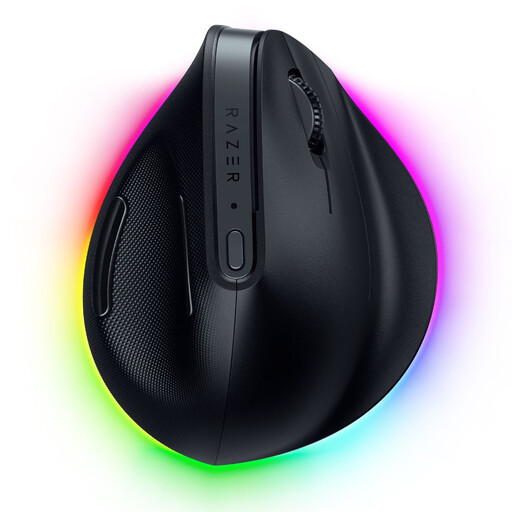
Razer Pro Click V2 Wireless Ergonomic Vertical Mouse
Why it's a great choice: For anyone who spends long hours at their PC, for both gaming and work. Its vertical design was specifically engineered to reduce wrist and forearm strain.
This mouse tackles the pitfall of sacrificed ergonomics head-on. Gone is the flashy design, replaced by a purely functional shape that promotes a natural hand posture—a factor that is all too often underestimated.
Long-lasting Comfort: Its vertical design is its number one selling point. Its triple connectivity (Bluetooth, 2.4 GHz, and wired) makes it ultra-versatile for juggling multiple devices.
Still not convinced?
Explore our full selection of products, all tested and approved according to our strict criteria for performance and reliability.
Frequently Asked Questions (FAQ)
What is the lifespan of a gaming mouse?
The lifespan of a gaming mouse is often measured by the number of clicks its switches can endure. Entry-level models typically last for 5 to 10 million clicks, while premium models can exceed 70 million. The cable (for a wired gaming mouse) and the battery (for a wireless gaming mouse) are also wear points to watch out for. Opt for a braided cable, which is often more durable.
Is a high DPI really necessary for gaming?
Absolutely not. A stratospheric DPI is in no way a guarantee of performance. The vast majority of gamers set their mice between 800 and 3200 DPI. What's essential is the quality of the sensor and having adjustable DPI to find the perfect setting for your sensitivity, screen resolution, and each specific game.
How do I properly clean my gaming mouse?
First step: unplug your mouse. Use a soft, dry cloth (microfiber is ideal) to clean the shell. For nooks and crannies (between buttons, the scroll wheel, etc.), a small, soft brush or a cotton swab lightly dampened with isopropyl alcohol will do the trick. Most importantly, no water! Never apply liquid directly to the mouse. Also, remember to regularly clean the optical sensor with a dry cotton swab to maintain flawless precision.