
Gaming Mouse Buyer’s Guide: How to Choose the Right Model
As a product expert at Joybuy, every day I see gamers feeling lost in the maze of gaming mice. Spec sheets are overflowing with jargon and impressive numbers, but how can you tell what will truly improve your in-game performance?
Before you pull out your credit card, it's essential to sidestep a few well-worn marketing traps designed to make you spend more on features you often don't need.
- The Myth of Outrageous DPI: Many brands tout astronomical DPI (Dots Per Inch) figures: 26,000, 36,000, and even higher. In reality, most gamers, including pros, set their mouse between 800 and 3200 DPI. An excessively high number is by no means a guarantee of performance. Worse, it can actually harm your precision if the sensor can't keep up.
- Sacrificing Ergonomics and Weight: What good is the most advanced sensor on the market if your mouse gives you hand cramps after 30 minutes? The weight, shape, and how it fits your grip style (palm, claw, or fingertip grip) are far more decisive factors for your long-term comfort and performance.
- Misunderstood Wireless Connectivity: The fear of latency (the infamous lag) on a wireless gaming mouse is a non-issue today for quality models. The real trap lies in the actual battery life (often calculated without RGB lighting enabled) and the stability of the connection, which can vary wildly from one model to another.
The Criteria That Truly Matter When Choosing a Gaming Mouse
To make the right choice, focus on the features that have a direct impact on your gameplay.
Sensor, DPI, and Polling Rate: Looking Beyond the Numbers
The sensor is the heart of the mouse. Rather than focusing on the maximum DPI, pay attention to the overall quality of the sensor (PixArt models, like the PAW3395, are often the benchmark) and its maximum tracking speed, measured in IPS (Inches Per Second). A high IPS ensures the mouse can handle your swiftest movements without ever spinning out.
The polling rate, measured in Hertz (Hz), indicates how often the mouse reports its position to the computer. The current standard is 1000 Hz (a 1 ms response time). Newer models push this up to 8000 Hz (8K), offering theoretically superior responsiveness, which is most noticeable on very high refresh rate monitors. It's a real plus for competitive players, but far less perceptible for the average user.
Weight and Ergonomics: Your Comfort Comes First
Weight is a matter of preference, but a clear trend is emerging:
- Lightweight gaming mouse (under 70g): Favored for FPS games like Valorant or CS2, it facilitates large, rapid sweeping movements (flicks).
- Medium-weight mouse (70-100g): Highly versatile, it offers an excellent balance of stability and agility, ideal for all game genres.
Ergonomics are just as crucial. Ensure the mouse's shape matches your hand size and grip style. There are models specifically designed as an ergonomic gaming mouse, a left-handed gaming mouse, or even a vertical gaming mouse for those looking to reduce wrist strain.
Wired vs. Wireless: The 2026 Showdown
- Wired gaming mouse: The guarantee of a stable, latency-free connection without ever worrying about the battery. Modern, braided, and ultra-flexible cables (like paracord) almost completely eliminate any feeling of drag.
- Wireless gaming mouse: Absolute freedom of movement. Today's wireless technologies (2.4 GHz) easily rival their wired counterparts in terms of responsiveness. The key points to check are battery life and the simplicity of charging (via USB-C or a docking station).
Our Top Picks for Every Type of Gamer
Here are a few models that meet specific needs while avoiding the traps we've discussed.
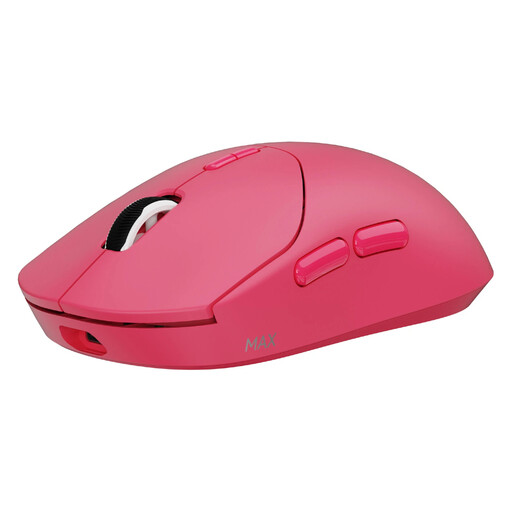
RAPOO VT2 MAX Wireless Gaming Mouse, True 8K Wireless Polling Rate, 53g Lightweight
Why it hits the mark: With its featherlight 53g weight and native 8000 Hz wireless polling rate, this mouse is built for speed and precision. It's perfect for FPS players who demand maximum responsiveness for their flicks and micro-adjustments.
This model doesn't just rely on a stratospheric DPI. It combines an ultra-lightweight design with a true 8000 Hz polling rate for a tangible boost in responsiveness, steering clear of marketing claims with no real-world benefit.
Native 8000 Hz wireless polling rate for near-zero latency; featherlight 53g weight; record-breaking battery life (up to 750h in 1000 Hz mode).
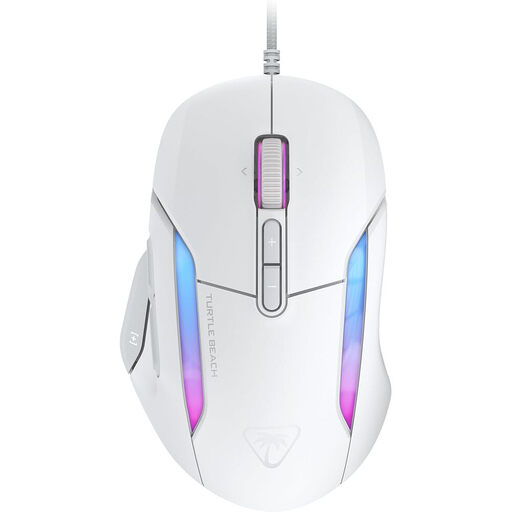
Turtle Beach Kone II Wired Gaming Mouse
Why it hits the mark: Its ergonomic shape is designed for comfort during long gaming sessions. Its 7 programmable buttons, which can handle up to 23 functions thanks to Easy-Shift[+] technology, are a dream for MMO or RTS players who juggle numerous spells and macros.
It focuses primarily on ergonomics and customisation. Its proven shape and multiple buttons meet a real need for comfort and control, which is far more relevant than the simple race for higher DPI.
Easy-Shift[+] technology for a total of 23 programmable functions; ergonomic design ideal for medium to large hands; PhantomFlex braided cable for a near-wireless feel.
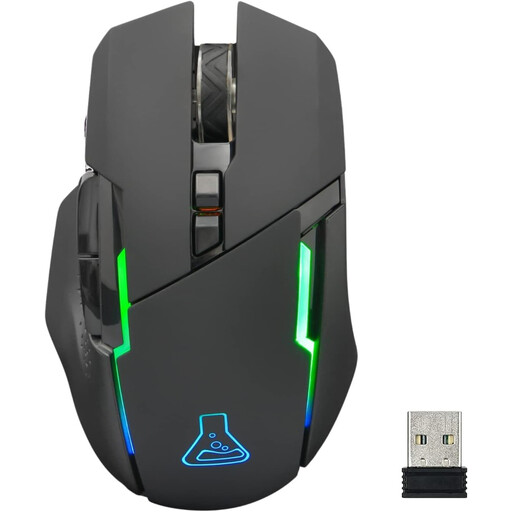
THE G-LAB Kult Caesium Wireless Gaming Mouse
Why it hits the mark: It offers wireless freedom, an adjustable DPI up to 7200 (more than enough for most games), and RGB gaming mouse lighting, all at a very accessible price. It's an excellent starting point to get geared up without breaking the bank.
This model offers a balanced feature set (wireless, adjustable DPI) without getting caught up in over-the-top specs. It avoids the classic trap of entry-level products that sacrifice reliability for a single flashy feature.
Reliable 2.4 GHz wireless connectivity; good battery life (up to 32h without RGB); ergonomic design for right-handed users.
Looking for other models?
We have curated a complete, up-to-date selection of products that meet our demanding selection criteria and current safety standards.
FAQ: Everything You Need to Know About Gaming Mice
Is a wireless gaming mouse as responsive as a wired model?
Yes, for the vast majority of gamers. Modern 2.4 GHz wireless technologies offer response times of around 1 ms, identical to classic wired mice. The difference is imperceptible to the naked eye. Only world-class esports players might possibly feel a difference with 8000 Hz wired models. For 99% of users, the freedom of wireless wins hands down, with no compromise on performance.
Is an 8000 Hz polling rate really useful?
An 8000 Hz rate means the mouse communicates its position 8,000 times per second (every 0.125 ms). This can provide slightly smoother tracking and reduce latency by a few fractions of a millisecond. This gain is most relevant for professional gamers using very high-frequency monitors (240 Hz and above). For the average gamer, a 1000 Hz rate is more than sufficient and, as a significant bonus, it consumes fewer CPU resources.
How do I know if a mouse is right for my hand and grip?
The best approach is to compare the mouse's dimensions (length, width, height) with your current model or to measure your hand. Next, identify your grip type:
- Palm Grip: Your entire hand rests on the mouse. Opt for larger, more ergonomic models.
- Claw Grip: Your palm touches the back of the mouse, and your fingers are arched like a claw. Medium-sized, often ambidextrous mice are an excellent choice.
- Fingertip Grip: Only your fingertips are in contact with the mouse. Choose small, lightweight models.