
Gaming Mouse Buying Guide: How to Choose the Right One
Choosing a new gaming mouse can quickly become a daunting task. Between jargon-filled spec sheets, sometimes extravagant designs, and marketing promises, it's easy to feel lost and end up with buyer's remorse. Our role is to decode this flood of information for you and provide clear, concrete advice. The goal: to guide you to THE peripheral that truly matches your playstyle and budget, while helping you avoid the most common pitfalls.
The 3 Pitfalls to Avoid When Buying a Gaming Mouse
The market is flooded with models that prioritise looks over performance. Here are the most common mistakes that can cost you dearly… and ruin your gaming experience.
- The Myth of Astronomical DPI: Many brands flaunt astronomical DPI (dots per inch) figures, sometimes exceeding 20,000. In reality, most gamers, including pros, set their sensitivity to much lower values (typically between 400 and 3200 DPI). An oversized number is often just a marketing gimmick with no real impact on precision. The quality of the sensor itself is far more crucial.
- Ergonomics Sacrificed for Style: A RGB gaming mouse with spectacular lighting is certainly eye-catching. But if its shape isn't suited to your hand or grip style (palm, claw, fingertip), it will quickly become uncomfortable, or even painful, after a few hours of gaming. Long-term comfort should always take precedence over aesthetics.
- Flimsy Materials: A tempting price can hide low-quality plastics or switches with limited durability. A mouse that starts developing ghost double-clicks or whose feet wear out in a few months is a poor investment, regardless of its other features.
Essential Criteria for an Informed Choice
To make the right choice, focus on the few features that have a real impact on your performance and comfort.
Sensor and Connectivity
The sensor is the heart of the mouse. Modern optical sensors (like those in the PixArt PAW series) are now the standard, renowned for their reliability and precision. Instead of focusing on max DPI, check for the absence of flaws like unwanted hardware acceleration, which is much more detrimental in-game.
When it comes to connectivity, the choice comes down to two options:
- Wired gaming mouse: It guarantees a connection with zero latency and frees you from any battery constraints. It's the reliable choice, and often more affordable.
- Wireless gaming mouse: Today's 2.4 GHz technologies offer nearly imperceptible latency, easily competing with wired models. They provide complete freedom of movement, a real advantage in fast-paced games. Battery life then becomes the key factor to watch closely.
Weight and Ergonomics
Weight is a crucial factor, especially for FPS enthusiasts. A lightweight gaming mouse (often under 80g) allows for quicker movements and causes less wrist fatigue. For other genres like MOBAs or MMOs, a slightly heavier weight can, on the contrary, offer more stability. While ergonomics are subjective, a mouse whose shape fits your grip will radically improve your long-term comfort and precision.
Buttons and Customisation
The number of buttons depends on your games of choice. For an FPS, 2 to 4 side buttons are usually sufficient. For MMOs or MOBAs, however, a programmable mouse with 8 or more buttons becomes a major asset for assigning macros and skills.
Our Recommended Gaming Mouse Picks
Instead of an endless list, here are a few models that tick all the boxes for specific player profiles, based on the criteria we've just discussed.
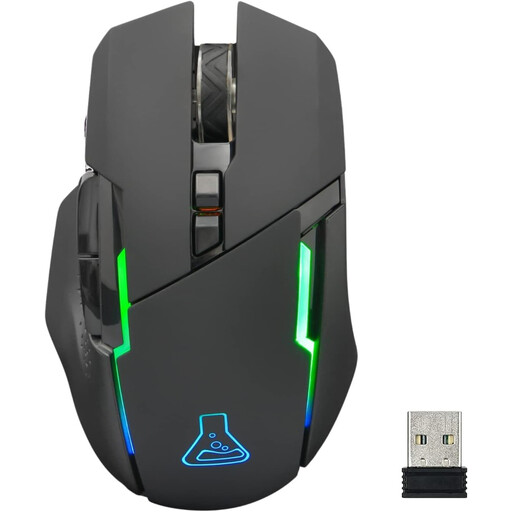
THE G-LAB Kult Caesium Wireless Gaming Mouse
Why we recommend it: Ideal for getting into wireless gaming without breaking the bank. It packs the essentials (adjustable DPI, RGB lighting) at a very accessible price point, perfect for casual gaming sessions.
This model doesn't overdo it with DPI. It focuses on a sensitivity range (up to 7200 DPI) that is more than enough for all uses and on comfortable ergonomics for right-handed users.
Its reliable 2.4 GHz wireless connectivity and very decent battery life (up to 32 h without RGB) make it an excellent trade-off in this price range.
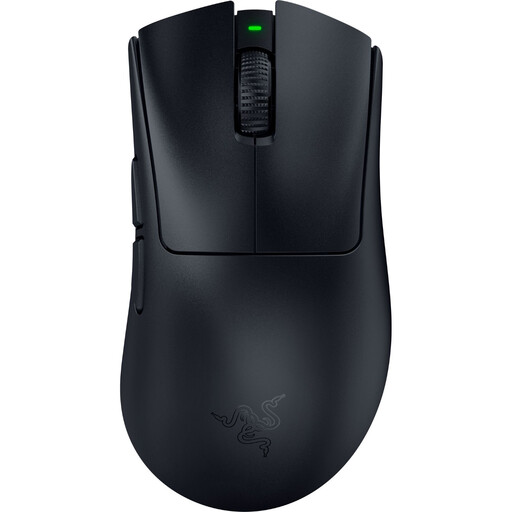
Razer DeathAdder V4 Pro Wireless Gaming Mouse
Why we recommend it: Built for e-sports, this mouse gets straight to the point: a feather-light weight, a top-tier sensor, and near-zero latency. It's the weapon of choice for gamers who want to optimise every millisecond of their reaction time.
Here, there are no aesthetic frills. The design is understated, and the ergonomics, a legacy of a proven line of models, are entirely focused on pure performance and comfort during long sessions.
Its feather-light weight of 56 g for maximum agility and its HyperSpeed wireless technology that ensures flawless responsiveness. Its Focus Pro optical sensor guarantees incredibly precise tracking.
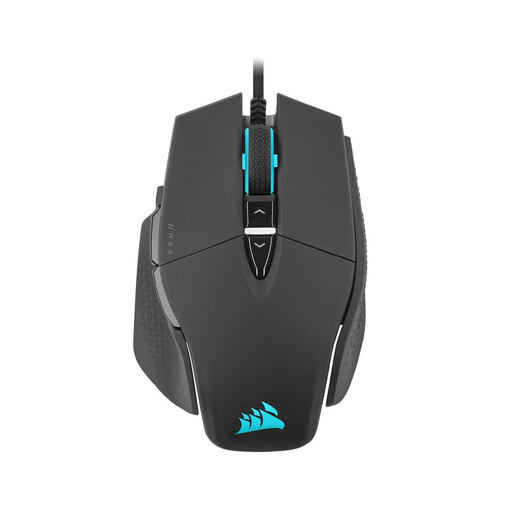
CORSAIR M65 RGB ULTRA Wired Gaming Mouse
Why we recommend it: Designed specifically for FPS players, this wired mouse combines a sturdy aluminium frame with a unique feature: a programmable "sniper" button. It's the ultimate precision tool for those who are serious about headshots.
Instead of getting lost in numbers, it offers a feature (the sniper button) with a direct, tangible impact on performance, justifying its "specialist" status. Its aluminium frame protects it from the pitfall of flimsy materials.
The famous sniper button that instantly lowers sensitivity for pixel-perfect shots, and its aluminium frame that guarantees rock-solid durability and stability.
Want to Explore Other Options?
Discover our full selection of products that meet our demanding selection criteria and current safety standards.
Frequently Asked Questions (FAQ)
Is a high DPI count really an advantage for a gaming mouse? Not really. Beyond a certain threshold (around 3200 DPI for most gamers), excessively high sensitivity becomes uncontrollable and doesn't translate into any precision gain. The quality of the optical sensor and its ability to track movements without error are far more crucial than a maximum DPI number, which is mostly a marketing gimmick.
What is the performance difference between a wired and a wireless gaming mouse in 2026? Today, the difference has become virtually non-existent for the vast majority of gamers. Modern 2.4 GHz wireless technologies offer polling rates of 1000 Hz and higher, resulting in latency under 1?ms: it's simply indistinguishable from a wired model. The choice therefore depends on your preferences: complete freedom of movement with wireless, versus no battery to worry about and an often lower price with wired.
How do I maintain my mouse to extend its lifespan? Regular maintenance is simple and can make all the difference. Use a soft, dry cloth to clean the shell. For the sensor, a simple dry cotton swab is enough to remove dust that can disrupt tracking. Also, remember to clean the mouse feet to maintain a smooth glide. Above all, avoid any liquids or harsh cleaning products that could damage the electronic components or the coating of your mouse.