
Gaming Setup Guide: How to Choose the Right Peripherals
Building your dream gaming setup can quickly become a headache. Between the technical jargon, marketing hype, and a jungle of product options, it's easy to make the wrong choice and end up with buyer's remorse. As a product expert for Joybuy, I'm here to guide you and bring some clarity to the process.
Let's break down the most common pitfalls together, so you can invest in gear that will truly elevate your experience, whether it's for gaming, streaming, or even working from home.
The 3 Pitfalls to Avoid When Choosing Your Peripherals
- The Myth of "Magic" Keyboard Switches. Marketers promise ultimate "gaming" responsiveness with very loud switches, but the reality is far more nuanced. A loud mechanical keyboard isn't synonymous with performance and can quickly become a nightmare for you and those around you. The real difference lies in the typing feel, durability, and how well it suits your specific use case (fast-paced gaming, intensive writing, etc.).
- The RGB Mirage at the Expense of Performance. A RGB keyboard with a million colours looks great, but this flashy feature often hides a low-quality build?: a flimsy chassis, cheap ABS plastic keycaps that turn shiny in a few months, or even non-existent software drivers. Performance should always take precedence over a light show.
- The Megapixel Race for Webcams. A budget 4K webcam will often produce worse results in real-world conditions than an excellent Full HD (1080p) model. Image quality primarily depends on the sensor size, its low-light performance, and fluidity (frames per second). These are the very features often sacrificed on the altar of entry-level 4K.
The Real Criteria for an Informed Choice
To avoid falling into these traps, focus on a few technical fundamentals. These objective criteria are the best guarantee of high-performing, durable hardware.
1. Keyboards?: Switch Type and Build Quality
The choice of a gaming keyboard hinges above all on its switches. Here are the three main families?:
- Linear?: They offer a smooth and quiet keystroke with no tactile bump. A popular choice for fast-paced games (FPS) that require rapid and repeated key presses.
- Tactile?: They provide a slight tactile feedback (a "bump") at the actuation point to confirm the keypress, but without the audible "click." This is the perfect balance for mixed-use (gaming and typing).
- Clicky?: They combine tactile feedback with a distinct, audible "click." Highly valued for heavy typing, they are often considered too loud for gaming with voice chat or in shared office spaces.
An increasingly sought-after feature?: hot-swappable sockets. This allows you to change switches without any soldering, opening the door to nearly infinite customisation and repairability.
2. Webcams?: Sensor and Fluidity Before Resolution
For a streaming webcam, don't be mesmerised by resolution alone. Two parameters take priority?:
- Sensor Size?: A larger sensor (expressed as a fraction of an inch, e.g., 1/2") captures more light. The result? A sharper, more detailed image with less digital "noise," especially when lighting isn't ideal.
- Frame Rate (FPS)?: A webcam that records at 60 FPS (frames per second) will deliver a much smoother and more natural look than a 30 FPS model. This is crucial for streaming fast-paced games. A 1080p 60 FPS stream will always be preferable to a sluggish, choppy 4K 30 FPS stream.
3. Mice and Headsets?: Precision, Comfort, and Latency
For other PC peripherals, the same logic applies. For a gaming mouse, sensor precision (DPI) matters, but ergonomics and weight are just as crucial for getting through long sessions without fatigue. For a wireless gaming headset, prioritise a 2.4?GHz connection (much lower latency than Bluetooth) and check the advertised battery life to avoid running out of power mid-game.
Recommended Picks for Your Setup
Here are a few products that tick all the right boxes, based on the criteria we've just established.
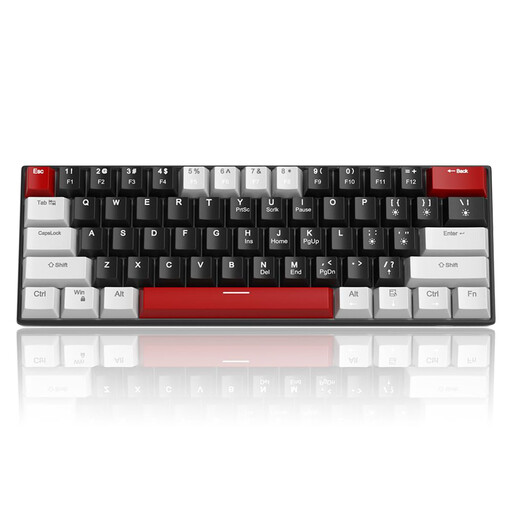
MageGee STAR 61 60% Wired Gaming Keyboard
Why this one? Perfect for those who focus on the essentials : responsiveness. Its wired connection guarantees near-zero latency, a must-have for competitive gaming. Its compact form factor frees up maximum desk space for wide mouse movements.
It skips the flashy RGB to focus on what matters : a simple but effective backlight, quality mechanical switches, and full anti-ghosting technology. Performance first.
Responsive mechanical switches (choice of : Linear Red or Clicky Blue) and full anti-ghosting for rock-solid reliability in-game.
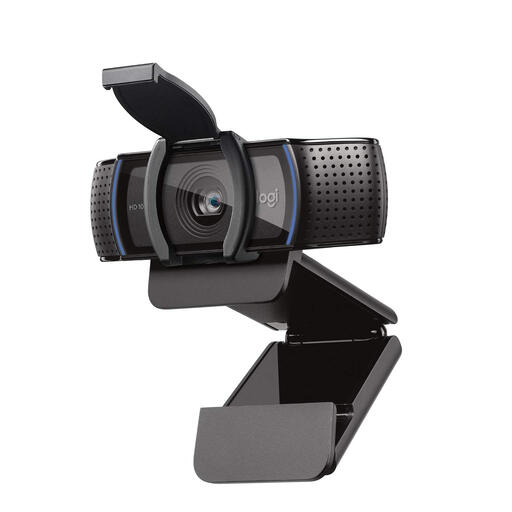
Logitech HD Webcam Pro C920S
Why this one? The gold standard for getting into streaming or elevating your video calls without breaking the bank or overcomplicating things. A plug-and-play model praised for its reliability.
It proves that a great image doesn't have to mean 4K. Its excellent Full HD sensor, combined with responsive autofocus and automatic exposure correction, delivers a much cleaner picture than many low-end 4K webcams.
A sharp and smooth Full HD 1080p picture, an autofocus that stays locked on, and stereo microphones that do a great job of delivering clear audio.
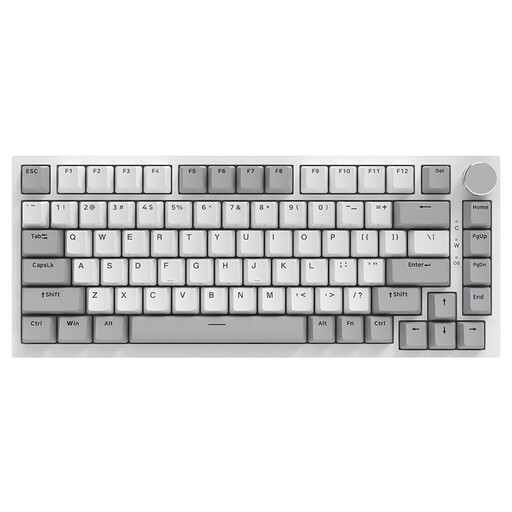
AJAZZ AK820 75% Wired Mechanical Keyboard
Why this one? The keyboard for enthusiasts who love to shape their gear to their exact preferences. Its hot-swappable design offers total freedom to experiment and find THE perfect typing feel.
It shatters the myth of the "one-size-fits-all" switch by giving you the power. No more being locked into a single choice! You can test, mix, and match linear, tactile, or clicky switches to create a keyboard that is uniquely yours.
Gasket Mount structure and hot-swappable sockets for a softer typing experience, a more muted sound, and limitless customisation.
Looking for More Hidden Gems?
Discover our full selection of products that meet these quality criteria and European standards.
Frequently Asked Questions (FAQ)
How long does a mechanical keyboard last?
A mechanical keyboard is built to last much longer than a standard membrane keyboard. The lifespan of its switches is rated for tens of millions of keystrokes (often 50 million or more). The quality of the materials also plays a crucial role?: PBT keycaps are far more resistant to wear and won't turn yellow, unlike ABS. And with a hot-swappable model, you can simply replace a faulty switch to extend the keyboard's life even further.
Does an RGB keyboard use a lot of power?
No, the power consumption of an RGB keyboard is very low. The power drawn from your computer's USB port has a negligible impact on your electricity bill. Additionally, all models allow you to adjust the brightness or even turn off the LEDs completely to save energy (which is especially useful with a laptop).
Do I absolutely need a 4K webcam to stream on Twitch?
Absolutely not. The vast majority of platforms, especially Twitch, are optimised for a stream in 1080p at 60 frames per second (FPS). This is the sweet spot between image quality for your viewers and the bandwidth required from your internet connection. A 4K webcam might be justified for highly professional productions, but an excellent 1080p webcam is more than enough to get started and even to stream regularly with high quality.