
HOTAS Buying Guide: How to Choose a Flight Simulation Joystick
Finding the right flight simulation gear can be overwhelming. Between the technical jargon, the multitude of models, and the marketing promises, it's easy to feel lost. As a Product Recommendation Officer at Joybuy, my role is to help you navigate the options. The goal isn't to drown you in specifications, but to provide practical guidance for choosing a HOTAS (Hands On Throttle And Stick) system that truly fits your needs and budget, whether you're a rookie pilot or a seasoned veteran.
Essential Criteria for Choosing Your Flight Gear
Before looking at specific models, it's helpful to clarify a few key points. A smart choice is based on objective criteria that will ensure a satisfying experience in the long run.
1. Compatibility: The First Question to Ask
This is the non-negotiable starting point. A PC flight stick won't necessarily work on a console, and vice versa. Always check the device's compatibility with your platform: PC (Windows) or Xbox. Manufacturers state this clearly on the packaging and in the product specifications. Also, consider the games you plan to play. Most modern equipment is natively supported by titles like Microsoft Flight Simulator or X-Plane, but it never hurts to double-check.
2. Ergonomics and Modularity
Your comfort during long flight sessions is paramount. A good flight simulation joystick should feel comfortable in your hand. Some models offer an ambidextrous design, a valuable feature if you're left-handed or plan to share your gear.
Modularity is another aspect to consider. A system where the throttle is detachable from the joystick offers great flexibility. This allows you to adapt the setup to your space: keep the two units together on a desk for stability, or separate them on your lap for greater immersion.
3. Sensor Technology for Precision
The precision of your movements is what separates a simple gamepad from true simulation hardware. Many Thrustmaster HOTAS models use magnetic sensor technology (often called H.E.A.R.T). Unlike traditional potentiometers that wear down over time from friction, these sensors operate without any physical contact. The result? Precision that never degrades and a significantly longer lifespan. This is a technical detail with a direct, tangible impact on the quality of your piloting.
Our Recommended HOTAS Systems
Keeping these criteria in mind, here is a selection of products that meet different needs and player profiles.
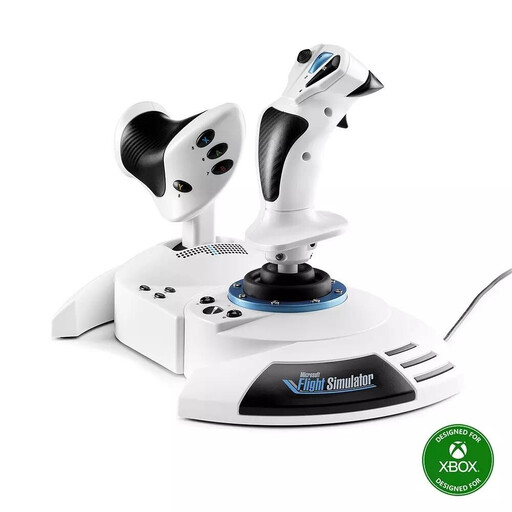
Thrustmaster T.Flight Hotas One Microsoft Flight Simulator Special Edition
-
Why we recommend it: This bundle is an excellent entry point into the world of simulation. Its official Microsoft Flight Simulator license and Plug and Play compatibility on PC and Xbox make it a straightforward, effective solution. No complex setup required: just plug in and fly. The detachable throttle is a real bonus at this price point.
-
Pros:
- Broad Compatibility: Works natively on Xbox Series X|S, Xbox One, and PC.
- All-in-One and Ready to Fly: Includes a joystick and throttle with 5 axes and 14 buttons.
- Dual Rudder System: Rudder control is available via twisting the stick (Z-axis) or a rocker switch on the throttle.
- Adjustable Ergonomics: The stick's resistance can be adjusted to suit your preferences.
-
Who is this product for?: Ideal for beginners and casual players looking for an immersive experience without breaking the bank. It's a top choice for Xbox joystick owners who want to take their setup to the next level.
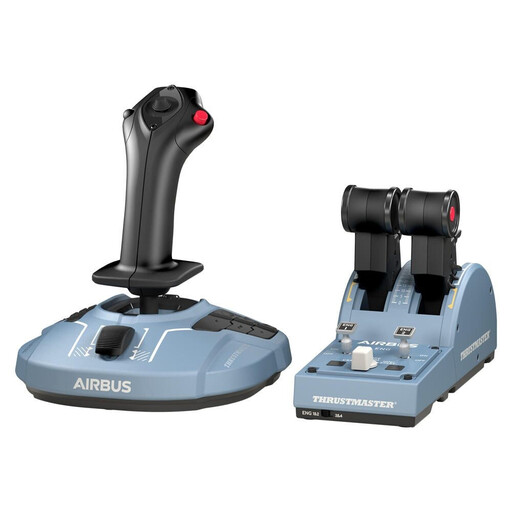
Thrustmaster TCA Officer Pack Airbus Edition
-
Why we recommend it: For civil aviation enthusiasts, this pack is a gold standard. As an official replica of the Airbus A320's controls, it offers a remarkable level of immersion. Precision is guaranteed by H.E.A.R.T magnetic sensor technology, and its modular design allows for extensive customisation.
-
Pros:
- Realistic Immersion: Ergonomic replicas of an Airbus sidestick and throttle quadrant.
- High Precision: H.E.A.R.T technology ensures surgical precision and excellent durability.
- Ambidextrous Configuration: The joystick can be adapted for right- or left-handed use with interchangeable button modules.
- Advanced Features: The throttle quadrant includes functional thrust reversers, a detail purists will appreciate.
-
Who is this product for?: Primarily for PC gamers passionate about civil aviation simulation (Microsoft Flight Simulator and X-Plane compatible). If flying airliners is your goal, the TCA Airbus is an outstanding choice.
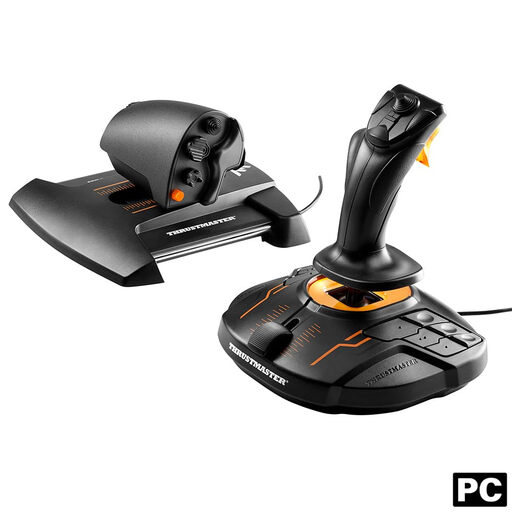
Thrustmaster T.16000M FCS HOTAS
-
Why we recommend it: The T.16000M is renowned for its excellent precision-to-price ratio. It features the same H.E.A.R.T magnetic sensor technology found in more expensive models, but in a more accessible package. Its versatility makes it equally effective for traditional flight simulation and space combat (dogfighting).
-
Pros:
- Extreme Precision: 16-bit resolution on the joystick for remarkably fine control.
- Fully Ambidextrous: The joystick is completely configurable for right- or left-handed use.
- S.M.A.R.T Throttle: The sliding rail system provides smooth, precise throttle movement.
- Numerous Controls: With a total of 30 buttons and two 8-way 'point of view' hat switches, you won't run out of shortcuts.
-
Who is this product for?: For intermediate to advanced PC gamers who prioritize precision and versatility. It's a highly popular piece of gear among players of Elite Dangerous, Star Citizen, and combat simulators like DCS World.
Looking for Other Options?
This selection covers a range of needs, but the market is vast. If you want to explore other models of joysticks, rudder pedals, or accessories, you can browse our complete flight simulator category to discover a wider range of equipment.
Frequently Asked Questions about HOTAS
What is a HOTAS system?
HOTAS is an acronym for Hands On Throttle And Stick. It's a setup consisting of a joystick (to control the aircraft's pitch and roll) and a separate throttle (to manage engine power). This system allows you to control essential flight functions without ever taking your hands off the controls, offering immersion and responsiveness far superior to a standard gamepad or keyboard and mouse.
Is a HOTAS essential for Microsoft Flight Simulator?
No, it's not essential. You can certainly play with an Xbox controller or even a keyboard and mouse. However, for an authentic, precise, and immersive flight experience, using a HOTAS-style flight stick is highly recommended. The fine control over power, the precision of the control axes, and the access to numerous buttons radically change the gameplay experience.
How do I know if a joystick is compatible with my PC or Xbox?
The most reliable method is to check the product's technical specifications. Manufacturers always clearly state the compatible platforms (e.g., "PC", "Windows 10/11", "Xbox Series X|S & Xbox One"). As for games, most modern HOTAS systems are automatically recognized by major simulators. A "Plug and Play" logo or a mention of native compatibility with a specific game, like Microsoft Flight Simulator, is a good indicator.