
How to Choose the Right Mechanical Gaming Keyboard for Your Setup
The world of mechanical gaming keyboards is booming. Form factors, switch types, innovative features… Faced with an overwhelming number of options, it's easy to feel a bit lost. Whether you're a Valorant esports pro, a high-tech enthusiast, or simply seeking optimal typing comfort, finding the ideal keyboard is crucial.
As a product expert at Joybuy, my mission is to guide you through this jungle. This guide breaks down the essential criteria and presents a selection of models that have caught our eye, all without unnecessary marketing jargon.
Our Tips for Choosing Your Mechanical Keyboard
Before diving into our selection, let's review the key criteria for finding the keyboard that's right for you.
1. Form Factor?: A Matter of Space and Use
Your keyboard's size is more than just a detail?: it dictates your ergonomics and the free space on your desk.
- Full-size (104/105 keys)?: The classic layout with a number pad. Essential if you juggle gaming and office work (spreadsheets, data entry, etc.).
- TKL (Tenkeyless, 87/88 keys)?: A full keyboard, just without the number pad. An excellent compromise that frees up precious space for your mouse—a significant advantage in FPS games.
- Compact (60?%, 65?%, 75?%)?: These ultra-compact form factors sacrifice certain keys (function keys, dedicated arrows…) for maximum space-saving and portability. A compact mechanical keyboard, like a 60?% model, is perfect for minimalist setups or gamers on the go. The missing keys remain accessible through combinations with the Fn key.
2. The Switches?: The Heart of Your Typing Experience
The switch is the engine of the keyboard. It defines the feel, sound, and responsiveness of every key.
- Traditional Mechanical Switches?: They come in three main families?:
- Linear (Reds)?: A smooth and quiet travel, highly valued for its responsiveness in gaming.
- Tactile (Browns)?: A slight tactile bump at the actuation point, but without the audible "click". The perfect balance between gaming and typing.
- Clicky (Blues)?: A tactile bump accompanied by a distinct, audible "click". Very satisfying for typing, but potentially disruptive to those around you.
- Magnetic Switches?: A newer technology that uses Hall effect sensors to detect pressure. It allows for ultra-fast activation and customisable actuation points, making it the preferred choice for a competitive FPS keyboard.
- Hot-swappable Keyboard?: This feature lets you change switches without any soldering. A major advantage for customisation enthusiasts who love to test different typing feels, or simply to replace a faulty switch in a flash.
3. Connectivity and Additional Features
- Wired vs. Wireless?: A wireless gaming keyboard means freedom of movement and a clean desk setup, thanks to low-latency 2.4?GHz and Bluetooth technologies. Wired models, on the other hand, guarantee a flawless, latency-free connection—a must-have for competitive play.
- Practical Features?: A keyboard with a dedicated volume wheel, media keys, or customisable RGB lighting are the small extras that make a real difference in daily use.
Our Mechanical Keyboard Recommendations
Here are a few options that stand out for their features and market position, designed to meet different needs and budgets.
AJAZZ AK980 V2?: Versatility Without Compromise

Why it stands out?: The AJAZZ AK980 V2 is a true technological powerhouse. Its 98?% layout cleverly retains the number pad while being more compact than a full-size keyboard. It checks all the boxes for modern features?: triple connectivity, a hot-swappable PCB, and welcome refinements like the volume knob and customisable TFT screen.
Advantages?:
- Triple Connectivity?: Wired (USB-C), Bluetooth, and 2.4?GHz for maximum flexibility.
- Gasket Mount Structure?: Delivers a softer typing experience and a more muted sound thanks to its multiple sound-dampening layers.
- Premium Features?: Equipped with a metal volume knob and a TFT screen to display info or GIFs.
- Long Battery Life?: Its 10000 mAh battery ensures extended use in wireless mode.
Who is it for?? For the user looking for an "all-in-one" keyboard that is as high-performing for gaming as it is comfortable for long work sessions, without compromising on features.
MageGee STAR 61?: The Essentials in a Compact Form Factor
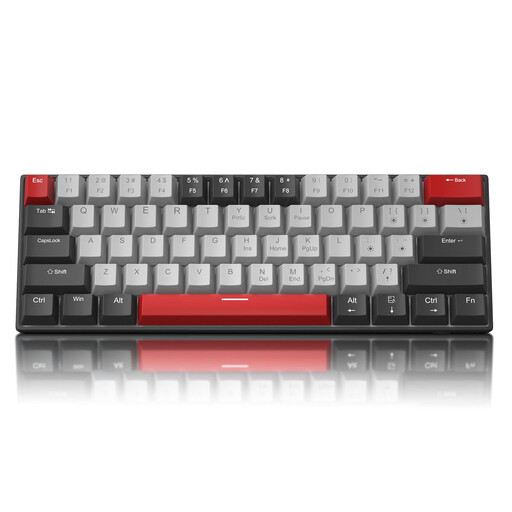
Why it stands out?: The MageGee STAR 61 is an excellent entry point into the world of mechanical keyboards. Its ultra-compact 60?% form factor frees up maximum desk space, perfect for FPS players who need plenty of room for their mouse.
Advantages?:
- 60?% Form Factor?: Extremely compact and portable, ideal for small desks or travel.
- Detachable USB-C Cable?: Makes it easy to transport and allows you to use a custom cable if you wish.
- Full Anti-ghosting (N-Key Rollover)?: Ensures all your keystrokes are registered, even during fast and complex in-game actions.
- Blue Backlighting?: Offers simple and effective lighting with 19 different modes to customise your setup's atmosphere.
Who is it for?? For casual or regular gamers on a budget, those with a modest-sized desk, or anyone looking for a simple and effective first compact mechanical keyboard.
Royalaxe X68?: Built for Esports
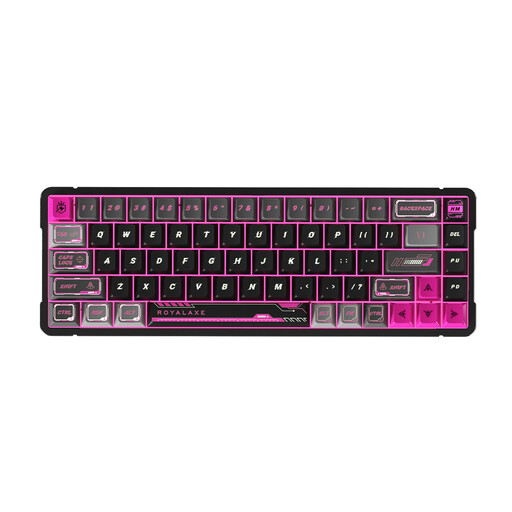
Why it stands out?: The Royalaxe X68 is designed for competition. Its full aluminium chassis gives it remarkable weight and stability, while its Outemu Peach Crystal magnetic switches deliver top-tier responsiveness, which is crucial in games like CS2 or Valorant.
Advantages?:
- Magnetic Switches?: Allow for near-instantaneous activation and increased durability, a decisive advantage in fast-paced games.
- Aluminium Chassis?: Robust, stable, and provides a premium typing feel.
- Compact 65?% Form Factor?: Retains the arrow keys while remaining very compact, an excellent balance for gaming and daily use.
- Designed for Competitive Gaming?: Responsiveness and precision are at the core of its design, making it an excellent FPS keyboard.
Who is it for?? For the competitive gamer who prioritises performance, speed, and durability above all else. An investment for those who are serious about their in-game performance.
Looking for Other Options??
Our selection is just a glimpse of what's possible. If you're specifically looking for a wired model for a flawless connection, many other configurations are available.
? Discover our collection of wired USB-C keyboards
Frequently Asked Questions (FAQ)
1. What is the difference between a mechanical, optical, and magnetic switch??
- Mechanical?: A physical contact between two metal parts registers the keystroke. This is the most common technology, offering a wide variety of feels.
- Optical?: The keystroke is detected when the key's stem breaks a beam of light. The lack of physical contact reduces wear and tear and can offer faster activation.
- Magnetic?: A sensor measures the change in a magnetic field as the key is pressed. This allows for near-instantaneous activation and lets you customise the key's actuation distance.
2. Is a hot-swappable keyboard really useful??
Absolutely, and for two main reasons. First, customisation?: you can try different types of switches (linear, tactile, clicky) on the same keyboard to find the perfect feel without having to buy a whole new one. Second, durability?: if a switch becomes faulty, you can replace it in seconds (the tool is often included), significantly extending your keyboard's lifespan.
3. Is a 60?% layout suitable for work??
It depends on your use case. If your work involves a lot of data entry using a number pad, a 60?% layout will quickly show its limitations. However, for writing, coding, or standard office tasks, it's perfectly viable once you get used to the key combinations (via the Fn key) to access the missing functions. Its main advantage remains ergonomics and the space it saves on your desk.