
Mechanical Gaming Keyboard Guide: Find the Right Keystroke for Victory
In the gaming arena, every millisecond counts. A missed command, a key that registers a split-second too late, and defeat is certain. A good mechanical gaming keyboard isn't just a peripheral? it's an extension of your reflexes. But faced with a jungle of layouts, switches, and features, it's easy to get lost.
This guide is here to cut through the noise. Our mission: to decode the technical jargon and highlight models that truly make sense, whether you're an esports pro or a passionate gamer searching for the perfect setup.
How to Choose Your Mechanical Gaming Keyboard?: The 3 Key Factors
Before diving into our top picks, here are a few essential criteria to guide your choice and help you understand the technologies that will make a difference in your gaming sessions.
1. The Layout?: Balancing Space and Functionality
The size of your keyboard directly impacts your ergonomics and the amount of space you have for your mouse.
- Full-size (104/105 keys)?: The timeless classic, complete with its number pad. Ideal if you also use your PC for work.
- TKL (Tenkeyless)?: A TKL mechanical keyboard omits the number pad. The space saved is significant, allowing for wide mouse movements—a decisive advantage in FPS games.
- Compact Layouts (96?%, 75?%, 60?%)?: For fans of minimalism, these keyboards optimize space to the max. A 96% keyboard manages the feat of keeping the number pad in a very condensed chassis. Even smaller layouts, like 60%, are the kings of clean setups and portability but require some finger gymnastics with key combinations to access all functions.
2. The Switches?: The Heart of the Experience
The type of switch (the mechanical component under each key) defines everything: the typing feel, the responsiveness, and even your keyboard's sound signature.
- Classic Mechanical Switches?: They are generally classified into three main families. Linear switches (usually red) offer smooth, fast travel, highly sought-after for gaming. Tactile switches (brown) mark the actuation point with a slight bump under your finger, making them very versatile. Finally, Clicky switches (blue) add an audible "click" to the tactile feedback, a very satisfying sensation for typing.
- Hot-Swappable Keyboard?: This golden feature allows you to change switches on the fly, without any soldering. It's the holy grail for enthusiasts who love to experiment with different typing feels or simply replace a faulty switch to extend their keyboard's life.
- Magnetic (Hall Effect) Switch Keyboard?: This is the latest revolution. There's no physical contact here. The key's travel is measured by a magnetic sensor, allowing for near-instant actuation and, most importantly, ultra-precise adjustment of the actuation point via software. It's an undeniable competitive edge for those seeking absolute responsiveness.
3. Connectivity and Responsiveness?: Wired or Wireless?
The myth of the laggy wireless gaming keyboard is well and truly dead. Modern wireless technologies easily rival wired connections.
- Wired?: The reliable choice. It's the simplest and most stable connection, guaranteeing minimal latency and zero battery worries. The most extreme models push the polling rate up to 8000?Hz for near-instant communication with the PC.
- 2.4?GHz Wireless?: Via a USB dongle, this technology ensures ultra-low latency (often 1?ms), making it perfectly viable for competitive gaming, even at a high level.
- Bluetooth?: A bit slower than 2.4?GHz, Bluetooth shines with its versatility. It lets you connect the keyboard to multiple devices (PC, tablet, laptop) in the blink of an eye and without a dongle.
One last point: check for anti-ghosting and N-Key Rollover (NKRO). This technology ensures all your keystrokes are registered, even when you press a multitude of keys at once. And for style, an RGB gaming keyboard will let you customize the lighting for total immersion or simply to match your setup.
Our Mechanical Keyboard Recommendations
Here are three models that stand out for their technical specs and market positioning, catering to a variety of gamer profiles.
1. THE G-LAB KEYZ ELITE 400 Linear Switch?: Versatility Without Compromise
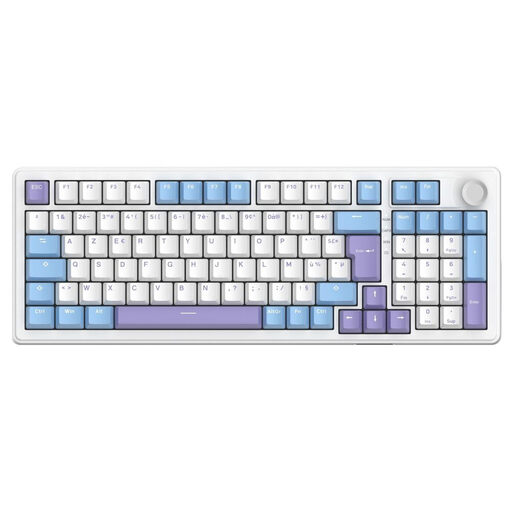
Why it stands out?: This model from The G-Lab is a true Swiss Army knife. It juggles triple connectivity (wired, 2.4?GHz, and Bluetooth) with a very clever 96% keyboard layout that retains the number pad in a compact form factor. Its 5-layer gasket mount structure, combined with pre-lubricated linear switches, delivers a remarkably smooth and quiet typing experience.
-
Key Strengths?:
- Triple connectivity for maximum flexibility.
- Practical 96% compact gaming keyboard layout.
- Hot-swappable switches for easy customization.
- Gasket mount structure for a premium typing feel.
- Double-shot PBT keycaps, built to last.
- Good battery life in wireless mode.
-
Who is it for??: The versatile gamer who wants a keyboard that's as comfortable for gaming as it is for work, and who loves to customize their gear. It's a golden option for a clean setup that sacrifices no functionality. Note: This model has a QWERTY layout.
2. MageGee MK-Box 60?%?: The Accessible Compact
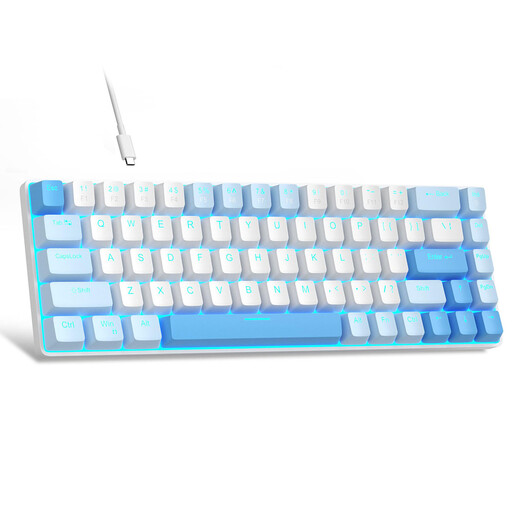
Why it stands out?: The MK-Box from MageGee plays the card of compactness and a budget-friendly price. Its 60% layout frees up maximum desk space, a significant advantage for FPS players who need ample room for their mouse. Equipped with linear red switches, it delivers the responsiveness expected from a mechanical keyboard in an ultra-minimalist chassis.
-
Key Strengths?:
- Ultra-compact 60% layout for maximum space-saving.
- Smooth and fast linear red mechanical switches.
- Full anti-ghosting on all 68 keys.
- Detachable USB cable for easy transport.
- A very attractive price point for taking your first steps into the world of mechanical keyboards.
-
Who is it for??: Gamers on a tight budget, those short on desk space, or digital nomads looking for a small mechanical keyboard to take anywhere. A simple and effective entry point into this universe. Note: This model has a US QWERTY layout.
3. THE G-LAB KEYZ ELITE 400 HE?: Absolute Performance
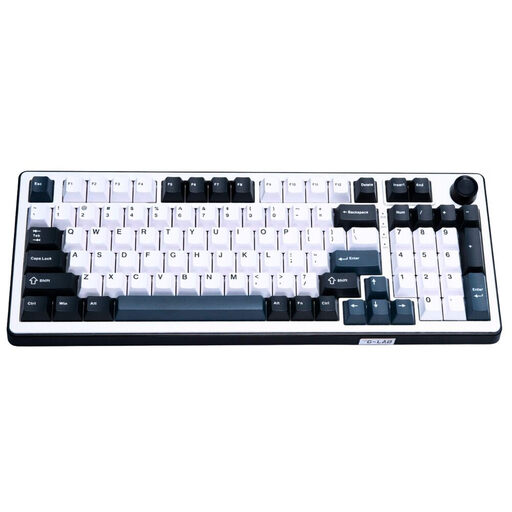
Why it stands out?: This version of the Keyz Elite 400 is a competitive beast. It features cutting-edge magnetic switch (Hall effect) technology, which allows for contactless detection for lightning-fast responsiveness. Paired with an 8000?Hz polling rate, its mission is simple: to obliterate latency.
-
Key Strengths?:
- Magnetic switches for esports-grade speed and precision.
- 8000?Hz polling rate for maximum responsiveness.
- 96% keyboard layout that retains the number pad.
- Gasket mount structure for a typing feel that is both flexible and precise.
- Customization via a web interface, with no heavy software to install.
- Hot-swappable switches compatible with other magnetic switches.
-
Who is it for??: The competitor and esports enthusiast for whom every millisecond counts. It's also the choice for tech aficionados who want a competitive edge with the most high-performance hardware available today. Note: This model has a US QWERTY layout.
Want a Style That Stands Out?
If style matters as much to you as performance, our collection of cute PC keyboards might just catch your eye. Discover models that blend design and functionality for a setup that is uniquely yours.
Frequently Asked Questions (FAQ)
1. What type of switch should I choose for a mechanical gaming keyboard? It's all about feel and use case! Linear switches (often red) are a gamer favorite for their smooth travel, which allows for fast, repeated actions without fatigue. Tactile switches (brown) offer an excellent compromise for mixed gaming/office use. As for magnetic switches, they represent the future: their speed and adjustable actuation point make them the ultimate weapon for competition.
2. Is a wireless gaming keyboard as good as a wired one? Absolutely. Today, a wireless gaming keyboard using 2.4?GHz technology offers a latency of around 1?ms, which is imperceptible and completely on par with a wired connection, even for pros. Bluetooth, while slightly slower, remains perfect for casual gaming and is unbeatable for versatility.
3. What are anti-ghosting and N-Key Rollover (NKRO)? Anti-ghosting prevents "ghost strokes" when multiple keys are pressed simultaneously. N-Key Rollover (NKRO) is its ultimate form: it guarantees that every single keypress is registered, no matter how many keys you press down at the same time. It's a non-negotiable feature for games that require complex combos.