
Top Mechanical Keyboards for Gamers and Professionals
Choosing a mechanical keyboard can quickly become overwhelming given the sheer number of options available. Whether you're a gamer seeking ultimate responsiveness, a developer churning out lines of code, or an office professional focused on comfort, finding the perfect keyboard is crucial. This guide is here to help you see clearly, focusing on the essentials and cutting through the marketing jargon.
Buyer's Guide?: The 3 Criteria That Make All the Difference
Before diving in headfirst, it's essential to master a few key concepts that will shape your daily comfort and efficiency.
1. Size?: Full-Size or Ultra-Compact??
Your keyboard's size isn't just a detail; it redefines your workspace and your posture.
- 100?% Format (Full-size)?: The classic, with its 104 keys and indispensable number pad. It's the best friend of spreadsheet pros, accountants, and anyone who crunches numbers daily.
- 60?% Format: By ditching the number pad, function keys, and navigation cluster, the 60?% keyboard goes all-in on compactness. It frees up a huge amount of desk space for wide mouse movements, which explains its popularity among FPS gamers. Its pocket-sized format also makes it the ideal travel companion.
2. Connectivity?: Wired or Wireless??
The classic dilemma: the rock-solid stability of a wired connection or the total freedom of wireless?
- The Wired USB-C Keyboard: It guarantees a foolproof connection and near-zero latency, a non-negotiable feature for competitive gaming. Bonus: no fussing with batteries, it's always ready to go.
- The Wireless Keyboard: The perfect solution for a minimalist desk setup and maximum freedom of movement. Modern technologies, like a Bluetooth keyboard or a 2.4?GHz connection, deliver stunning responsiveness. The only thing to watch out for is battery life, which becomes a key deciding factor.
3. Switches?: The Heart of the Machine
Switches are the small mechanisms hidden under each key that define the entire typing experience. There are dozens of types, but the blue switch remains a huge favourite for its crisp, tactile, and audible feedback. Each press is accompanied by a sharp "click" and a satisfying resistance, confirming the key's actuation. A real pleasure for long typing sessions, but be warned: this characteristic sound can quickly become a nightmare for your colleagues in an open-plan office.
Our Mechanical Keyboard Recommendations
Enough theory, let's get practical! Here are the models that caught our attention for their versatility and excellent value.
For Nomads and Minimalist Desks?: ET 60% Tri-Mode

Why it stands out: This 60?% keyboard is the champion of versatility in a mini format. Thanks to its triple connectivity (wired USB-C, Bluetooth, and 2.4?GHz), it switches effortlessly from a PC to a tablet or smartphone. The ideal solution for those who juggle multiple devices or are often on the move.
Key Features:
- Triple-Mode Connectivity: Switch between a wired connection, a 2.4?GHz link, or Bluetooth (BT1/BT2) in the blink of an eye.
- Ultra-Compact Format: Optimises desk space and fits into any backpack.
- Customisable RGB Backlighting: 16 lighting effects for a personalised ambiance.
- "Clicky" Blue Switches: The famous tactile and audible feedback for responsive and precise typing.
Who is it for? PC and console (Xbox) gamers, mobile developers, and anyone who wants a clean desk setup without sacrificing the comfort of mechanical typing.
For Versatility and Performance?: ET 100% Tri-Mode Gaming
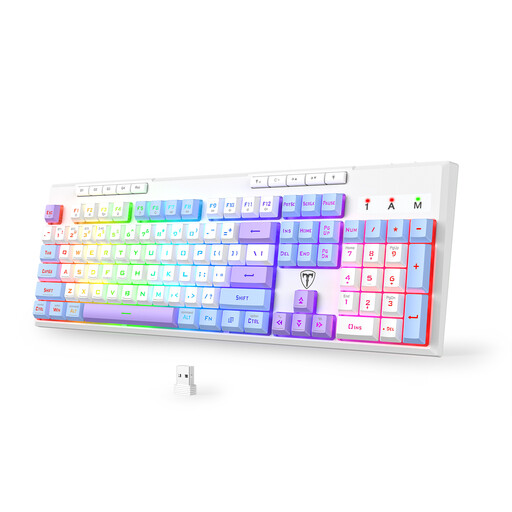
Why it stands out: A true Swiss Army knife that refuses to compromise. It combines the comfort of a full-size 104-key layout with the freedom of wireless and features designed for demanding users. Its 4000?mAh battery gives it marathon-like endurance, while its 6 programmable macro keys will delight gamers and content creators alike.
Key Features:
- High-Capacity Battery: Up to 400 hours of battery life (with backlighting off), according to the manufacturer's figures.
- Programmable Macro Keys: Execute complex commands with a single press to boost your productivity or unleash your in-game combos.
- 26-Key Anti-Ghosting: Ensures all your keystrokes are registered, even in the heat of the moment.
- Total Connectivity: Bluetooth 5.0, 2.4?GHz, and wired USB-C for universal compatibility.
Who is it for? The gamer who wants it all, without compromise. The professional who transitions seamlessly from work to play. The user seeking the flexibility of wireless with the power of a full-size keyboard.
For a Reliable Start?: ET 100% Wired with Blue Switches
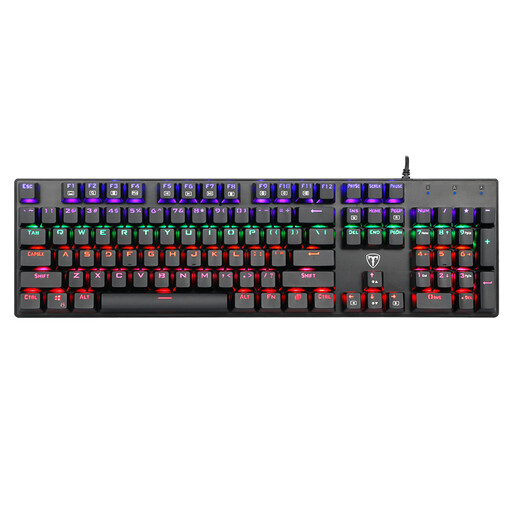
Why it stands out: This keyboard gets straight to the point by focusing on the essentials: a pure, reliable, and no-frills mechanical experience. Its exclusively wired connection eliminates any concerns about latency or battery life. It's a simple and effective choice that doesn't forget practical details like splash resistance and full anti-ghosting.
Key Features:
- 100?% Anti-Ghosting (N-Key Rollover): Every keystroke is registered, no matter how fast you type or how many keys are pressed simultaneously. Essential for gaming and fast typing.
- Robust Design: It's splash-resistant thanks to drainage holes, and its ABS keycaps are built to last.
- Responsive Blue Switches: The famous tactile and audible feedback that improves typing accuracy and comfort.
- "Plug-and-Play" Simplicity: You plug it in, it works. No driver or software installation is required.
Who is it for? Those who want to get into mechanical keyboards without breaking the bank, PC or Mac gamers who swear by the stability of a wired connection, and anyone looking for a robust and efficient work tool.
Didn't find what you're looking for??
Our selection focuses on versatile models, but the perfect keyboard is a very personal matter. For other designs, different switch types, or accessories, feel free to take a look at our full catalogue.
? Explore our entire gaming collection for more options.
Frequently Asked Questions (FAQ)
Why switch to a mechanical keyboard instead of sticking with a membrane one??
For three reasons: precision, comfort, and durability. A mechanical keyboard offers much crisper feedback, which improves typing speed and reduces errors. Its switches are designed to withstand tens of millions of keystrokes, whereas a membrane keyboard wears out much faster. Finally, being able to choose your switches ensures a custom-tailored typing feel. Once you've tried it, it's hard to go back.
Is a QWERTY keyboard really usable in France??
Absolutely. The QWERTY keyboard is a standard in the gaming and development worlds. Even if the physical keys are QWERTY, you just need to set your operating system (Windows, macOS, Linux) to the AZERTY layout. Your brain and fingers will get used to it very quickly! It's simply a matter of habit.