
Memory Card Buying Guide: How to Choose the Right Card Every Time
Buying a memory card seems simple, but the wrong choice can quickly turn into a nightmare: corrupted files, stuttering videos, or sluggish performance. Between the technical jargon and vague marketing promises, it's easy to get lost and make a purchase you'll regret. This guide is here to clarify everything and help you choose THE perfect card for your camera, smartphone, drone, or gaming console.
Before diving into our top picks, let's review the most common mistakes that can cost you dearly?:
- The illusion of "up to" speeds: Many cards highlight an impressive read speed (e.g., "up to 150 MB/s") but hide a much more modest write speed. However, write speed is what's crucial for recording 4K video without interruption or capturing burst photos without any lag. This is the number one cause of recordings that suddenly stop.
- Endurance: the forgotten spec for heavy use: Using a standard memory card in a dashcam or security camera is a classic mistake. These devices record in a loop, which prematurely wears out a standard memory card. The risk? Data loss at the most critical moment. A high-endurance card, on the other hand, is specifically designed to withstand these intensive write cycles.
- The jungle of speed classes: Between acronyms like Class 10, U3, V30, and V90, it's easy to get confused. Buying a high-capacity card with a video speed class (V) unsuitable for your 4K or 8K device is a guarantee you'll get unusable recordings, even if the packaging screams "fast."
Criteria to Check Before You Buy
To avoid these unpleasant surprises, focus on a few non-negotiable technical specifications. They are the key to your card's compatibility and real-world performance.
1. Format and Compatibility: SD vs. microSD
The format is the first criterion to consider. There are two main standards?:
- SD Card (Secure Digital): Larger in size, it's primarily used in cameras (mirrorless, DSLR) and camcorders. They come in SDHC (up to 32?GB) and SDXC (from 64?GB to 2?TB). Make sure your device is SDXC compatible if you opt for a 64?GB card or larger.
- microSD Card: More compact, it's found in Android smartphones, tablets, drones, action cameras (like GoPro), and some gaming consoles like the Nintendo Switch. microSDXC cards (64?GB and up) are the most common today. Most come with an SD adapter, making them particularly versatile.
2. Write Speed and Performance Classes
This is the most important criterion, but also the most confusing. Here are the three indicators to master?:
- UHS Speed Class: Symbolised by a U containing a number (U1 or U3). The U3 class guarantees a minimum write speed of 30 MB/s, the bare minimum for smooth 4K video recording. The U1 class (10 MB/s) is only sufficient for Full HD.
- Video Speed Class (V): This is the most reliable indicator for video. Noted as V10, V30, V60, or V90, the number corresponds to the minimum write speed in MB/s. For 4K video, a V30 card is the absolute minimum. For 8K or professional high-bitrate workflows, a V90 card becomes essential.
- Bus Interface (UHS-I vs. UHS-II): The UHS-I interface offers theoretical speeds up to 104 MB/s. The UHS-II interface, recognisable by its second row of pins, can exceed 300 MB/s. Be aware, to take advantage of UHS-II speeds, your device (camera body, card reader) must also be compatible.
3. Storage Capacity: Assessing Your Needs
The ideal capacity depends entirely on your usage. Here are a few benchmarks to guide you?:
- 64?GB: A good starting point for moderate smartphone use or for shooting in JPEG format.
- 128 / 256?GB: The sweet spot, the most versatile choice. Ideal for expanding a smartphone's memory with numerous apps and media, or for photographers who occasionally shoot in 4K.
- 512?GB / 1?TB: Reserved for seasoned videographers, drone pilots shooting in high resolution, or professional photographers juggling large RAW files.
Our Recommended Memory Cards
We have selected models that meet specific needs, keeping in mind the pitfalls to avoid.
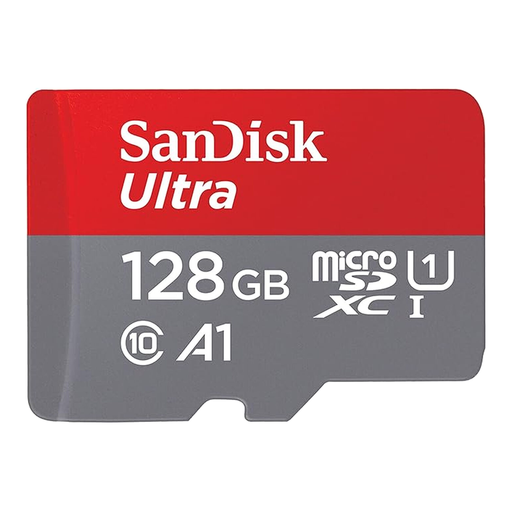
SanDisk Ultra microSDXC 128GB + SD Adapter
Why this card? It's the perfect balanced solution for expanding the storage of an Android smartphone or tablet. Its 128 GB offers ample space for photos, videos, and apps, all at an affordable price.
This card is certified A1 (Application Performance Class 1). This standard ensures that apps stored on it launch quickly—a detail often overlooked by entry-level cards that only focus on sequential transfer speeds.
Transfer speeds up to 140 MB/s to move your files to a computer in a flash. The included SD adapter ensures broad compatibility with cameras and laptops.
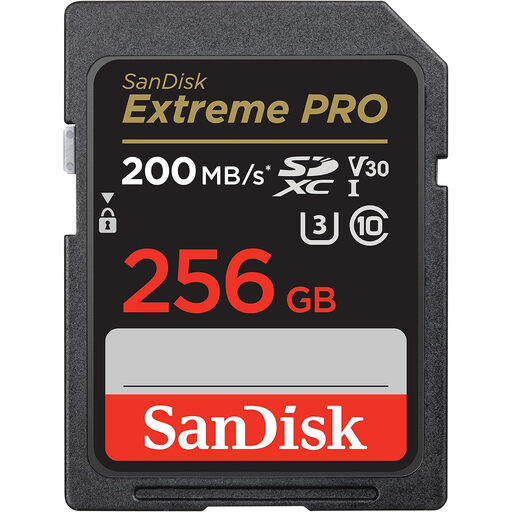
SanDisk Extreme PRO 256GB SDXC
Why this card? The ideal compromise for content creators using a mirrorless or DSLR camera. It combines high write speeds with a comfortable 256 GB capacity, perfect for 4K video and long RAW photo shoots.
It clearly displays its U3 and V30 certifications, which guarantee a minimum write speed of 30 MB/s. This helps you sidestep the trap of cards that promise incredible read speeds but collapse during 4K recording.
Write speeds up to 140 MB/s, perfect for never missing a shot in burst mode. SanDisk QuickFlow technology speeds up file offloading, a real time-saver for post-production.
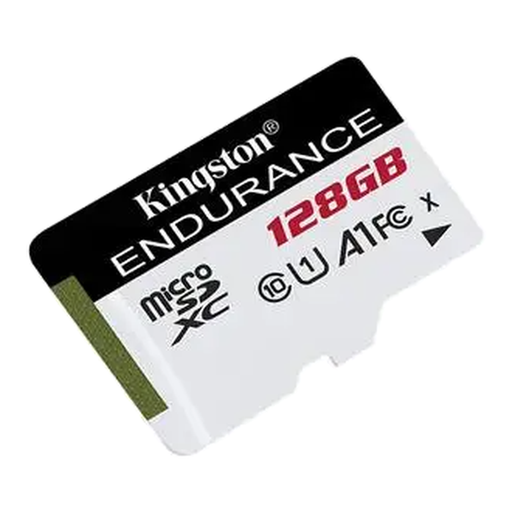
Kingston High-Endurance microSD 128GB
Why this card? Specially designed for devices that record in a loop, such as dashcams or security cameras. Its technology is optimised for rock-solid reliability, even when subjected to intensive write cycles.
It tackles the endurance pitfall head-on. Unlike a standard model, it's built to withstand thousands of hours of recording and rewriting, thus preventing failures and the loss of crucial video footage.
Engineered for extreme conditions, it withstands temperatures from -25 °C to 85 °C, as well as shocks and water. Its U1/A1 class ensures smooth Full HD 1080p recording.
Looking for other models?
Discover our complete and up-to-date selection of products that meet our demanding selection criteria.
Frequently Asked Questions (FAQ)
Should I format a new memory card?
Yes, it's essential. It is highly recommended to format any new SD or microSD card directly within the device that will use it (camera, smartphone, etc.). This process ensures perfect file system compatibility and prevents read or write errors.
What memory card capacity should I choose for a smartphone?
For everyday use (apps, photos, a few videos), a 128?GB card is an excellent compromise. If you are a heavy media consumer (movies, games) or frequently shoot in 4K, a 256?GB or 512?GB card will give you more peace of mind.
What is the difference between a UHS-I and a UHS-II SD card?
The difference is both physical and technical, directly impacting transfer speed. A UHS-I card has a single row of pins and maxes out at 104 MB/s. A UHS-II card, with its second row of pins, can exceed 300 MB/s. To benefit from this, your camera and card reader must be UHS-II compatible. Note that a UHS-II card will work in a UHS-I port, but its speed will be throttled to that of the port.