
Memory Card Guide: How to Choose the Right One
Choosing a memory card in 2026? It can be a real headache. Between the jungle of technical acronyms (U3, V30, A2, SDXC) and sometimes misleading marketing promises, it's easy to end up with an unsuitable model. My role, as a product expert at Joybuy, is to demystify the topic for you. The goal?: to help you make the right choice and avoid unnecessary expenses or disappointing performance.
Before we dive into our top picks, let's break down the most common mistakes and the criteria you should never overlook.
The 3 Pitfalls to Avoid When Buying a Memory Card
The market is saturated with options, but they are far from being created equal. Here are three classic mistakes that can cost you dearly, both in money and frustration?:
- The Capacity-Only Trap?: Focusing only on the number of gigabytes (GB) is a rookie mistake. A budget 256GB memory card might be unable to record 4K video without stuttering, all due to a slow write speed. Remember this?: capacity doesn't equal performance.
- The Read Speed Illusion?: Manufacturers love to highlight impressive read speeds (e.g., "up to 200 MB/s"). However, for capturing burst photos or recording video, it's the write speed that truly matters. A card with a slow write speed will cause slowdowns or even dropped frames.
- The Compatibility Mistake?: Buying a high-performance card, like a UHS-II, for a device that only supports the UHS-I interface is throwing money down the drain. Your device won't be able to harness its potential, and you'll have paid a premium for unused technology.
Key Criteria to Check Before You Buy
To avoid making a mistake, focus on these three technical specifications. They are what determine your card's real-world performance.
Beyond Gigabytes?: Understanding Speed Classes (U3, V30, V90)
These acronyms indicate the guaranteed minimum write speed, a crucial factor, especially for video.
- UHS Speed Class (U1, U3)?: U1 guarantees a 10 MB/s write speed, which is sufficient for Full HD video. The U3 class ensures 30 MB/s, the bare minimum for a SD card for 4K video worthy of the name.
- Video Speed Class (V30, V60, V90)?: This even more precise classification is designed for very high resolutions. V30 (30 MB/s) is the standard for 4K. The V60 and V90 classes are aimed at professionals shooting in 8K or at extreme bitrates. For video, a fast SD card must therefore be at least U3/V30 certified.
Format and Capacity?: SD vs. microSD, SDHC vs. SDXC
There's no room for error here?: the physical format and capacity standard must be compatible with your device.
- Format?:SD cards (the full-size format) are used in most cameras. microSD cards (the small format) are found in smartphones, drones, action cameras, and consoles like the Nintendo Switch. Good to know?: most microSD cards are sold with an SD adapter.
- Capacity?: The SDHC (High Capacity) standard goes up to 32GB. Beyond that, the SDXC (Extended Capacity) standard takes over, ranging from 64GB up to 2TB (for example, a 512GB SD card or a 1TB microSD card). The key is to?? Always check your device's manual to find out the maximum capacity and the standard it supports.
Endurance?: The Overlooked, Yet Vital, Criterion for Dashcams and Surveillance
For intensive use involving constant write and rewrite cycles (a memory card for a dashcam or a security camera), a standard card will wear out very quickly. This is where "High Endurance" cards come in. They are specifically designed to withstand thousands of hours of continuous recording, ensuring reliability and longevity.
Memory Cards for Every Use
Rather than an endless list, we've opted for targeted choices for specific profiles, applying the advice we've just covered.
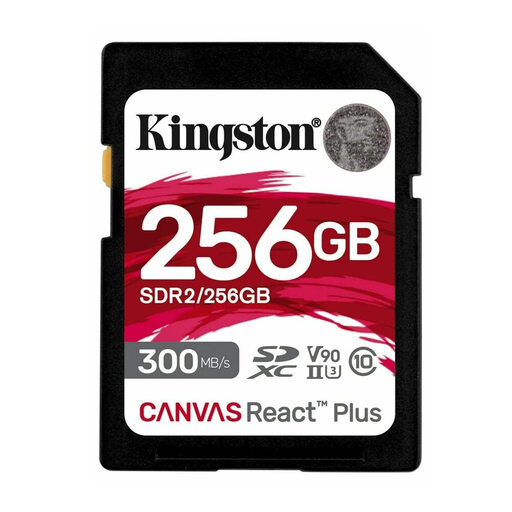
Kingston Technology 256GB Canvas React Plus SDHC UHS-II
Why this choice? This is the go-to card for photographers and videographers using a high-end mirrorless or DSLR camera. It's built for the most demanding workflows : 8K video, high frame rate (HFR) 4K, and RAW burst shooting.
This card doesn't bet everything on read speed. With 260 MB/s write speeds and its V90 certification, it smashes through bottlenecks and prevents the recording interruptions typical of slower cards.
Its UHS-II interface ensures ultra-fast transfers to a computer, cutting the time it takes to offload large files in half (or more!). Note that a compatible card reader is required to get the full benefit.
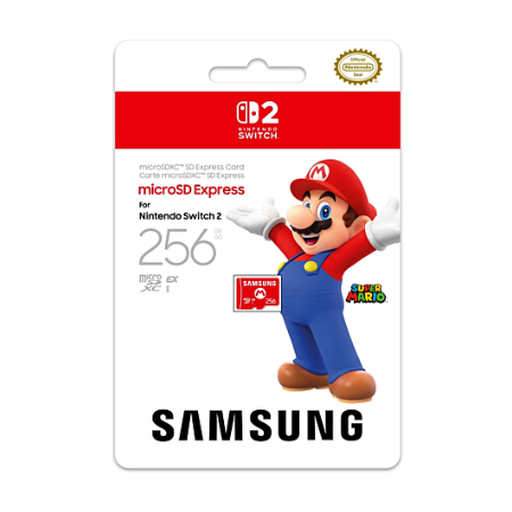
Samsung 256GB microSD Express Card for Nintendo Switch 2
Why this choice? As an official microSD card for the Nintendo Switch 2, it guarantees perfect compatibility and optimised performance for the console. The result : reduced loading times and a seamless gaming experience.
It eliminates any risk of incompatibility. By adopting the new microSD Express standard, it's designed for the Switch 2. This helps you avoid the trap of buying a generic card that wouldn't be fully utilised by the console.
This is the peace-of-mind choice. An official product, optimised for the console, that lets you expand your Switch 2's storage without any guesswork or unpleasant surprises.
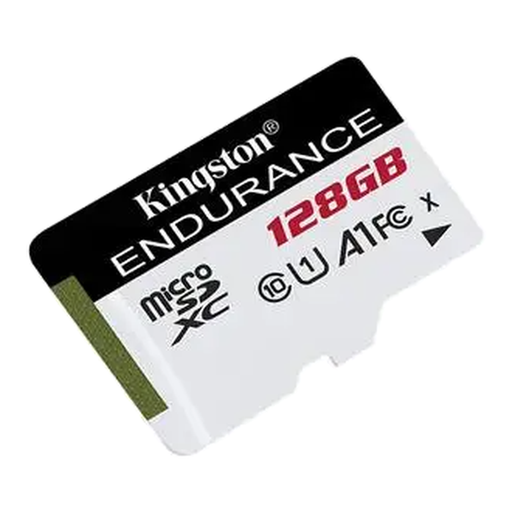
Kingston Technology 128GB High-Endurance microSD
Why this choice? This dashcam memory card is specifically designed to withstand intensive, continuous write cycles. It's equally suitable for home security cameras that run 24/7.
It directly tackles the problem of premature wear. A standard card in a dashcam can fail in just a few months. This "High Endurance" model is built to survive that kind of treatment.
Reliability and peace of mind. Designed to operate in extreme temperatures and withstand shocks, it ensures your most important recordings will always be safe.
Want to see more options?
We've put together a complete selection of products that meet our selection criteria and current standards.
Frequently Asked Questions About Memory Cards
How do I format a new memory card?
The best practice is to always format a new card directly in the device you're going to use it with (camera, console, dashcam). This process ensures perfect compatibility and optimises the file system for that specific device. The option is usually found in the settings or setup menu.
Is an SDXC card compatible with an older device?
Not always. Compatibility is backwards, but not forwards. In practice?: an SDXC-compatible device can read SDHC and SD cards. However, an older device limited to SDHC cards (up to 32GB) simply will not recognise an SDXC card (64GB and up). When in doubt, there's only one source of truth?: your device's manual.
What's the difference between a standard SD card and a "High Endurance" card?
A standard card (like a SanDisk Extreme PRO or Samsung PRO Plus) is optimised for storage and fast data access?: taking photos, launching apps, etc. A "High Endurance" card, on the other hand, is made with much more robust flash memory, capable of withstanding thousands of write and erase cycles. This makes it essential for devices that record on a loop, like dashcams, to prevent failure and the loss of crucial video footage.