
microSD Card Buying Guide: Avoid Pitfalls and Choose the Right Card
Is the "Low storage space" notification constantly popping up on your smartphone? Are your video recordings stuttering on your new camera? Choosing a microSD card seems simple enough, yet many users end up with an unsuitable or even defective model after just a few months. The culprit is marketing that focuses heavily on storage capacity while obscuring far more crucial criteria for ensuring performance and durability.
Here are the two most common mistakes to avoid at all costs:
- Buying a standard card for intensive use: A dash cam microSD card or surveillance camera card endures continuous write cycles. A standard card is simply not built for such endurance and is likely to fail prematurely—and, of course, always at the worst possible moment.
- Ignoring the actual speed classes: Looking only at the maximum read speed on the packaging is a classic trap. For 4K video recording or smooth app performance, it's the sustained write speed that makes all the difference—a technical detail often buried in obscure acronyms.
This guide is here to help you decode the technical jargon and make an informed choice that's perfectly suited to your devices and budget.
Essential Criteria for Making the Right Choice
To choose wisely, you need to examine three key features closely: compatibility, speed class, and endurance.
1. Compatibility and Capacity (SD, SDHC, SDXC)
The first step is to check the maximum capacity supported by your device (smartphone, camera, console, etc.). Not all memory card formats are cross-compatible:
- SDHC (High Capacity): From 4?GB to 32?GB.
- SDXC (Extended Capacity): From 64?GB to 2?TB. A 128GB microSD card or a 256GB memory card falls into this family.
Be aware that a slightly older device that is only SDHC-compatible will not be able to read an SDXC card. This crucial information can be found in your device's manual or on the manufacturer's website.
2. Speed Classes (U, V, A): The Heart of Performance
Throughput is the ultimate performance metric. These acronyms indicate the guaranteed minimum write speed, which is essential for flawless video recording.
- UHS Speed Class (U):
- U1: 10?MB/s minimum write speed. Sufficient for Full HD (1080p) video.
- U3: 30?MB/s minimum write speed. Essential for 4K video.
- Video Speed Class (V):
- V30: 30?MB/s minimum write speed. This is the current standard for a camera SD card used for 4K filming.
- V60 / V90: 60?MB/s and 90?MB/s, speeds reserved for 8K video professionals or the most demanding burst-shot modes.
- Application Performance Class (A):
- A1 / A2: This standard measures the card's ability to handle numerous small read/write operations. An A2-certified card ensures faster launch times for apps installed on it from an Android smartphone.
3. Endurance: The Overlooked Criterion, Vital for Dash Cams
For a device that records on a loop, like a dash cam or a surveillance camera, a high-endurance microSD card isn't an option—it's a requirement. These cards are specifically designed to withstand thousands of hours of recording and rewriting, whereas a standard model would fail within a few months. The icing on the cake is that they are often more resistant to extreme temperatures, a significant advantage inside a car.
Top microSD Card Recommendations
We have selected models that meet specific needs, keeping in mind the common pitfalls to avoid.
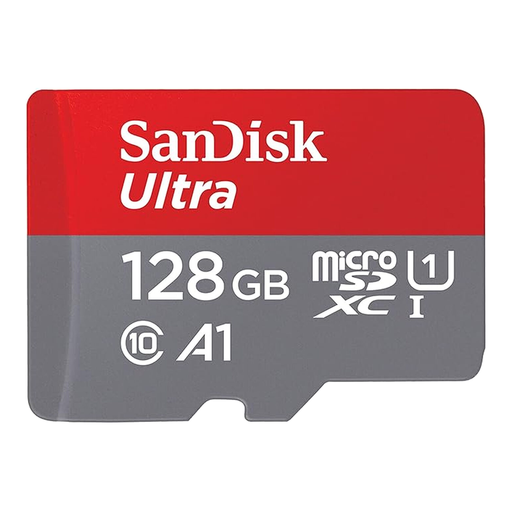
SanDisk Ultra microSDXC 128 GB + SD Adapter
Why we chose it: It's the perfect all-rounder for expanding an Android smartphone's storage. Its 128 GB offers ample space for your photos, videos, and apps, all at a very reasonable price.
Its A1 certification ensures optimised performance for launching applications. No more frustrating slowdowns that you get with a basic card chosen only for its capacity.
An excellent capacity-to-price ratio. The included SD card adapter makes it highly versatile for easily transferring your files to a computer or camera.
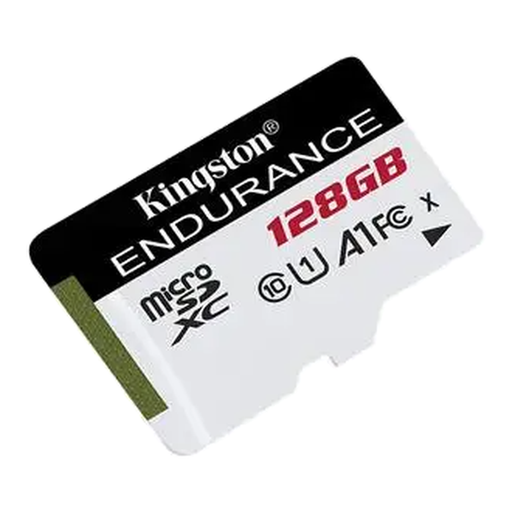
Kingston Technology High Endurance 128 GB MicroSD
Why we chose it: Tailor-made for write-intensive devices (dash cams, surveillance cameras), it guarantees reliable recording over the long term.
Its status as a high-endurance microSD card means it's designed to withstand thousands of rewrite cycles. This prevents the sudden failures that are so common with standard cards used under these conditions.
Its resistance to extreme temperatures (-25°C to 85°C), shock, and water (IPX7) ensures flawless operation, even in the harsh conditions of a car's interior.
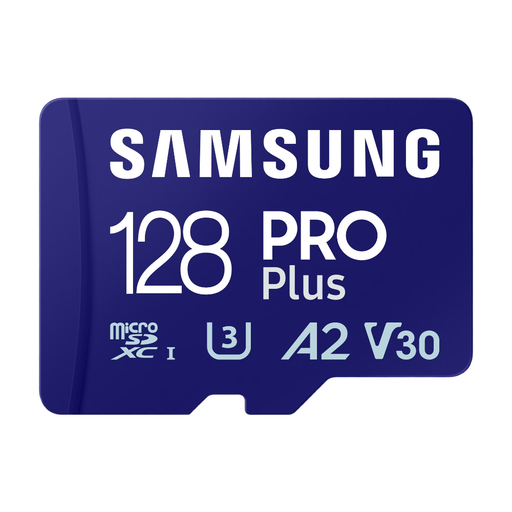
Samsung PRO Plus MicroSDXC (2023) 128 GB
Why we chose it: This Samsung microSD card goes all-in on speed. Its high read and write speeds are perfect for capturing 4K UHD video and burst-shot photos, whether with a mirrorless camera, a drone, or a premium smartphone.
The U3 and V30 certifications guarantee a sustained write speed of at least 30 MB/s. This ensures smooth, drop-free 4K recording, a far cry from the misleading peak speeds advertised by some competitors.
Samsung advertises read speeds of up to 180 MB/s and write speeds of up to 130 MB/s. This will significantly speed up transferring your video footage to a computer.
Want to explore other options?
We have compiled a comprehensive, up-to-date selection of products that meet our strict selection criteria and safety standards.
Frequently Asked Questions (FAQ)
What's the difference between an SD card and a microSD card?
The difference is primarily one of size. The SD card is the larger, standard format found mainly in cameras and laptops. The much more compact microSD card is the standard for smartphones, tablets, drones, and dash cams. Most microSD cards also come with an adapter, allowing them to be used in a standard SD card slot.
Should you format a new memory card?
Yes, it is highly recommended. Formatting the card directly within the device that will use it (camera, smartphone, etc.) ensures it is configured with the ideal file system. This simple step can prevent many compatibility or performance errors. The "Format Card" option is usually found in your device's settings menu.
What capacity should you choose for a dash cam?
For a dash cam recording in Full HD (1080p), a 128GB microSD card is an excellent compromise. It can store several hours of video before the loop recording begins to overwrite the oldest files. If your model records in 4K, or if you want to keep a longer archive of your drives, a 256GB memory card will be more suitable. Whatever you choose, don't skimp on a "high-endurance" model.