
Which microSD Card Should You Choose? Capacity, Speed, and More
By our editors, July 14, 2026
Does the "Storage almost full" message pop up on your smartphone at the worst possible moment? Are your 4K video recordings choppy or do they stop abruptly? Choosing a microSD card might seem simple, but the jungle of standards, speeds, and capacities is enough to make your head spin.
This guide is here to demystify it all. We'll break down the technical specs that really matter and present a selection of memory cards for every use case: expanding your smartphone's storage, boosting your Nintendo Switch, or capturing professional video with a drone or camera.
How to Choose Your microSD Memory Card
Before you buy, three essential criteria must be considered: capacity, speed, and compatibility.
1. Capacity: 128GB, 256GB, or 512GB?
Storage capacity is the first thing to evaluate. It all depends on your use case.
- 128GB: A 128GB microSD card is an excellent starting point for everyday use. It's perfect for expanding an Android smartphone's memory, storing photos, music, and a few apps. It's also a great capacity for casual Nintendo Switch gamers.
- 256GB: The 256GB microSD card often represents the best compromise. It offers enough space for photo enthusiasts, users who occasionally shoot in Full HD or 4K, and avid gamers who download many titles to their console.
- 512GB and up: A 512GB microSD card is aimed at the most demanding users. Content creators, videographers who regularly shoot in 4K or 6K, or collectors of digital games will find the space they need to never feel constrained again.
2. Speed: Crucial for Performance
A card's speed is as crucial as its capacity, especially for video recording and launching applications. There are two indicators to watch closely:
- Read and Write Speed: Expressed in megabytes per second (MB/s), read speed affects how quickly you can access your files (like loading a game). Write speed, on the other hand, determines how fast data is saved (like burst photography or video capture).
- Speed Classes:
- Video Speed Class (V30, V60, V90): This standard guarantees a minimum sustained write speed. For a 4K microSD card, the V30 class (30 MB/s minimum) is the bare minimum for smooth, flawless recording.
- Application Performance Class (A1, A2): This classification is critical for a smartphone microSD card. An A2 card offers optimised performance for launching and running apps stored on it, resulting in a much more responsive user experience.
3. Compatibility: The Absolute Prerequisite
Always check the maximum memory card capacity supported by your device (smartphone, camera, drone, console). Most recent devices are compatible with the microSDXC format (over 32GB) but may have a limit (e.g., 512GB or 1TB). Finally, the often-included SD adapter allows these cards to be used in older readers or cameras that are only compatible with the standard SD format.
Top microSD Card Recommendations
To help you make the right choice, here is a selection of tried-and-tested models that meet a variety of needs.
Samsung Pro Plus microSDXC (2023) 512GB
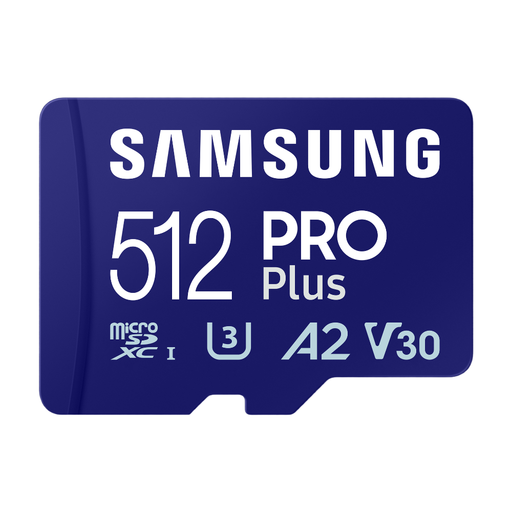
Why it stands out: This Samsung microSD card model offers a perfect balance between generous storage capacity and very high speeds. It's an ultra-versatile option, capable of handling demanding applications and the most intensive video recording alike.
Advantages:
- XXL Capacity:512GB to store hours of 4K video, thousands of photos, and a vast collection of apps.
- High Performance: Read speeds up to 180 MB/s and write speeds up to 130 MB/s.
- Built for Video:V30 certified, it ensures reliable and smooth 4K UHD video recording.
- App Performance: The A2 class guarantees lightning-fast app launches on compatible devices.
Who is it for? For content creators, drone pilots, and action camera users, as well as high-end smartphone owners who need a fast and spacious microSD card to never worry about available space again.
Samsung P9 Express 256GB MicroSDXC
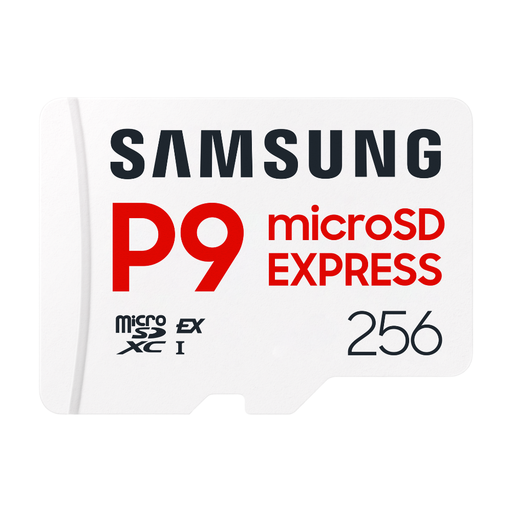
Why it stands out: This memory card stands out by integrating cutting-edge SD Express technology. It is designed for professionals who demand extreme transfer speeds to optimise their workflow.
Advantages:
- Next-Gen Speed: Reaches read speeds of up to 800 MB/s with the SD Express interface (PCIe Gen3x1).
- Backward Compatibility: Also works with traditional UHS-I devices, ensuring a smooth transition.
- Designed for Pros: Ideal for 4K, 6K, and 8K video, as well as high-speed burst photography.
- Video Reliability: Its design ensures stable performance, even during the most demanding 6K recordings.
Who is it for? For professional photographers and videographers equipped with mirrorless cameras or workstations compatible with SD Express. It's a future-proof choice for those who want to drastically reduce transfer times for their largest files.
SanDisk Ultra microSDXC 128GB
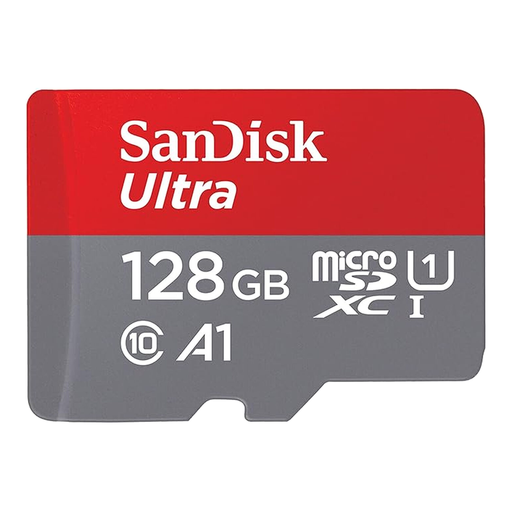
Why it stands out: The SanDisk microSD card Ultra is a reliable choice, renowned for its excellent value for money. It's a dependable and accessible solution for everyday storage needs.
Advantages:
- Ideal for Android: The A1 performance class allows apps to load faster on smartphones and tablets.
- Fast Transfer Speeds: With read speeds of up to 140 MB/s, transferring your photos and videos to a computer is a breeze.
- Versatility: Its 128GB capacity and the included SD adapter make it a practical choice for a multitude of devices.
Who is it for? For Android smartphone and tablet users looking to expand their storage on a budget. It's also very well-suited as a microSD card for Nintendo Switch for gamers with a moderately sized game library.
Looking for other options?
Didn't find what you were looking for in this selection? Don't worry. If you're looking for a specific capacity or brand, many other possibilities exist.
? Explore our full range on our dedicated memory cards page to find the perfect model for your needs.
Frequently Asked Questions about microSD Cards
Which microSD card should I choose for a Nintendo Switch?
For the Nintendo Switch, a 128GB or 256GB card is an excellent choice. Prioritise a UHS-I certified model with a good read speed to reduce your game loading times. Cards like the SanDisk Ultra or the Samsung Pro Plus are solid choices.
How do I check if a microSD card is compatible with my smartphone?
The most reliable way is to check your phone's technical specifications on the manufacturer's website. It will indicate the card type (microSD, microSDHC, microSDXC) and the maximum supported capacity (e.g., "expandable up to 1TB via microSDXC").
What do the V30 and A2 speed classes mean?
- V30 (Video Speed Class 30) guarantees a minimum sequential write speed of 30 MB/s. It's an essential certification to ensure 4K video recording without interruptions or dropped frames.
- A2 (Application Performance Class 2) indicates that the card is optimised for storing and running applications. It offers much higher random read/write speeds than the A1 class. The result: better responsiveness and smoother performance on a smartphone.