
Mini PC Buying Guide: Choosing the Right Compact Desktop PC
Gone are the days of bulky, noisy PC towers gathering dust under your desk! The Mini PC, or mini-computer, is emerging as the ideal solution for anyone who wants desktop-level power without sacrificing their living space. Whether you're a remote professional, a student, a creative, or a gamer, there's a model out there for you.
But with an overwhelming number of options, how do you find the right one? Don't worry. This guide is here to help you navigate the landscape, identify the key criteria, and make the right choice in 2026.
Buyer's Guide: The Essential Criteria for Your Mini PC
Before you dive in, let's review the components that separate a high-performance machine from a stylish paperweight. Here are the points you absolutely shouldn't overlook.
Processor and RAM: The Engine Room
The processor (CPU) is the brain of the machine. For office work and multimedia, an AMD Ryzen 5 will do the job perfectly. However, for demanding applications like video editing, 3D rendering, or gaming, an AMD Ryzen 7 or 9 Mini PC becomes essential to harness superior computing power.
RAM is just as crucial. Today, 16 GB is a comfortable baseline for versatile use. For demanding users and gamers, upgrading to 24 GB or more of DDR5 guarantees flawless performance, even when juggling dozens of applications.
Connectivity and Display: Think About Your Peripherals
A Mini PC needs to connect to your entire ecosystem. Be sure to check the number and type of available ports:
- USB Ports: The inclusion of USB 3.2 or USB4 ports ensures ultra-fast data transfers.
- Video Outputs: For a multi-monitor setup, make sure the model has multiple outputs, such as HDMI 2.1 and DisplayPort. A 4K Mini PC capable of driving several displays is a real productivity booster.
- Network: Wi-Fi 6E provides a more stable and faster wireless connection, while one or more Ethernet ports (e.g., 2.5G) guarantee ultra-high-performance wired connectivity.
Silence is Golden: The Advantage of a Discreet PC
A compact form factor implies discretion. A good cooling system is therefore essential to keep the machine performing well without being a nuisance. Well-designed models dissipate heat effectively and become completely unnoticeable, making them the ideal silent PC for an office or living room.
Recommended Mini PCs for Buyers
Enough theory, let's get practical! To help you choose, we've broken down several promising configurations. Here are our top picks, for every profile and budget.
FIREBAT A8 Mini PC: Raw Power in a Compact Form Factor
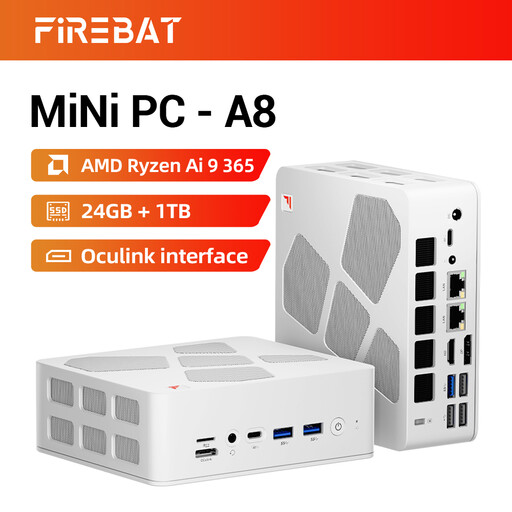
Why it stands out: The FIREBAT A8 is a true pocket-sized workstation. It packs a powerhouse processor, the AMD Ryzen AI 9 365 (10 cores, 20 threads), supported by a Radeon 880M graphics chip. With specs like these, it chews through the most demanding tasks, from gaming to content creation, without breaking a sweat. Its ultra-comprehensive connectivity, including an Oculink port for an external graphics card, Wi-Fi 6E, and dual 2.5G Ethernet ports, seals the deal.
Advantages
- Processor: AMD Ryzen AI 9 365 (10 cores / 20 threads)
- Memory: 24 GB of DDR5 RAM
- Storage: 1 TB PCIe 4.0 SSD for near-instant load times
- Display: Support for four 4K screens
- Advanced Connectivity: USB4, HDMI 2.1, Oculink, dual 2.5G Ethernet, Wi-Fi 6E
Who is it for? It's clearly aimed at creatives, demanding professionals, and gamers who want a gaming Mini PC capable of replacing a traditional tower without making any compromises on performance.
SOYO S4PLUS Mini PC: The Balance of Performance and Price
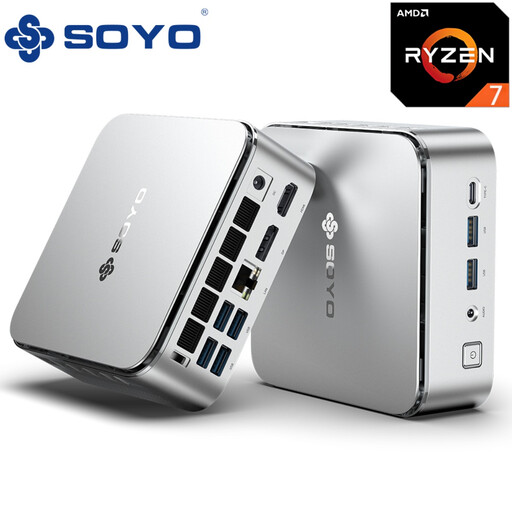
Why it stands out: The SOYO S4PLUS strikes the perfect balance between performance and budget. Equipped with an AMD Ryzen 7 H 255 processor (8 cores / 16 threads) and a Radeon 780M graphics chip, it handles multitasking with ease and runs many recent games with impressive fluidity. Its sleek, compact silver chassis is a nice touch.
Advantages
- Processor: AMD Ryzen 7 H 255 (up to 4.9 GHz)
- Memory: 24 GB of LPDDR5 RAM
- Storage: 512 GB PCIe 3.0 SSD
- Display: 4K at 120 Hz support via DisplayPort
- Connectivity: 6x USB 3.2 ports, Wi-Fi 6, Bluetooth 5.2
Who is it for? The ideal machine for professionals, students, and casual gamers looking for a responsive and versatile PC for both work and play, without needing absolute top-tier performance.
FIREBAT R3 Mini PC: The Accessible Option for Office and Multimedia
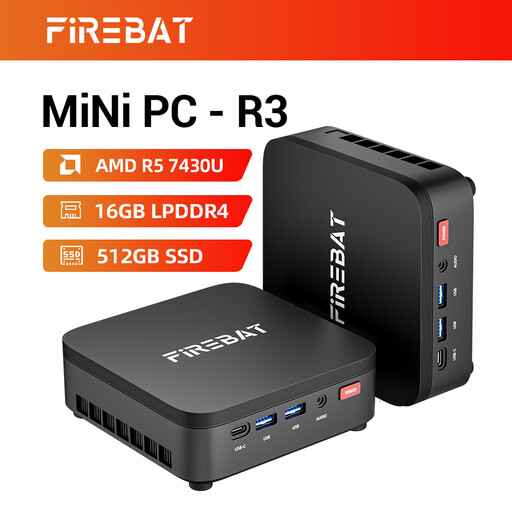
Why it stands out: The FIREBAT R3 is the perfect solution for those on a tight budget who don't want to compromise on everyday smoothness. Its AMD Ryzen 5 7430U processor (6 cores / 12 threads) and 16 GB of RAM ensure a flawless experience for web browsing, the Office suite, video streaming, and even some light photo editing. Capable of driving three 4K displays, it's also an excellent productivity tool.
Advantages
- Processor: AMD Ryzen 5 7430U (6 cores / 12 threads)
- Memory: 16 GB of LPDDR4 RAM
- Storage: 512 GB SSD
- Display: Support for three 4K screens
- Modern Connectivity: Wi-Fi 6 and Bluetooth 5.2
Who is it for? This is the recommended choice for students, remote workers, or anyone looking to build a discreet and efficient media centre for their living room. A reliable and budget-friendly mini-computer.
Still Not Convinced?
Our selection is just a taste, and the Mini PC market is full of hidden gems. If you haven't found your perfect match yet or are simply curious, feel free to explore our complete collection of bestselling tech products. There you'll find a wide range of solutions for every need and budget.
Frequently Asked Questions about Mini PCs
Is a Mini PC powerful enough for gaming?
Absolutely! A well-equipped gaming Mini PC, with a beefy processor (like a Ryzen 7 or 9) and a recent integrated graphics chip (Radeon 780M or 880M), can run many AAA games in 1080p under excellent conditions. For the most demanding users, models with an Oculink or Thunderbolt/USB4 port even allow you to connect an external graphics card for top-tier performance.
What is the power consumption of a Mini PC?
This is one of their biggest advantages. A Mini PC is far more energy-efficient than a traditional tower. On average, it consumes between 15 and 90 watts at full load, compared to 200 to 500 watts (and sometimes much more) for a traditional desktop PC. The result: significant savings on your electricity bill and a smaller environmental footprint.
Can you upgrade a Mini PC?
Yes, but to a certain extent. On most models, it's very easy to replace or increase the RAM and storage (SSD). However, the processor (CPU) and graphics chip (GPU) are almost always soldered to the motherboard and are therefore not replaceable. This makes it crucial to choose these two key components wisely at the time of purchase, as your decision will be final.