
Nintendo Switch 2 Controller: How to Choose the Right Model Without Paying for Unnecessary Extras
A Nintendo Switch 2 controller can significantly improve comfort, precision and multiplayer sessions. But with all the technical specs and marketing claims, it's not always easy to tell genuinely useful features from mere gimmicks. Before you place an order, there are three pitfalls worth paying attention to.
The first concerns compatibility. A wireless Switch controller may work with the Nintendo Switch, Switch OLED or Switch Lite, without necessarily supporting all the features of the Switch 2. The C button, GameChat service or certain motion controls may depend on the controller model and the game you're playing.
The second pitfall involves the advertised battery life. A claim of "up to 40 hours" varies depending on RGB lighting usage, volume level and connection type. Some Turtle Beach models, for example, claim up to 40 hours without lighting, but last significantly less time when the light effects are switched on.
Finally, the term anti-drift alone doesn't guarantee a consistent experience over time. You need to look at the stick technology used, the warranty period, the connection type, and the availability of spare parts or after-sales service. An accessory like a grip can improve handling, but it will never replace a reliable control mechanism.
The Key Factors to Check Before Buying
1. Compatibility and Features That Actually Work
Start by identifying your console: Nintendo Switch, Switch Lite, Switch OLED or Nintendo Switch 2. A Nintendo Switch Bluetooth controller can be handy for playing away from the screen, but not all features are necessarily available on every console.
Make sure to check:
- the advertised compatibility with your console model;
- whether the C button for GameChat is present;
- support for motion controls;
- the presence of a 3.5mm headphone jack;
- compatibility with local multiplayer games.
Nintendo Switch Joy-Cons remain particularly well-suited to handheld mode, sharing between two players and games that use motion controls. For longer sessions, however, a standard controller offers a different, often more comfortable, grip.
2. Connection, Battery Life and Cable
A wireless Switch controller reduces clutter around your TV. The models featured here generally claim a range of up to 9 metres, though conditions can vary depending on your environment. Walls, nearby Bluetooth devices and metal obstacles can all affect connection stability.
A wired Switch controller runs without a battery and avoids interruptions from recharging. It's particularly suitable for players who sit close to the console. A 3-metre cable gives you more freedom, but you'll need to route it carefully to reduce the risk of trips or falls.
For a rechargeable model, pay close attention to:
- the battery life per charge;
- the time needed to recharge;
- whether a cable is included in the box;
- the ability to play while charging;
- the impact of RGB lighting on battery life.
3. Sticks, Programmable Buttons and Ergonomics
Hall Effect or TMR sticks use magnetic detection. Manufacturers associate them with better wear resistance and a reduced risk of drift, though this doesn't offer an absolute guarantee against any failure.
Programmable rear buttons can prove useful in action, racing or fighting games. They let you assign certain commands to easily accessible buttons without moving your thumbs. However, their usefulness depends on how simple they are to set up and their compatibility with the console's features.
Also consider comparing the weight, grip texture, cable length and button layout. A Switch controller with programmable buttons isn't automatically better suited to your needs if you mainly play family or casual games.
Our Selection Based on Your Profile
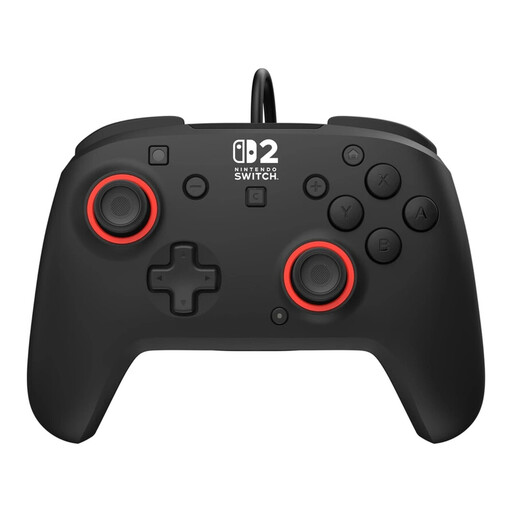
Turtle Beach Rematch Wired Gamepad
Why this choice suits this profile: Its USB connection eliminates the need for recharging, making it a great first controller for playing near the dock.
The lack of a battery removes any battery life concerns. The 3m cable does need to be positioned so it doesn't create a trip hazard.
Hall Effect sticks, two assignable rear buttons, C button, 3.5mm headphone jack and 3m USB cable.
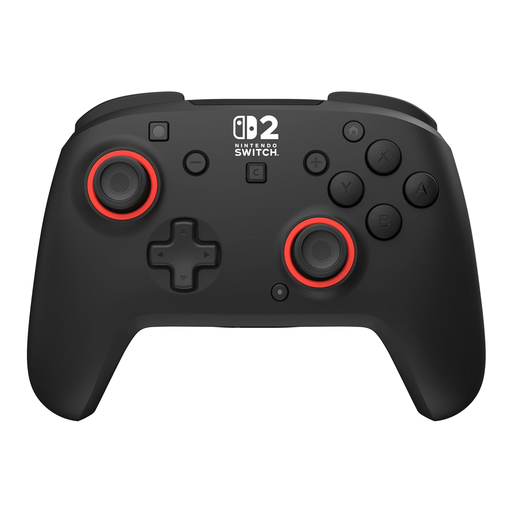
Turtle Beach Rematch Wireless Bluetooth
Why this choice suits this profile: This wireless model combines a claimed battery life of up to 40 hours, TMR sticks and customisable controls for long gaming sessions.
The spec sheet clearly states the TMR technology, claimed battery life and USB-C charging conditions.
Two programmable rear buttons, gyroscope, C button for GameChat and a claimed wireless range of up to 9m.
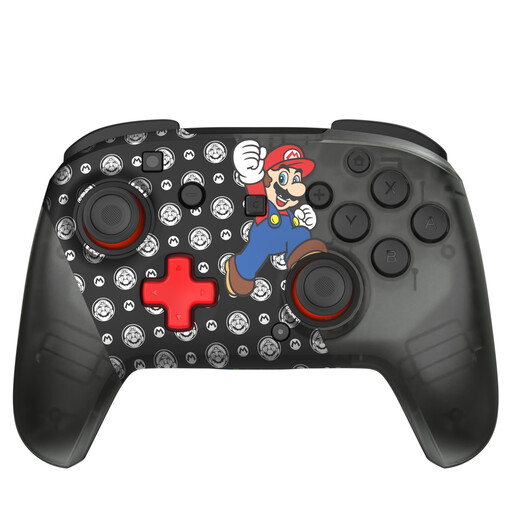
Turtle Beach Rematch Super Mario Jump Wireless
Why this choice suits this profile: Its Super Mario Jump design adds a real collector's touch, while still offering Bluetooth connectivity and motion control support.
Compatibility with the Switch 2, Switch, Switch Lite and Switch OLED is clearly stated. However, please note: the C button is not available on this model with the Switch 2.
Mario design, claimed battery life of up to 40 hours, gyroscope and two programmable rear buttons.
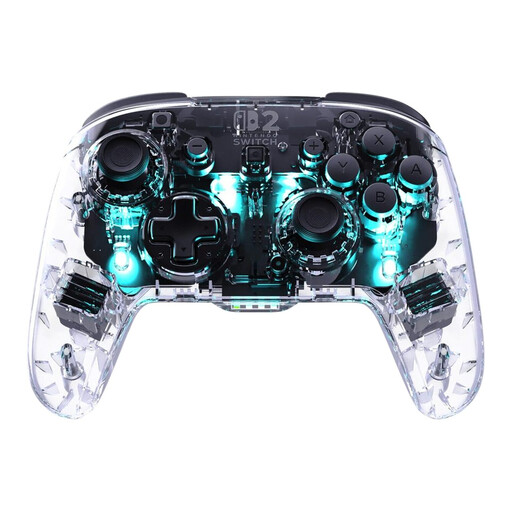
Turtle Beach Afterglow Wave Wireless RGB
Why this choice suits this profile: Gamers looking for an RGB Switch controller get four lighting modes, TMR sticks and rear controls.
Battery life is claimed at up to 40 hours with lighting off, compared to 12 hours with RGB active – a difference worth keeping in mind.
Eight RGB zones, TMR sticks, C button, gyroscope, two assignable buttons and a 3.5mm headphone jack.
Looking for other options?
We've put together a comprehensive, real-time updated list of products that meet these strict criteria and European safety requirements.
Frequently Asked Questions About the Nintendo Switch 2 Controller
Does a wireless Switch controller work with the Nintendo Switch 2?
It depends on the model. Check the compatibility list provided by the manufacturer and verify support for Switch 2-specific features, particularly GameChat and the C button. A Bluetooth connection doesn't mean all features are available.
How long can you expect an anti-drift Switch controller to last?
TMR and Hall Effect technologies are designed to reduce wear from mechanical contact in the sticks. However, they can't guarantee a precise lifespan. Avoid shocks, moisture and dust build-up around the joysticks, and keep your proof of purchase to make use of the warranty if needed.
Should you choose a wired or rechargeable controller?
Choose a wired model if you play near the console and want to avoid recharging. A rechargeable controller will be more suitable if you move around the room or play from the sofa. In either case, check the cable length, charging time and included accessories.