
Nintendo Switch 2 Controller: How to Choose the Right Model for Your Needs
Buying a Nintendo Switch 2 controller isn't just about picking a colour or a Nintendo character. Between the Joy-Con 2, wireless models, wired controllers and those with programmable buttons, the differences can be felt in comfort, responsiveness and battery life.
Some marketing claims also deserve a closer look. A battery life advertised as "up to" 40 hours depends on the intensity of the vibration, the type of connection and the condition of the battery. Similarly, a Bluetooth controller doesn't necessarily offer the same features as an official Nintendo model. And a controller that's compatible with the Switch 2 may lack certain console functions, such as the C button or haptic feedback.
Here are the points to check before placing your order.
The Pitfalls to Avoid Before Buying
1. Confusing Compatibility with Full Support
The phrase "compatible with Nintendo Switch 2" doesn't guarantee that all the console's features will be available. Some models originally designed for the Nintendo Switch work with the Switch 2, but may not include the C button or certain chat functions.
So take the time to read the specification sheet. In particular, check for GameChat, motion sensors, vibration feedback and NFC functionality. The Turtle Beach Rematch Donkey Kong and Invincible Mario controllers, for example, are compatible with the Switch 2, but their specs state that the C button is not supported.
2. Relying Only on the Advertised Battery Life
A wireless Nintendo Switch 2 controller is particularly handy in the living room, but it needs regular charging. The figures quoted are usually based on very specific test conditions. With a built-in battery, you also have to accept that you can't replace it yourself.
When comparing models, also look at the cable supplied, the charging time and whether you can continue playing while it's charging. A wired controller eliminates the battery issue, but its cable can become annoying if you're sitting far from the console.
3. Paying for Features You Rarely Use
A controller with programmable buttons or a Turbo Switch 2 controller can simplify certain controls, but these features aren't essential in every game. Turbo mode serves quite specific needs, while customising buttons can require some setup time.
For long gaming sessions, the comfort of the grip, the button layout and the weight often matter more.
The Technical Specs to Compare
Connection: Bluetooth, 2.4 GHz or USB
A Switch 2 Bluetooth controller sets up without a cable and gives you plenty of freedom of movement. However, you do need to pair it with the console from the controller settings menu. The HORI wireless models shown here use a 2.4 GHz radio connection and claim a range of up to 10 metres.
A wired USB controller plugs directly into the dock and requires no pairing. It's well suited to competitive gaming and players who prefer not to rely on a battery. Just remember to check the cable length and whether a USB-A to USB-C adapter is included.
Battery Life and Charging
The Turtle Beach Rematch models claim up to 40 hours of battery life. The Nintendo Pro Controller Switch 2 also boasts around 40 hours, with USB-C charging. Other options, like the HORI Wireless HORIPAD Turbo models, claim up to 10 hours of use.
These figures are manufacturer estimates, not a guaranteed duration in all conditions. For occasional family use, 8 to 10 hours can be perfectly adequate. On the other hand, players who have back-to-back sessions will want to prioritise a higher capacity to space out the recharges.
The Features That Really Matter
Before choosing a Nintendo Switch controller, focus on the features that match your games:
- Motion sensors: useful in games that support the gyroscope and accelerometer.
- Vibration: check whether it's standard vibration, HD Rumble or absent altogether.
- Programmable rear buttons: handy for assigning secondary commands.
- C button: gives quick access to GameChat functions on models that support it.
- 3.5 mm headphone jack: essential if you play with a wired headset.
- NFC: needed to use certain compatible amiibo functions.
For electrical products, keep the instruction manual and follow the charging guidelines. A built-in lithium-ion battery must not be opened or punctured, and it should not be replaced by the user. At the end of its life, the controller should be taken to a collection point for waste electrical and electronic equipment.
Which Controller for Your Profile?
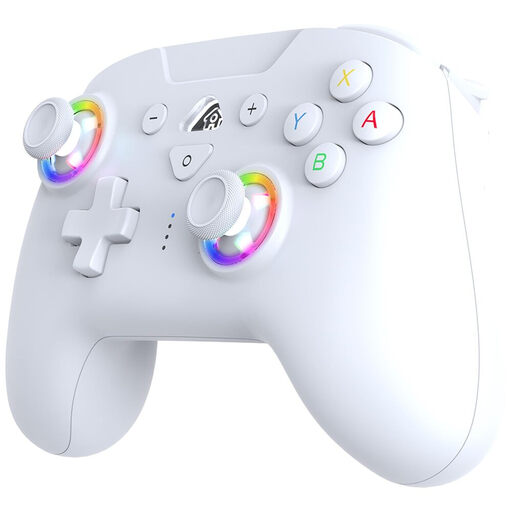
SUBSONIC Wireless Controller SW2 & SW with LED - White
Why this choice suits this profile: Its wireless design and claimed 9 to 10 hours of battery life make it ideal for family gaming sessions and occasional multiplayer.
The spec sheet details Switch 2 compatibility, USB-C charging and the available features, rather than just making a vague promise of comfort.
Bluetooth, motion sensors, three levels of vibration, Turbo mode and two rear buttons M1/M2.
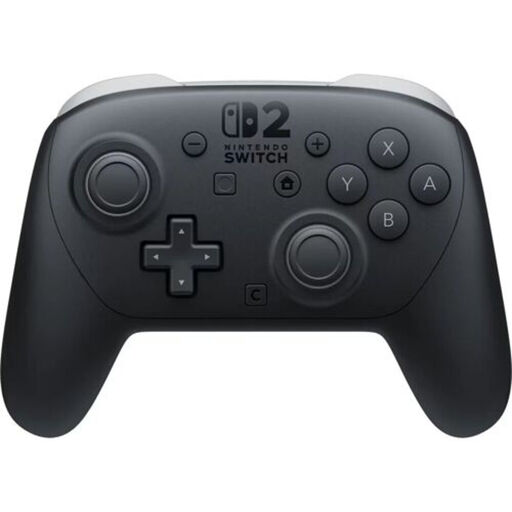
Nintendo Pro Controller Switch 2
Why this choice suits this profile: This official model is aimed at players who want the Switch 2's own features in a classic controller format.
The spec sheet clearly distinguishes the Switch 2-specific features: C button, 3.5 mm audio, HD Rumble 2, motion controls and GL/GR buttons.
Bluetooth connection, amiibo compatibility, around 40 hours of battery life and a rechargeable USB-C battery.
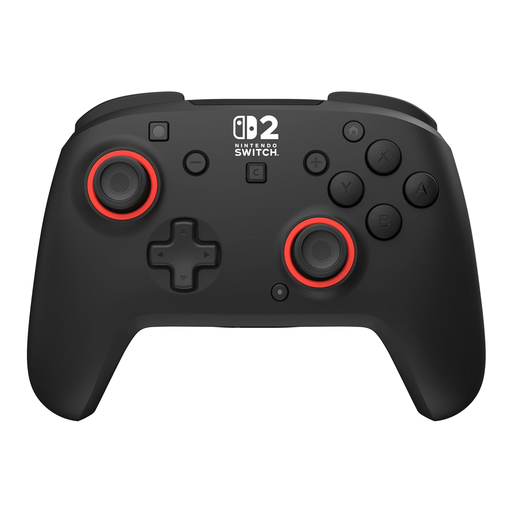
Turtle Beach Rematch Wireless Bluetooth Controller
Why this choice suits this profile: Regular players benefit from a generous claimed battery life, TMR sticks and two customisable rear controls.
The spec sheet provides concrete data on battery life, the 9-metre range and the joystick technology, without presenting these figures as a guarantee valid in every scenario.
TMR sticks, C button for GameChat, motion detection, USB-C charging and two assignable rear buttons.
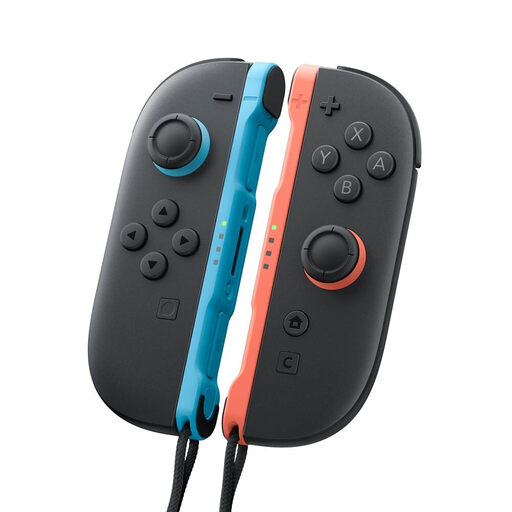
Nintendo Joy-Con 2 Controller Pair for Switch 2 - Light Blue/Red
Why this choice suits this profile: This pair lets you quickly start a local game without having to buy two standard-format controllers straight away.
Compatibility is clearly stated as exclusive to the Switch 2, which reduces the risk of buying an accessory intended for an older console.
Two controllers, wrist straps included, C button, motion controls, HD Rumble 2 and mouse-style control in compatible games.
Looking for other options?
We've put together a comprehensive, real-time updated list of products that fully meet these strict selection criteria and European safety regulations.
Frequently Asked Questions About the Nintendo Switch 2 Controller
Which Nintendo Switch 2 controller should I choose for playing with others?
For local multiplayer, a pair of Joy-Con 2 lets you quickly share the console. A standard-format controller, like the Nintendo Pro Controller Switch 2 or a Subsonic model, offers more comfort during long sessions, but only provides one controller.
Will a Switch 2 Bluetooth controller work with the original Nintendo Switch?
It depends on the model. Some models claim compatibility with the Nintendo Switch, Switch Lite and Switch OLED, while the Joy-Con 2 are designed exclusively for the Switch 2. Always check the list of compatible platforms on the product's spec sheet.
How long will a wireless controller last?
The lifespan depends on the battery, how often it's charged and the storage conditions. A built-in battery gradually loses its capacity. To preserve it, avoid high temperatures, use a suitable charger and unplug the controller if it gets unusually hot or if the battery swells.