
Nintendo Switch 2 wireless controller: how to choose a reliable model suited to your needs
A wireless controller for Nintendo Switch 2 can significantly improve your gaming comfort. However, you still need to choose a model that suits the way you play. Battery life, Turbo function, rear buttons and compatibility with the Switch Lite are just some of the criteria worth checking before placing your order.
The market includes both wired controllers and accessories compatible with several generations of consoles, as well as models whose specifications remain vague about the functions actually available. Here are the key points to check to avoid a disappointing or unsuitable purchase.
Common pitfalls before buying
1. Don’t confuse compatibility with functionality
A controller advertised as compatible with Nintendo Switch, Switch OLED and Switch Lite does not necessarily support all its functions on each console. The C button, for example, is associated with the communication and chat functions of Nintendo Switch 2. Its use also depends on the game, your Nintendo Account and, depending on the service concerned, a Nintendo Switch Online subscription.
Before ordering, check the precise list of compatible consoles, along with the functions actually supported.
2. Don’t rely solely on the maximum battery life
An advertised battery life of 10 hours generally refers to a maximum value measured under favourable conditions. It may vary depending on use of the motion sensors, battery condition, distance from the console and gaming conditions.
A rechargeable Switch controller with a USB-C port is very practical, but it still needs to be recharged regularly. If you play frequently, choose a model supplied with its cable and keep it somewhere convenient near the console.
3. Check which functions are unavailable
A controller can feature TMR sticks, programmable buttons and a Turbo function without supporting advanced vibration. The wireless HORI model featured here offers neither HD Rumble 2 nor vibration functionality.
This absence clearly does not prevent you from playing, but it may be noticeable in games where haptic feedback contributes to immersion. Detailed specifications are far more useful than a simple compatibility claim.
Technical criteria to examine
Hall effect TMR sticks: contact-free detection
Hall effect TMR sticks use magnetic detection to measure the movement of the stick. This design reduces the friction associated with some traditional mechanisms. It cannot guarantee a specific lifespan, but it is an interesting technical benefit for regular players.
Also consider the stick layout, trigger travel and grip. A 228 g controller measuring 5.7 × 14.5 × 11.4 cm may be comfortable during long gaming sessions, but ergonomics ultimately depend on the size of your hands and your playing habits.
Wireless connection and range
A wireless Switch controller should maintain a stable connection in your usual living-room setup. The HORIPAD Turbo Frost advertises a maximum range of 10 metres. This figure is measured under favourable conditions: walls, furniture and interference may reduce the actual range.
To pair the controller, hold down the sync button until the indicator starts flashing, then select the controller in the console’s Bluetooth settings.
Turbo, profiles and rear buttons
The Turbo function automatically repeats the input from certain buttons. It can be useful in games based on repeated presses, but it does not replace player precision and may be prohibited in certain competitive or online contexts.
Programmable rear buttons allow you to assign a command to an easily accessible button without moving your thumbs. The HORIPAD Turbo Wireless also offers two customisable profiles, a button-lock function and a dedicated HORI button for the Turbo and Assign functions.
Which controller should you choose based on your gaming profile?
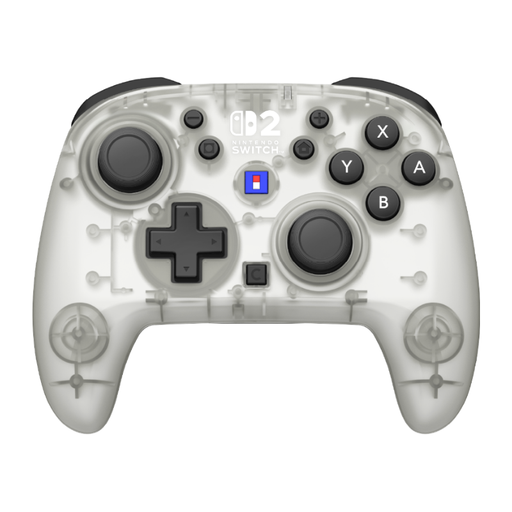
Hori Horipad Turbo Frost Wireless Controller for Nintendo Switch & Switch 2
Why this choice suits this profile : This wireless controller for Nintendo Switch 2 covers the essentials without requiring complicated setup. It works with Switch 2, Switch, Switch OLED and Switch Lite.
The specifications clearly state the maximum range of 10 m, the advertised battery life and the absence of HD Rumble 2. This allows you to compare its features with all the facts at your disposal.
TMR sticks, gyroscope, accelerometer, supplied USB-C cable and rechargeable battery offering up to 10 hours of battery life depending on the conditions of use.
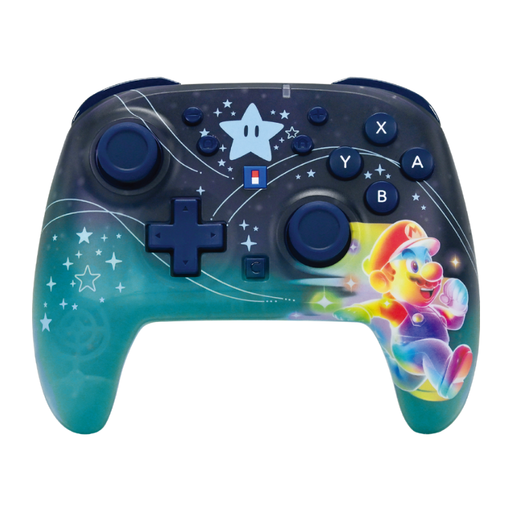
Hori Super Mario Galaxy Horipad Turbo Wireless Controller
Why this choice suits this profile : Its translucent Mario Galaxy-inspired design will appeal to players who care about the look of their accessory while also wanting advanced settings.
The advertised functions are clearly detailed : C button, Turbo, Assign, customisable profiles, button lock and rear buttons.
Advertised range of up to 10 m, TMR sticks, gyroscopic sensors and a maximum battery life of 10 hours, as stated by the manufacturer.
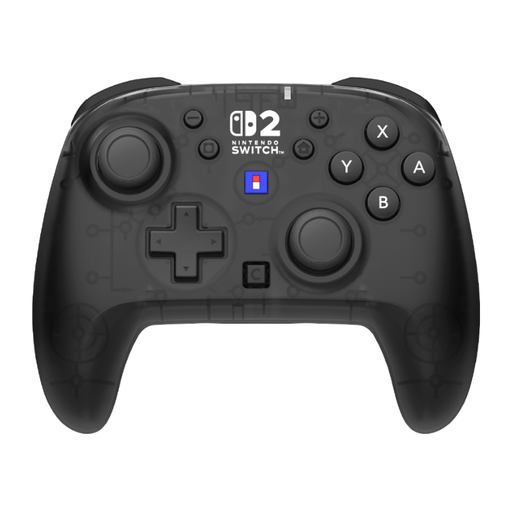
Hori Horipad Turbo Wireless Gamepad for Nintendo Switch & Switch 2
Why this choice suits this profile : Regular players can configure the rear buttons and save two profiles according to the game genres they play or their individual habits.
The specifications clearly state that it has an integrated battery, includes a USB-C cable and does not offer vibration. This means you avoid paying for a feature that you assume is included but is ultimately unavailable.
Two programmable rear buttons, button lock, C button, Turbo and integrated motion sensors.
Looking for more options ?
We have selected a complete, real-time updated list of products that meet these strict selection criteria, as well as European safety requirements.
Usage and care advice
- Fully charge the controller with the supplied USB-C cable before using it for the first time.
- Avoid excessive heat, moisture and prolonged exposure to sunlight.
- Clean its surface with a soft, slightly damp cloth without using solvents.
- Never attempt to open the integrated lithium-ion battery.
- Activate button lock before carrying the controller to prevent accidental presses.
- To preserve battery life, store it in a dry place and recharge it before a long gaming session.
Actual lifespan depends on frequency of use, impacts, storage conditions and maintenance. No fixed figure can guarantee how many years a controller will function correctly.
FAQ about wireless controllers for Nintendo Switch 2
Is an official Nintendo controller essential?
No. An official Nintendo licence may nevertheless provide reassurance regarding the advertised compatibility. It is still essential to check the available functions, connection type, presence of sensors and any limitations of the model, such as the absence of vibration.
Does the C button work on a standard Nintendo Switch?
The C button is mainly associated with the chat functions of Nintendo Switch 2. On a standard Switch, it may therefore not have the same purpose. Check the controller’s instructions as well as the information provided for the game concerned.
How much does it cost to use a rechargeable Switch controller?
The electricity required to recharge it is generally inexpensive. However, the cost depends on the battery capacity, how often you recharge it and the tariff charged by your supplier. The main practical points to check are the advertised battery life and whether a charging cable is included.