
Nintendo Switch Joy-Con Controller: how to choose the right controller for solo or multiplayer gaming
Buying a Nintendo Switch Joy-Con controller seems straightforward… until you start comparing colours, compatibility and the accessories included. A pair of Nintendo Switch Joy-Con controllers can be used to play with two people, enjoy the console in handheld mode or take advantage of motion controls. However, not every controller advertised as compatible offers the same features.
Before placing your order, it is worth checking three things: your console generation, the type of connection and how you intend to use the controller. Here are the essential criteria to help you avoid choosing the wrong product.
Common pitfalls before buying
1. Confusing Switch, Switch OLED and Switch 2
The product name can be misleading. A controller for Nintendo Switch OLED is generally intended for the same console generation as the standard Switch, while a Switch 2 Joy-Con is designed for the new console and its specific features.
The Joy-Con 2 controllers featured here are advertised as exclusively compatible with Nintendo Switch 2. They should therefore not be chosen for a standard Switch or a Switch OLED. Conversely, a standard pair of Nintendo Switch Joy-Con controllers should not automatically be considered compatible with Switch 2: always check the product listing carefully.
2. Choosing based on colour alone
A red and blue Joy-Con set or a pair of multicoloured Joy-Con controllers may catch your eye, but the colour says nothing about the sensors, battery life or box contents. Check that wrist straps, a Joy-Con grip and the advertised features are included.
A product may include two controllers without providing a charging grip or a traditional grip. This accessory is often sold separately, which can increase the total cost and make a noticeable difference to gaming comfort.
3. Choosing a wireless controller for an experience that requires advanced controls
Bluetooth provides genuine freedom of movement, but a wireless Nintendo Switch controller does not necessarily include rear buttons, adjustable triggers or Hall effect sticks. For fighting games, FPS titles or long gaming sessions, the shape and precision of the sticks matter just as much as connectivity.
Features to check before choosing
Compatibility and connection type
An official Nintendo controller from the Joy-Con range attaches to the console’s side rails and can also be used separately via Bluetooth. Each Joy-Con has its own buttons and can serve as an individual controller in games that support local multiplayer.
You should also check how the controller charges. Joy-Con controllers are generally recharged while attached to the console, whereas a standalone controller may use a USB-C cable or a dedicated charging dock. A wired connection, such as that of the Turtle Beach Afterglow controller, means you do not have to manage a battery, but it does require you to stay close to the console.
Sensors and gaming features
For games that use motion controls, look for at least an accelerometer and a gyroscope. Depending on the model, the standard right Joy-Con may also include an infrared motion camera and NFC technology, particularly for features linked to amiibo.
HD Rumble delivers more detailed haptic feedback than simple vibrations. It will not transform every game, as its use depends on the software, but it can make compatible actions feel more immersive.
Ergonomics, battery life and accessories
The technical specifications for several pairs of Nintendo Joy-Con controllers indicate around 20 hours of battery life. This figure can vary depending on the intensity of the vibrations, sensor usage and battery condition.
For games that use motion controls, always attach the wrist straps. Also check the box contents: two controllers, two wrist straps and, where specified, two grips. For extended gaming sessions, a traditional controller may feel more comfortable to hold than two small, separate Joy-Con controllers.
Our selection for different types of player
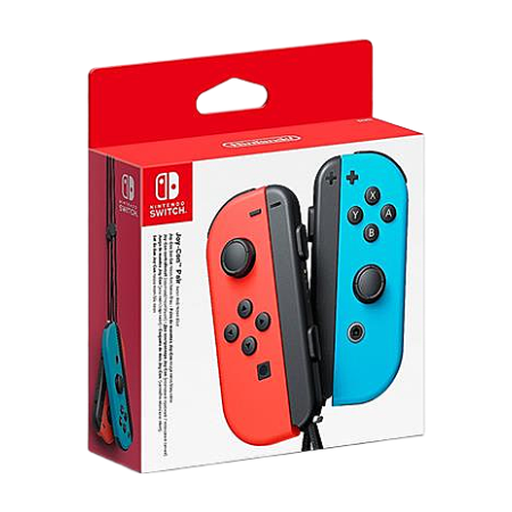
Nintendo Joy-Con Controller Pair for Switch - Neon Red/Blue
Why this choice suits this type of player: this pair lets you get started with local multiplayer straight away, with one Joy-Con per player, while remaining suitable for use attached to the console or with a grip.
The product listing specifies Bluetooth connectivity, the inclusion of two grips and compatibility with the Nintendo Switch family.
HD Rumble, gyroscope, infrared camera on the right Joy-Con and two built-in rechargeable batteries.
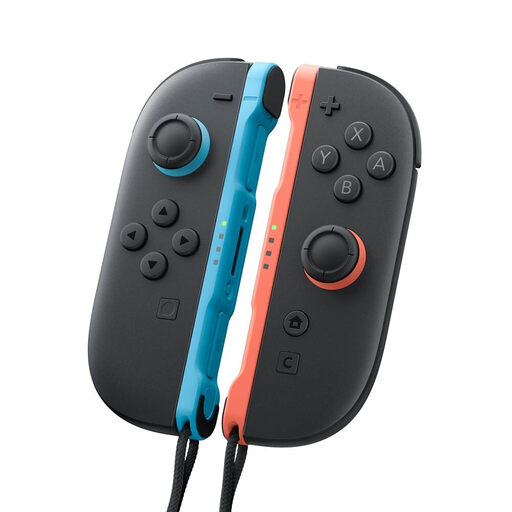
Nintendo Joy-Con 2 Controller Pair for Switch 2 - Light Blue/Red
Why this choice suits this type of player: Switch 2 owners benefit from a set designed for this console, with features specific to this generation.
Compatibility is advertised as limited to Nintendo Switch 2, clearly removing the risk of confusing the different generations.
HD Rumble 2, C Button for GameChat, motion controls and mouse function in compatible games.
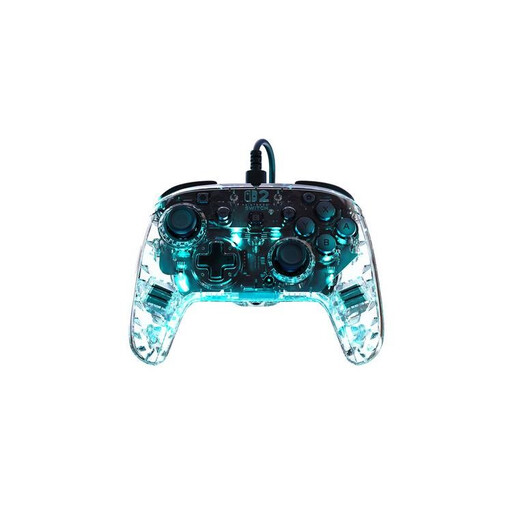
Turtle Beach Afterglow RGB Controller Wired
Why this choice suits this type of player: this controller is designed for players who prefer a classic grip, a stable connection and customisable controls.
The 3 m USB connection does not rely on a built-in battery, reducing interruptions caused by recharging.
Two programmable rear buttons, Hall effect sticks, C Button for GameChat and a 3.5 mm headphone jack.
Looking for more options ?
We have put together a complete, real-time updated list of products that fully meet these demanding selection criteria and European safety regulations.
Frequently asked questions about Nintendo Switch Joy-Con controllers
Can a pair of Joy-Con controllers be used to play with two people?
Yes, in games that support local multiplayer. Each Joy-Con can be used as an independent controller. However, check the game’s requirements: some titles require a complete pair per player or a more traditional controller.
How do you recharge wireless Joy-Con controllers?
The most common method is to attach them to the console’s rails, then connect the console to a power supply or place it in its dock, depending on the mode you are using. A charging dock or rechargeable grip can also be purchased separately. Always check the model’s product listing to confirm accessory compatibility.
How long can a Joy-Con controller be used for?
The product listings for several models indicate around 20 hours of battery life, but this duration varies depending on the intensity of the vibrations, sensor usage and battery condition. To protect the hardware, avoid moisture, extreme temperatures and impacts. If the battery swells, leaks or overheats, stop using the controller immediately and follow the manufacturer’s instructions.