
Portable Monitor Buying Guide for Remote Work and Gaming
Feeling cramped on your laptop screen? Whether you're working remotely, frequently on the go, or a creative professional in need of more space, juggling windows quickly becomes a headache. To boost your comfort and productivity, the portable monitor is the ideal solution to extend your display anywhere, anytime.
This guide will help you decode spec sheets and find the perfect model for your needs, from the digital nomad to the gamer who refuses to compromise.
How to Choose the Right Portable Monitor?
Before diving into our top picks, let's review the key technical criteria that will make all the difference depending on your use case.
1. Connectivity: The Simplicity of USB-C
This is the first thing to check. Today, almost all recent models rely on USB-C. Its main advantage? It transmits the video signal, power, and data (for touch functionality) through a single cable. This is by far the simplest and most streamlined setup for adding a second screen to your laptop.
A word of caution, however: make sure your computer's USB-C port supports DisplayPort Alternate Mode (or DP Alt Mode). If it doesn't, or if your machine is a bit older, opt for a monitor that also offers a Mini HDMI port. You will then need an external power source, via a second USB-C port or an AC adapter.
2. Display Quality: Resolution, Refresh Rate, and Panel Type
The panel's specifications depend directly on your intended use:
- For Office and Remote Work: A Full HD resolution (1920 x 1080 pixels) and a 60 Hz refresh rate are more than enough for viewing documents, browsing the web, and managing your emails.
- For Creatives (Photo, Video): Opt for a 4K portable monitor (3840 x 2160 pixels) for pin-sharp detail, which is essential for photo retouching or video editing. Color space coverage (sRGB, DCI-P3) becomes a crucial factor here to ensure color accuracy.
- For Gamers: A portable gaming monitor is distinguished by its high refresh rate (120 Hz or 144 Hz). This superior fluidity is a real advantage in fast-paced games, as it reduces motion blur and boosts responsiveness.
3. Size and Weight: Finding the Right Balance for Portability
For a travel monitor, portability is key. Screen sizes typically range from 13 to 18 inches. A 14 or 15.6-inch model offers an excellent compromise between viewing comfort and ease of transport. Larger sizes (17 or 18 inches) will appeal to those who prioritize screen real estate over compactness. In any case, keep an eye on the weight and thickness, especially if the monitor needs to fit into an already packed backpack.
Our Portable Monitor Recommendations
We've scoured the market to select three standout models, each catering to a specific user profile.
UPERFECT 14" 60 Hz Touchscreen: Versatility for Productivity
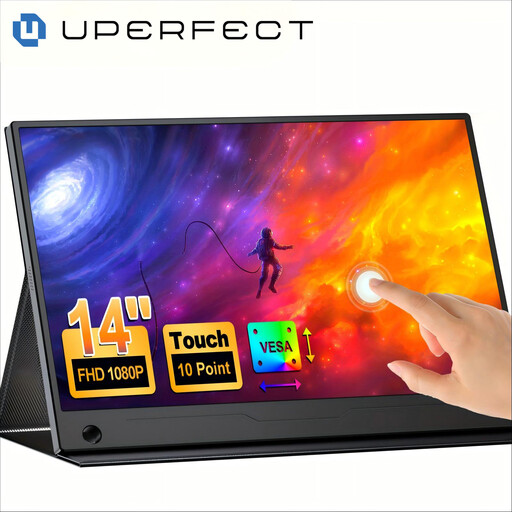
What sets it apart The real standout feature of this UPERFECT monitor is its 10-point touchscreen panel that transforms your second screen into an interactive control surface. Paired with its built-in, 180° adjustable stand, it offers incredible flexibility for presentations, document annotation, or more intuitive navigation.
Key Features
- Responsive touchscreen (requires a compatible source device).
- 100% sRGB color gamut coverage, ensuring accurate colors for office work and creative tasks.
- Built-in stand and VESA compatibility for mounting on an articulating arm.
- Slim and lightweight design, perfect for travel.
Who is it for? Digital nomads, presenters, and anyone looking to add an interactive dimension to their mobile workspace. It's an excellent choice as a second laptop screen to boost productivity.
ARZOPA Z1FC 16.1" 144 Hz: Absolute Fluidity for Gaming on the Go
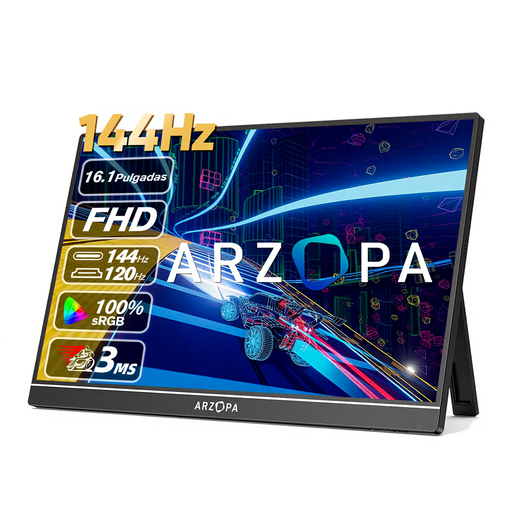
What sets it apart This ARZOPA monitor is, without a doubt, built for gaming. Its killer feature: a 144 Hz refresh rate that ensures flawless fluidity in action and competitive games. This is a feature that is still rare in the portable monitor market.
Key Features
- 144 Hz refresh rate for an ultra-smooth gaming experience.
- Full HD (1920x1080) resolution on a comfortable 16.1-inch screen.
- Vibrant colors with a color space covering 106% sRGB.
- Comprehensive connectivity with two USB-C ports and a Mini HDMI port.
Who is it for? The ultimate portable gaming monitor. It's aimed at laptop gamers who refuse to compromise on fluidity while on the move, as well as owners of consoles like the Nintendo Switch, PS5, or Xbox.
UPERFECT 18.4" 4K QLED: Total Immersion for Creatives
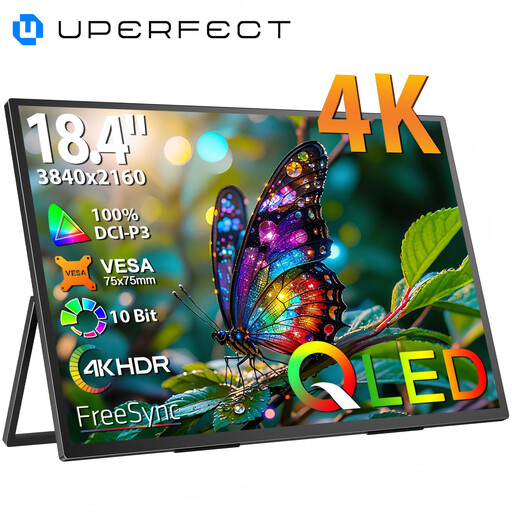
What sets it apart Here, UPERFECT goes all-in on image quality and immersion. With its massive 18.4-inch panel and 4K UHD (3840 x 2160) resolution, it provides a gigantic workspace and stunning detail. QLED technology perfects the experience with rich colors and deep contrasts.
Key Features
- 4K UHD resolution for maximum display sharpness.
- Extra-large 18.4-inch screen, perfect for intensive multitasking.
- QLED technology for superior image quality (colors, contrast).
- Metal chassis and VESA compatibility.
Who is it for? Creative nomads: photographers, videographers, graphic designers, or developers who require a 4K portable monitor to work with precision on high-resolution files, wherever they are.
Complete Your Mobile Setup
A good portable monitor is great. With the right stand for perfect ergonomics, it's even better! If our selection doesn't cover all your needs or if you're looking to fine-tune your setup, take a look at our other solutions.
? Discover our range of laptop stands and perfect your mobile workstation.
Frequently Asked Questions (FAQ)
1. How do I connect a portable monitor to my computer? The simplest solution is a single USB-C cable, provided both your computer and the monitor are compatible. This single cable handles both the display signal and power. Otherwise, you can use an HDMI (or Mini HDMI) cable for video, and a second USB-C cable connected to an AC adapter or another port on your computer for power.
2. Does a portable monitor need to be plugged into an AC outlet? Not always. It depends on the model and the power output of the port it's connected to. Many portable monitors can be powered directly by the USB-C port of a modern laptop. However, to achieve maximum brightness or if your computer's port isn't powerful enough, an external power source via an AC adapter is often required.
3. Can you use a portable monitor with a gaming console? Absolutely. Most portable monitors equipped with an HDMI (or Mini HDMI) port are compatible with consoles like the PlayStation, Xbox, or Nintendo Switch (via its dock). It's the perfect solution for enjoying your games on a much larger screen than the Switch's built-in display, for example.