
Which PS5 Controller Should You Choose? A Complete Buying Guide
Whether you're replacing your original pad, adding a second one for game nights with friends, or looking to shave off a few milliseconds in competitive play, choosing a PS5 controller isn't always a simple task. Between Sony's official model, more affordable alternatives, and "pro" versions built for esports, it's easy to get lost.
To help you find your way, we've broken down the essential criteria and selected the models that stand out from the crowd, whether you're a casual player or a pro-gamer. Follow our guide!
How to Choose Your PS5 Controller?
Before diving into our selection, let's define your priorities together. Here are the key points to review to find the perfect controller for you.
1. Compatibility and Key Features
This is the starting point. To enjoy the latest games released on the PlayStation 5, a PS5-compatible controller is simply mandatory. But if you're also a PC gamer, a model offering dual PS5/PC compatibility is a significant advantage.
Beyond simple compatibility, immersive features make all the difference. In this regard, Sony's official DualSense remains king with its haptic feedback and adaptive triggers, which transform the gaming experience. Third-party controllers, on the other hand, often focus on other strengths, such as adjustable vibrations or customisable RGB lighting.
2. Ergonomics and Customisation Options
For players aiming for performance, ergonomics and customisation are non-negotiable criteria. A PS5 controller with back paddles, for example, allows you to perform actions (jumping, reloading, etc.) without ever taking your thumbs off the sticks, offering a decisive advantage in FPS and other fast-paced games.
Adjustable-travel triggers, interchangeable thumbsticks, fully remappable buttons... These options, which allow you to tailor the controller to your hands and playstyle, are the hallmark of so-called "pro" models.
3. Budget and Player Profile
Of course, budget is a crucial factor. For occasional use or to equip a second player without breaking the bank, a budget-friendly yet functional PS5 controller will do the job perfectly. However, if you're seeking absolute immersion or aiming for the top of the online leaderboards, investing in a more advanced model, whether official or specialised, makes perfect sense.
Our Top PS5 Controller Picks
We've scoured the market to bring you three models that stand out, each in its own category. From the affordable alternative to the competitive beast, here are our picks for 2026.
Subsonic Wireless Controller with LED for PS5 - Black
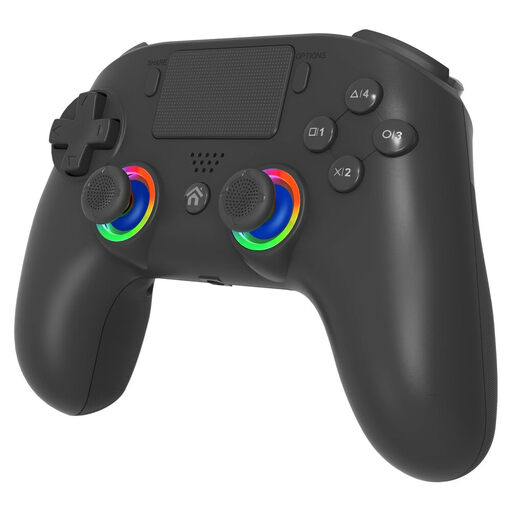
Why it stands out: This controller establishes itself as an excellent budget-friendly alternative, without sacrificing features. It includes two programmable back paddles and a Turbo function—options usually found on much more expensive models. Its customisable RGB lighting is the stylish icing on the cake.
Pros:
- Programmable back paddles (M1 and M2) for advanced control.
- PS5 and PC compatibility, so you can play on all your platforms.
- Three adjustable vibration levels to fine-tune the feel.
- Turbo function and customisable RGB lighting.
- Up to 10 hours of advertised battery life with an integrated lithium battery.
Who is it for? Ideal for gamers looking for an effective and affordable second wireless PS5 controller, or for those who want to experience the joy of programmable paddles without breaking the bank.
PlayStation DualSense Wireless Controller PS5 - Midnight Black
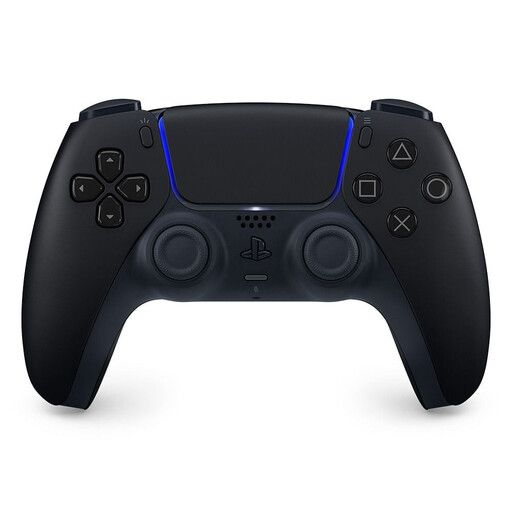
Why it stands out: Does it even need an introduction? The DualSense is THE official controller for the PlayStation 5, the key to total immersion. Its secret lies in two exclusive technologies: haptic feedback, which delivers surgically precise vibrations, and adaptive triggers, whose resistance changes in real-time. It's simply the best way to experience the PS5 just as the developers intended.
Pros:
- Haptic feedback and adaptive triggers for unparalleled immersion.
- Integrated microphone and speaker for simplified communication.
- Iconic design and proven ergonomics.
- Extensive compatibility: PS5, PC, Mac, Android, and iOS.
- Official product build quality and reliability.
Who is it for? For absolutely every PS5 owner who wants the purest and most immersive gaming experience. It's also a top-tier choice as a PS5 PC controller, thanks to its build quality and broad compatibility.
Razer Raiju V3 Pro Wireless eSport Controller - PS5 & PC - Black
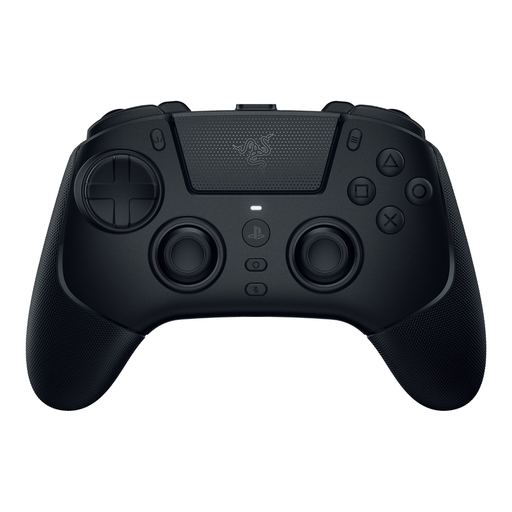
Why it stands out: The Razer Raiju V3 Pro is the ultimate weapon for competitors. This pro PS5 controller is designed entirely for performance. It packs an arsenal of features to maximise your responsiveness, starting with its Razer Pro HyperTriggers that deliver a near-instantaneous click, worthy of a gaming mouse. Add to that six fully remappable buttons and magnetic thumbsticks designed to never drift, and you have a true precision tool for esports.
Pros:
- 6 programmable buttons (4 back paddles and 2 extra buttons).
- Ultra-fast Pro HyperTriggers with adjustable travel.
- Magnetic thumbsticks with anti-drift technology for long-lasting precision.
- Low-latency Razer HyperSpeed Wireless connectivity.
- Advanced customisation via a dedicated mobile app.
Who is it for? Clearly aimed at competitive players and esports enthusiasts who make no compromises on responsiveness, customisation, and pure performance.
Still Not Convinced?
Doesn't our selection cover exactly what you're looking for? The world of controllers is vast, and preferences for grip, weight, or button layout are highly personal.
Feel free to explore our full range of wireless game controllers to find the hidden gem that perfectly matches your style.
Frequently Asked Questions about PS5 Controllers
Can you use a PS4 controller on a PS5 console?
Yes, you can use a DualShock 4 controller on your PS5, but be aware: it only works for PS4 games playable via backward compatibility. To launch a title developed specifically for the PS5, a PS5 controller like the DualSense is required.
How do you connect a PS5 controller to a PC?
Connecting a PS5 controller to a PC is a breeze. For a wired connection, a simple USB-C cable is all you need, and Windows will usually recognise it without a hitch. To play wirelessly, pairing is done conventionally via Bluetooth. An important point to note: key features like haptic feedback and adaptive triggers are currently only compatible with a handful of PC games.
What differentiates a pro PS5 controller from a standard DualSense?
A pro PS5 controller is a DualSense on steroids, optimised for competition. It stands out by adding features not found on the base model, including:
- Paddles or programmable back buttons.
- Adjustable-travel triggers or "trigger stops" for faster firing.
- Interchangeable thumbsticks (shape, height).
- Advanced software customisation options to adjust sensitivity and create game profiles.