
PS5 Wireless Controller: How to Choose the Model That Suits Your Play Style
A PS5 wireless controller gives you more freedom in front of the screen, but not all models are equal depending on how you play. From the official DualSense to customisable controllers and eSport-focused pads, the differences come down to connection, battery life, ergonomics and adjustability.
Before you place your order, take a moment to avoid three common mistakes.
The Pitfalls to Avoid Before Buying
1. Confusing Compatibility with Full Support
A PS5 Bluetooth controller may be recognised by a PC, Mac or smartphone without supporting all its features. On a computer, the adaptive triggers and haptic feedback depend on the game, the system and sometimes a USB-C connection.
So check compatibility with your device, but also with the games you plan to play. A PS5 controller for PC can handle the main controls perfectly over Bluetooth, while some advanced features may require the cable.
2. Relying Solely on the Stated Battery Life
Actual battery life varies depending on the speaker volume, vibration intensity, microphone use and activation of the adaptive triggers. A built-in rechargeable battery is convenient, but it is generally not designed to be user-replaceable.
Also watch out for models sold without a USB-C cable – you will need to buy this accessory separately. A quick look at the box contents can save you an unexpected expense.
3. Paying for Features You Won't Use
Rear buttons, saved profiles and adjustable triggers are genuinely useful for competitive gaming. For family use or adventure games, a standard DualSense already covers the essential PS5 functions.
A limited edition focuses mainly on its finish and collector appeal. It does not automatically transform the gaming experience. So compare the accessories, the technical specifications and the feel in hand, rather than just going by the design.
The Technical Criteria to Examine
Wireless Connection and Wired Mode
An official Sony PS5 controller typically uses Bluetooth and USB-C. Wired mode lets you keep playing while charging and can be essential on PC to enjoy certain immersive features.
To simply connect a controller to the PS5, the first pairing via cable is often the quickest method. On PC or mobile, turn on Bluetooth, then hold down the PlayStation and Create buttons until the light bar flashes. Then select "Wireless Controller" from the list of devices.
Some eSport models instead use a 2.4 GHz wireless receiver. This option may appeal to players who want a dedicated connection, but check that the dongle is included and compatible with your console before buying.
Immersive Features and Game Compatibility
Haptic feedback, adaptive triggers, the built-in speaker, the microphone and the six-axis motion sensor are among the main advantages of the DualSense. However, their operation depends on the game and the platform you are using.
On PS5, these features are generally well integrated into the console's ecosystem. On PC, check the information provided by the game and the manufacturer. A promise like "total immersion" does not guarantee that all features will be available in every title.
Ergonomics, Weight and Customisation
A standard DualSense weighs around 280 g, according to the technical specifications of the models shown. The DualSense Edge comes in at approximately 325 g, while some specialised controllers focus on a lighter weight or a more modular design.
For long sessions, consider in particular:
- the shape of the grips and access to the triggers;
- the texture of the sticks and buttons;
- the presence of trigger travel adjustment;
- the weight with or without a cable;
- the ability to replace the stick caps or modules.
Small removable accessories must be kept out of reach of children under 3 years old. For any device with a lithium battery, use a certified cable, avoid moisture and stop using it immediately if it swells or becomes abnormally hot.
Our Selection Based on Your Profile
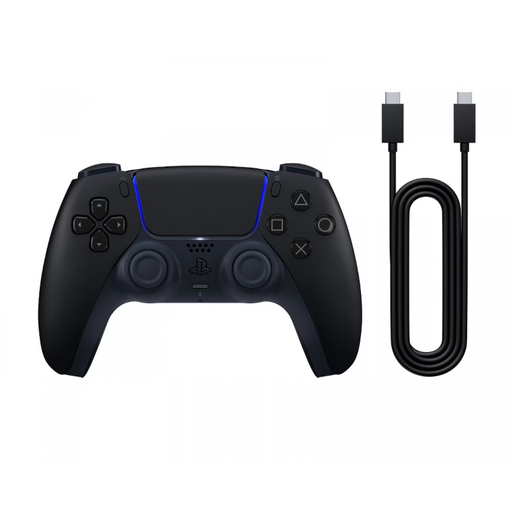
Sony DualSense Wireless Controller with USB Cable for PC – Midnight Black
Why this choice suits this profile: This official controller works equally well for a first-time setup on PS5 and for a player who also uses Windows, Mac or certain mobile devices. The USB-C cable is included, saving you from having to buy this essential accessory separately.
The stated compatibility covers PS5, Windows, Mac and mobile devices, with Bluetooth or USB-C connection. Advanced features still depend on compatible games.
Haptic feedback, adaptive triggers, built-in microphone, 3.5 mm headphone jack and USB-C cable included.
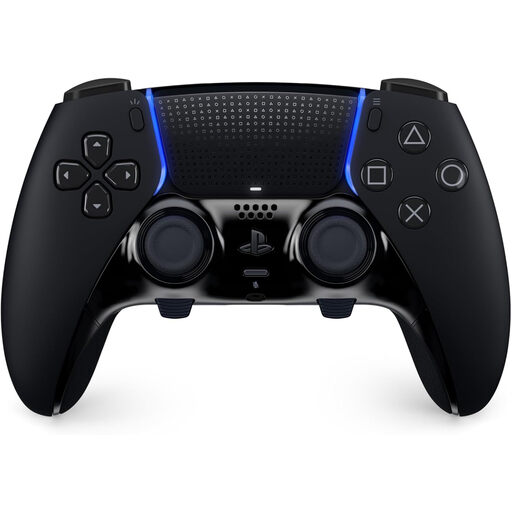
PlayStation DualSense Edge Wireless Controller for PS5 – Midnight Black
Why this choice suits this profile: The DualSense Edge is aimed at players who want to adjust controls, stick sensitivity and dead zones depending on each game.
The savable profiles and programmable controls offer genuine customisation, rather than relying solely on a promise of precision.
Three sets of stick caps, two types of removable trigger caps, customisable profiles and a 3 m braided cable.
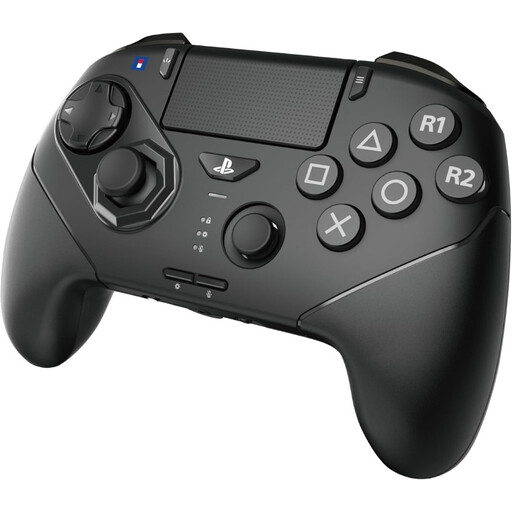
Hori Fighting Commander Octa Pro Wireless Controller for PS5/PC – Black
Why this choice suits this profile: This specialised controller is designed for fighting games and players who prefer a six-button layout, an interchangeable D-pad and programmable rear controls.
The physical options are clearly identified: three D-pads and one eight-direction analogue stick. The choice is therefore designed for a specific genre, not for all uses.
Official Sony licence, wireless or USB-C connection, six micro-switch buttons and locking USB-C cable.
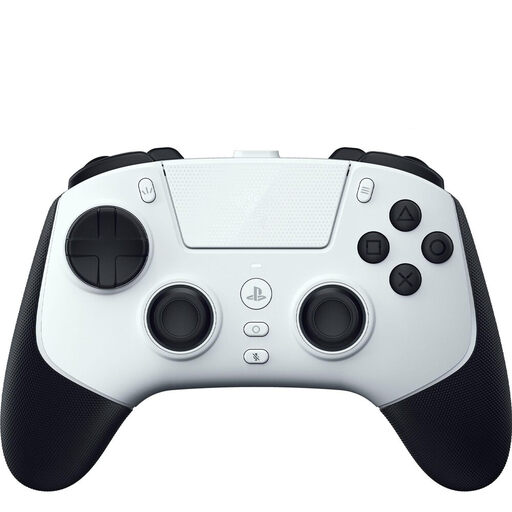
Razer Raiju V3 Pro Wireless eSport Controller – PS5 & PC – White
Why this choice suits this profile: Its six reconfigurable controls, adjustable trigger travel and 2.4 GHz wireless connection are designed for players who want to fine-tune every detail of their setup.
The adjustments are based on concrete elements: six buttons, four profiles and a stated connection frequency of 2.4 GHz. Wired mode remains available on PC.
Stated weight of 258 g, six customisable controls, profiles managed via the app and a carry case included.
Looking for other options?
We have put together a complete, real-time updated selection of products that meet these demanding criteria, while complying with European safety regulations.
Frequently Asked Questions About the PS5 Wireless Controller
How do I connect a PS5 Bluetooth controller to a PC?
Turn on Bluetooth on your computer, hold down the PlayStation and Create buttons until the light bar flashes, then select the controller from the list of devices. If you need the advanced features, try the USB-C connection and check the game's settings.
How long does it take to charge a DualSense?
The time depends on the charger, the cable and the remaining battery level. Some product specifications indicate around three hours for a full charge. You can play while charging with a compatible USB-C cable.
Is a customisable PS5 controller suitable for all players?
Not necessarily. Models like the DualSense Edge or certain eSport controllers are mainly aimed at users who make use of profiles, rear buttons or trigger adjustments. For standard play, a regular Sony PS5 controller already covers the essentials, with fewer settings to manage.