
Smartphone vlogging accessories: which equipment should you choose for hassle-free filming and publishing?
A recent smartphone can capture very impressive images. In real-life conditions, however, certain limitations quickly become apparent: muffled voices in the street, shaky footage while walking or a poorly lit face indoors. Smartphone vlogging accessories can help correct these issues, provided you do not get distracted by a specification sheet packed with features.
Pitfalls to avoid before buying
1. Mistaking an impressive specification sheet for practical usability
A microphone packed with different modes will not necessarily suit the way you film. Start by checking its compatibility with your phone, its connector type and how easy it is to pair. A model designed for a camera may require an adaptor to work with an iPhone or Android smartphone.
2. Underestimating the stability of your support
A very long selfie stick or lightweight tripod can quickly become unstable when your phone is positioned high up. The risk increases on a narrow table, uneven ground or in windy conditions. Before choosing, check its fully extended length, maximum supported weight and the stability of its feet.
3. Trusting the stated battery life without checking the charging requirements
The stated battery life generally depends on the mode used, brightness or wireless connection. If you plan to film while out and about, check the advertised usage time, battery type and whether the device can be recharged with the equipment you already use. A built-in battery is convenient, but it requires a little more attention in the long term.
Criteria to check when putting together a well-matched video setup
Sound: connectivity, range and backup recording
Sound quality plays an essential role in making a video easy to understand. For a travel vlog, interview or TikTok video filmed outdoors, a DJI wireless microphone can simplify recording while avoiding tangled cables.
In particular, check:
- Compatibility: USB-C, Lightning, camera or direct connection to a particular ecosystem.
- Number of transmitters and receivers: one transmitter is enough for one person, while a multi-person interview requires more channels.
- Noise reduction and gain adjustment: these features help balance the volume, but they cannot replace suitable microphone positioning.
- Backup recording: internal storage can save a take if the wireless transmission is temporarily interrupted.
Stability: a selfie stick is no substitute for a gimbal
A 3-axis smartphone stabiliser, also known as an iPhone and Android gimbal, compensates for some rotational movements. It is particularly useful for filming while walking, presenting yourself to camera or following a moving subject.
A Bluetooth selfie stick with a tripod function serves a different purpose: self-portraits, fixed shots and remote photography. It cannot eliminate shaking in the same way as a motorised stabiliser. The right choice therefore depends on how you plan to use it, not just on the product’s appearance.
Lighting: colour temperature, power and portability
A selfie stick with light is suitable for quick shots, while a portable RGB LED light generally offers more creative possibilities. Colour temperature, measured in kelvins, lets you create warmer or cooler light. When lighting a face, position the light source slightly above the phone and avoid pointing a very powerful LED directly at the subject.
Our recommendations for different users
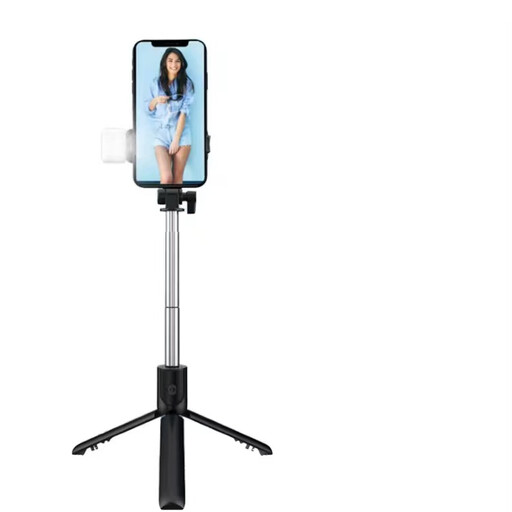
Verbex S05s Bluetooth Selfie Stick with Light
Why it suits this profile : this selfie stick combines a Bluetooth remote control, tripod function and fill light in an affordable format, making it ideal for getting started on TikTok or YouTube.
The advertised length of 100 to 150 cm is suitable for self-portraits, but extend the feet on a flat surface and avoid strong gusts of wind.
iOS and Android compatibility, horizontal or vertical orientation, stated weight of 200 g and remote control with a stated range of up to 20 m.
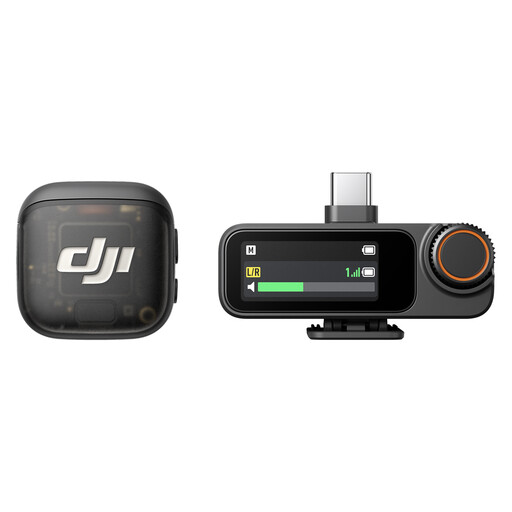
DJI Mic 3, 1 transmitter and 1 receiver
Why it suits this profile : creators who put sound first get a compact setup that can be used with an iPhone, camera or Android smartphone, thanks to the included USB-C adaptor.
The specifications mention automatic gain adjustment, two levels of noise reduction and 32 bit float internal backup recording.
Up to 28 hours of advertised use, three voice modes, support for four transmitters per receiver and synchronisation with additional receivers.
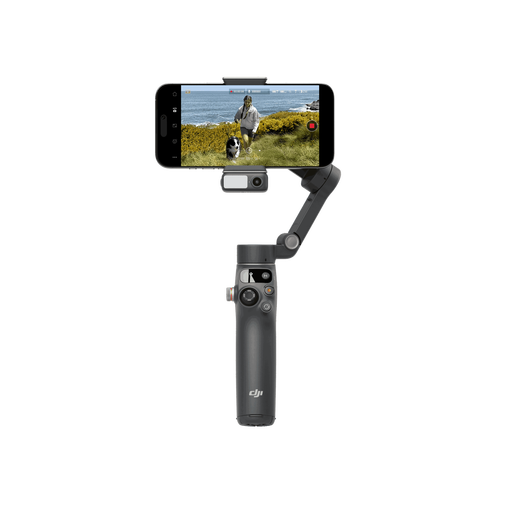
DJI Osmo Mobile 7P, gimbal for iPhone and Android
Why it suits this profile : this stabiliser is aimed at vloggers who often film while walking and want to combine stabilisation, subject tracking, extension rod and tripod in one device.
Three-axis stabilisation directly compensates for movement while walking, while the foldable design takes up less space in a bag.
Native tracking, integrated lighting in the multifunction module, advertised battery life of up to 10 hours and phone charging in certain configurations.
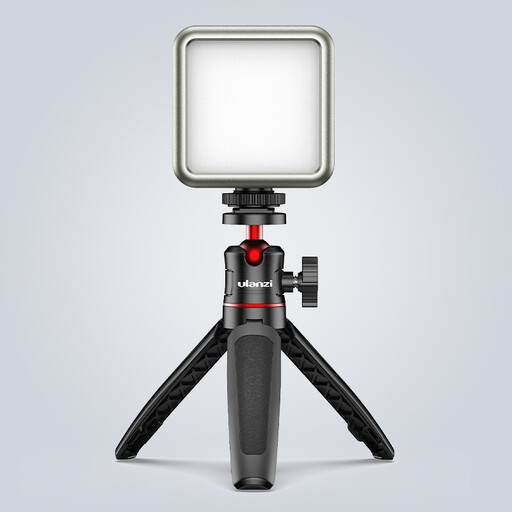
Ulanzi VL49, portable RGB LED light
Why it suits this profile : travellers, students and amateur videographers can easily take it with them to improve an indoor scene or give it a colourful atmosphere.
Its adjustable temperature range of 2 500 to 9 500 K lets you adapt the tone to your surroundings rather than relying solely on ambient light.
Multicolour RGB mode, built-in 2 000 mAh battery and easy-to-carry format. The product is not advertised as waterproof.
Looking for more options ?
We have brought together a complete, real-time updated selection of products that meet these demanding criteria, as well as European safety standards.
Setup tips for different types of content
- Talking-to-camera vlog: pair a tripod or gimbal with a microphone positioned near your collar and a light placed slightly off the phone’s axis.
- Outdoor interview: choose a wireless microphone with noise reduction and check the audio level before starting to record.
- Travel and moving shots: a 3-axis stabiliser will be more effective than a basic selfie stick. Even so, take a power bank if the session is likely to last several hours.
- Filming in a car: a suction cup camera mount can provide an in-car angle, but the surface must be clean, dry, smooth and sufficiently flat. Always check the mount before filming and follow road safety rules.
FAQ about smartphone vlogging accessories
Which equipment should I buy first when starting a vlog?
Start with the accessory that addresses your biggest problem. If your videos are shaky, choose a stable support or stabiliser. If voices lack clarity, a wireless microphone should take priority. A portable light will then be useful for indoor filming.
Will a gimbal work with all iPhones and Android smartphones?
Compatibility depends on the phone’s weight and dimensions, as well as the app used for subject tracking or editing. Before buying, check the model’s specifications and make sure the app is available on your operating system. With some Android devices, the download may be available from the manufacturer’s official website rather than Google Play.
How much does it cost to use these accessories day to day?
In everyday use, costs are generally limited to recharging the batteries and, depending on the model, replacing the remote control battery. To extend their lifespan, store the devices somewhere dry, avoid extreme temperatures, do not block the vents on lights and carry fragile components in a pouch.