
Nintendo Switch 2 Multiplayer Stands: A Complete Buyer’s Guide
The Nintendo Switch 2, like its predecessor, wins fans over with its versatility—especially its tabletop mode. It's perfect for impromptu multiplayer sessions with friends or family. The only problem is that this setup quickly reveals its limitations: a battery that drains in no time and a single USB-C port that forces you into an impossible choice: charge the console or connect an accessory.
As a product expert at Joybuy, my job is to do the legwork for you and unearth the most practical solutions. This guide focuses on the pitfalls to avoid and the essential criteria for choosing a Nintendo Switch 2 multiplayer stand that won't let you down.
The 3 Pitfalls to Avoid When Choosing Your Stand
The accessory market is a jungle where it's easy to make a mistake. Here are the most common errors:
- Unstable generic stands: A stand that's too light or flimsy might seem like a good deal, but it's likely to tip over at the slightest bump, endangering your precious console. Worse, some low-end models obstruct the ventilation grilles, leading to a risk of overheating.
- Overlooking connectivity: Buying a mere piece of plastic doesn't solve the fundamental problem of tabletop mode: the lack of ports. You'll still be stuck, unable to connect a wired controller to the Switch 2 while charging the console.
- The false promise of charging: Some stands do include a charging port, but without pass-through technology (which relays power). The result? They power the stand itself, but not the console while you're playing. In other words, they're useless for long gaming sessions.
The Criteria That Truly Make a Difference
To turn your console into a true portable gaming and charging station for the Switch 2, three features are non-negotiable.
1. Connectivity: USB-A Ports and Pass-through Charging
The number one criterion: the presence of at least two USB-A ports. This is the bare minimum for connecting two wired controllers for a stable, lag-free multiplayer experience. In addition, an input USB-C port is just as essential. This is what provides the pass-through function, acting as a bridge between your wall charger and the console. This way, you can play and charge at the same time, without any interruption. An accessory that checks both these boxes is a true USB playstand for the Nintendo Switch 2.
2. Stability and Ergonomics
A good portable stand for the Switch 2 must offer a wide base and non-slip pads for rock-solid stability, even during the most heated sessions. The viewing angle is just as crucial. A stand that positions the console too upright or too tilted will eventually cause neck strain. Prioritise models that offer a well-designed fixed angle or, even better, multiple adjustment levels for optimal gaming comfort.
3. Design and Compatibility
Check that the stand's design leaves the Nintendo Switch 2's ventilation grilles completely unobstructed. Poor heat dissipation can not only throttle performance but also reduce your console's lifespan. Officially licensed accessories, like those from the Hori brand, are often a guarantee of quality, compatibility, and hardware-friendly design. A Hori accessory for the Switch 2 is generally designed following Nintendo's specifications to the letter.
Our Top Picks for Every Type of Player
Rather than a simple product list, we've matched each accessory to a user profile to help you find the solution that truly fits your playstyle.
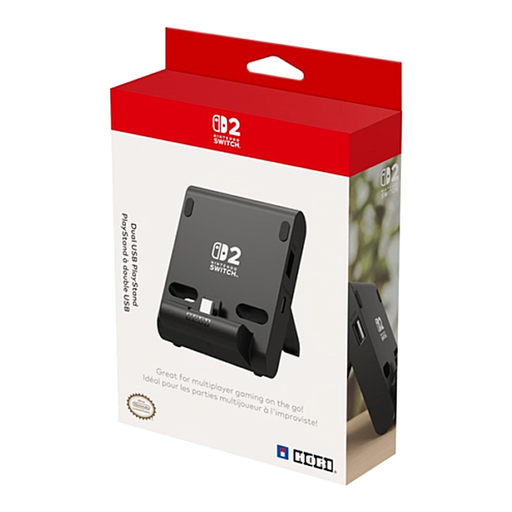
Hori Dual USB PlayStand
Why we chose it: This is the ultimate all-in-one solution for setting up multiplayer sessions anywhere. Compact and foldable, it slips easily into a bag. The ideal accessory for students or family trips.
It solves the impossible connectivity equation by integrating two USB-A ports and a pass-through USB-C charging port. Its official license is a guarantee of stability and optimal ventilation.
Lets you play and charge simultaneously. Foldable, portable design. Officially licensed by Nintendo for flawless compatibility.
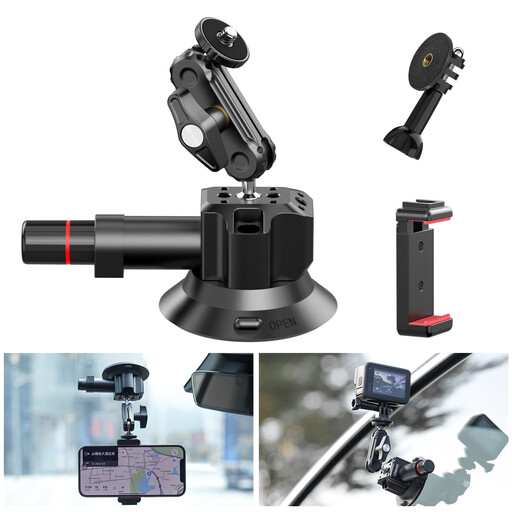
ULANZI SC-01 Universal Suction Cup Mount
Why we chose it: For those who want to mount their console on unlikely surfaces (train windows, glass tables, tiled walls...). It's not a gaming stand, strictly speaking, but an ultra-versatile mounting solution.
Its super-strong suction cup ensures rock-solid stability on smooth surfaces, solving the problem of wobbly stands. Note: it doesn't solve the lack of ports and requires an adapter to clamp the console.
Ultra-sturdy mounting on smooth, non-porous surfaces. 360° rotating head for the perfect viewing angle. Note: pair with an external USB-C hub for multiplayer.
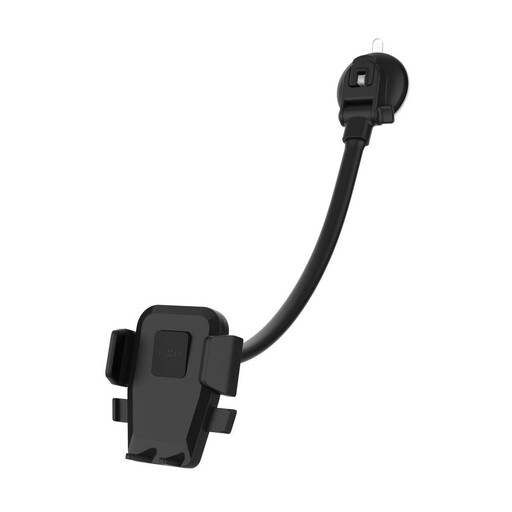
FIXED Iconiq Flex XL, black
Why we chose it: Originally designed for smartphones, this flexible arm stand is an excellent off-label solution for positioning the Switch 2 screen with pinpoint precision, for instance on a cluttered desk or a bedside table.
Its long, sturdy arm solves the problem of fixed, unergonomic viewing angles. However, use with caution as it's designed for lighter devices and, again, doesn't solve the lack of USB ports.
29 cm flexible arm for pinpoint positioning. Automatic clamp. Note: use with caution given the console's weight, and pair with an external USB-C hub.
Want to see more options?
We've put together a full selection of accessories that meet our selection criteria and safety standards.
Frequently Asked Questions (FAQ)
1. Can I use any charger with a Switch 2 multiplayer stand? It is highly recommended to use the official Nintendo AC adapter or a certified equivalent. A non-compliant charger may not provide enough power to play and charge simultaneously and, in the worst-case scenario, could damage your console or the accessory.
2. Can a stand with a built-in USB hub throttle the console's performance? No, as long as you choose a quality accessory. A well-designed model, ideally officially licensed, is specifically engineered not to hinder performance. It must ensure perfect airflow to prevent any overheating. The risk mainly exists with cheap, generic products.
3. Can you connect more than two wired controllers? Generally, these stands only offer two USB ports. To connect more controllers, you would theoretically need to connect another USB hub to one of the stand's ports. However, compatibility and the power supplied would not be guaranteed. It's best to stick to the configuration intended by the accessory manufacturer to avoid any nasty surprises.