
Tablet Buying Guide: How to Make the Right Choice
The tablet market has never been more vibrant, with models for every use case and budget. But this abundance can quickly become a minefield. Between jargon-filled spec sheets and marketing promises, it's hard to know where to turn. Our mission, as product experts at Joybuy, is to cut through the noise for you. This guide gets straight to the point: helping you choose THE tablet that will meet your long-term needs, without paying for features you don't need.
The 3 Traps to Avoid Before Buying a Tablet
Before diving into comparisons, it's crucial to avoid certain marketing traps that can lead to a disappointing purchase.
- The "More RAM is Better" Myth: Some spec sheets boast impressive amounts of RAM (sometimes over 20?GB). While a good amount of RAM is useful, it isn't everything. Finely-tuned software optimisation is far more crucial. An Apple iPad with less RAM will often feel smoother than a poorly optimised Android tablet with double the amount. What truly matters is the harmony between hardware and software.
- The "All-Day" Battery Life Promise: This marketing slogan is often based on very light usage scenarios (e.g., video playback at low brightness). For a student tablet or a drawing tablet, intensive use of the processor, screen, and stylus will cause the real-world battery life to melt away. Instead, rely on the battery's capacity, expressed in milliampere-hours (mAh), and the presence of fast charging.
- The Race for Hertz (Hz): A screen with a 120?Hz refresh rate offers a very pleasing visual fluidity, especially for gaming or web browsing. However, for use focused on reading or watching films, a 60 or 90?Hz screen is often more than enough and, crucially, more battery-efficient. The quality of the panel (LCD or AMOLED) and its resolution are far more important criteria for daily use.
The 3 Criteria That Really Matter for Your Tablet
To make an informed choice, focus on these three pillars that shape the daily user experience.
1. The Screen: Your Gateway to the Digital World
Size is the first criterion to consider. An 11-inch tablet or larger offers ideal visual comfort for multitasking, drawing, or watching movies. More compact models (8 to 10 inches) are more mobile and lightweight.
Beyond the diagonal size, the panel technology is paramount:
- LCD/IPS: A proven technology that offers beautiful colours and wide viewing angles. It's the sensible choice for excellent value for money.
- OLED/AMOLED: Found on high-end models like the Samsung Galaxy Tab S11, this technology delivers infinite contrast (blacks are truly black) and vibrant colours, as each pixel emits its own light. A treat for creatives and cinephiles.
2. The Processor and OS: The Heart and Brain
This duo dictates the smoothness, responsiveness, and scope of your tablet's capabilities.
- iPadOS (Apple): Renowned for its simplicity, security, and unmatched ecosystem of apps (especially for creatives). The power of Apple's in-house chips, like the M4 in the iPad Air, guarantees top-tier performance for the most demanding tasks.
- Android (Samsung, HONOR, etc.): Being more open, it offers PC-like file management and a huge selection of models at all price points. Samsung Galaxy tablets stand out with their One UI interface and unique features like DeX mode, which turns the tablet into a makeshift workstation.
3. The Ecosystem and Stylus: More Than Just Accessories
If note-taking or drawing is part of your plan, the quality of the stylus experience becomes a decisive factor.
- The S Pen on Samsung Galaxy Tab devices is often included and perfectly integrated into the ecosystem, with low latency and advanced software features.
- The Apple Pencil remains the benchmark for precision, but it must always be purchased separately.
Also, consider the overall ecosystem. If you already own devices from a particular brand, choosing a tablet from the same manufacturer will greatly simplify syncing your data and apps.
Top Tablet Recommendations
Here are a few options that stand out by meeting specific needs, all while avoiding the traps mentioned above.
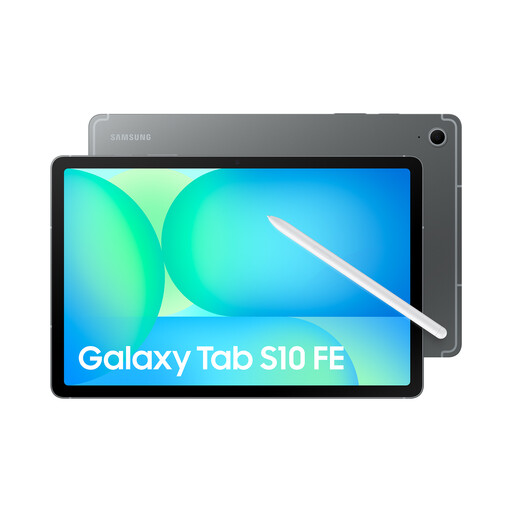
Samsung Galaxy Tab S10FE Wi-Fi 128 GB Grey
Why it stands out: Perfect for taking notes in lectures and working on the go. Its 10.9-inch format is an excellent compromise between comfort and portability. With its included S Pen, it's a complete study tool right out of the box. A strong contender for the title of best value-for-money tablet.
It counters the vague battery life trap by stating a concrete capacity of 8000 mAh and 45W fast charging. These are reliable figures that ensure it can last the day between classes.
The S Pen is included, a significant saving compared to the competition. Its IP68 certification (water and dust resistance) is a real bonus for durability when on the move.
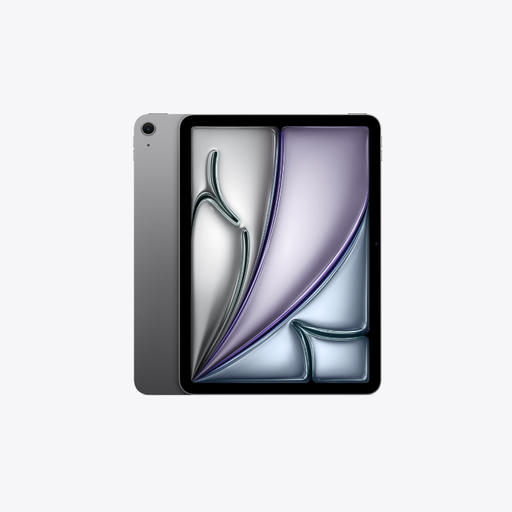
Apple 13-inch iPad Air (M4) Wi-Fi + Cellular 256 GB - Space Grey
Why it stands out: For those who demand raw power for video editing, photo retouching, or digital drawing. Its large 13-inch screen provides a very comfortable workspace, and the M4 chip handles the most demanding professional apps without breaking a sweat.
It perfectly illustrates that software optimisation is king. The M4 chip and iPadOS work in symbiosis to deliver top-tier performance, with incredibly efficient memory management.
The ecosystem of professional apps on iPadOS remains unmatched. Its 13-inch Liquid Retina display ensures remarkable colour accuracy and brightness, which are essential for graphic work.
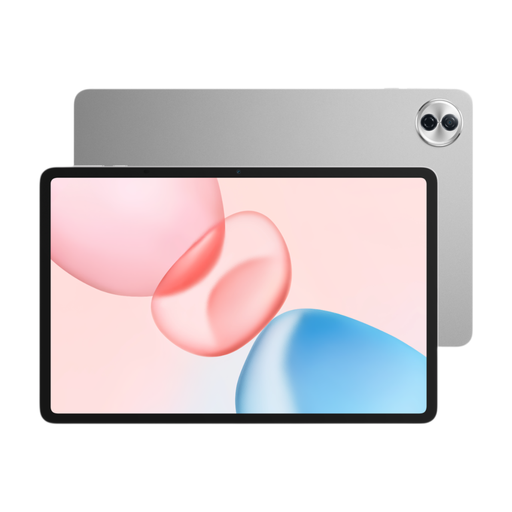
HONOR Pad 10 12.1-inch Wi-Fi - 256 GB - Grey
Why it stands out: Perfect for family movie nights, web browsing, and casual gaming. Its very large 12.1-inch screen offers great immersion for an affordable price point, and its 256 GB of storage is very generous.
It avoids technical one-upmanship (no costly 120 Hz screen) to focus on the entertainment essentials: a large, quality screen and a marathon 10100 mAh battery.
Its screen size-to-price ratio is unbeatable. The Snapdragon 685 processor is perfectly calibrated for streaming and daily tasks, ensuring a smooth experience without breaking the bank.
Want to see more models?
Explore our full selection of tablets, all chosen for meeting our demanding criteria and current standards.
Frequently Asked Questions (FAQ)
What is the lifespan of a tablet?
On average, you can expect a tablet to last 3 to 5 years. This lifespan depends on your usage, how you care for the battery, and, crucially, the duration of software support. Manufacturers like Apple and Samsung generally provide updates for several years, which extends the device's relevance and security.
Is 128?GB of storage enough in 2026?
For most users, 128?GB is a comfortable starting capacity. It allows you to store numerous apps, photos, and download movies for offline viewing. If you plan to store large files (4K videos, creative projects), you should aim for 256?GB or more. Don't forget that many Android tablets, unlike iPads, allow you to add a microSD card to expand storage affordably.
Wi-Fi or 5G Tablet: Which to choose?
For use primarily at home, school, or the office (wherever Wi-Fi is available), a Wi-Fi-only model is more than sufficient and more economical. The 5G (cellular) version is justified for frequent travellers or professionals who need a reliable connection everywhere, without depending on public Wi-Fi. Keep in mind that this involves an extra cost at purchase, as well as a subscription to a dedicated mobile data plan.