
Tablet with Keyboard Buyer's Guide: How to Choose Wisely
Navigating the jungle of tablets with keyboards can be a real headache. Between spec sheets packed with jargon and all-in-one bundles with tempting promises, it's easy to make the wrong choice. Our mission is simple: to help you find the high-performance, versatile tablet with keyboard that's right for you, without getting ripped off for useless gadgets or falling for classic marketing traps.
As a product expert at Joybuy, I'm here to help you see things more clearly. This guide sifts through the essential criteria for making the right choice, whether you're a student, a professional on the go, or simply looking for a device to share with your family.
The 3 Pitfalls to Avoid When Buying a 2-in-1 Tablet
Before you start comparing models, it's best to know the most common pitfalls. An attractive price can sometimes hide compromises that turn a good deal into a daily frustration.
- The Illusion of "Extended" RAM: Some spec sheets boast staggering RAM figures (20?GB, for example). Be careful, as this is often a sleight of hand that combines real, fast physical RAM with much slower virtual RAM (which borrows space from your storage). In practice, a tablet with 8?GB of physical RAM will always be more responsive than a model advertised as "20?GB" that actually only has 4?GB of physical RAM.
- Low-Quality Accessories: A tablet bundle with a keyboard, mouse, and stylus included? The idea is appealing, but only on one condition: the accessories must be up to snuff. A mushy keyboard, a mouse that constantly disconnects, or a case that barely protects your new device... and the entire advantage of the bundle is lost.
- Unrealistic Battery Life: The advertised battery life figures are almost always measured under lab conditions (minimum brightness, Wi-Fi off, etc.). Don't trust them. The only real benchmark is the battery's capacity, expressed in milliampere-hours (mAh). For peace of mind, aim for a minimum of 6,000?mAh. For heavy use, 8,000?mAh (or more) is your ticket to a worry-free experience.
The Tech Specs That Really Matter
To avoid making a mistake, focus on the few specifications that truly make a difference in performance and user experience for your future Android tablet.
Processor and RAM
The processor is the brain of the tablet. An Octa-Core (eight-core) model has become the standard for ensuring a smooth experience, even when juggling multiple apps.
When it comes to RAM, don't go below 6?GB of physical RAM. For more intensive use (gaming, photo editing, many open browser tabs), 8?GB of physical RAM (or more) is the bare minimum. This ensures your 2-in-1 tablet won't slow to a crawl after a few months.
Screen Size and Quality
Screen size depends on your primary use case:
- 10-inch Tablet: This is the ultimate all-rounder. It offers an excellent compromise between viewing comfort and portability, making it ideal for students and users on the go.
- Large-Screen Tablet (12 to 14-inch): Perfect for those who want to use it as a true laptop replacement for office work, streaming, or graphic design. The viewing comfort is unparalleled.
But size isn't everything; also look at the resolution. A Full HD (1920?x?1080 pixels) panel is the minimum today for a sharp image. The next step up, 2K, offers even greater comfort. Finally, prioritise IPS technology, which guarantees wide viewing angles and accurate colours.
Connectivity and Included Accessories
Good connectivity is non-negotiable. Wi-Fi 5 (or 6) and Bluetooth 5.0 (or newer) are essential for a stable internet connection and seamless pairing of your accessories (keyboard, mouse, headphones).
If you opt for a bundle, it's crucial to check that the keyboard has the correct layout for your region (e.g., QWERTY for English). A quick look at the description to check the material quality is also a good idea. A tablet with a stylus and mouse included promises a solution that's ready to use right out of the box.
Top Tablet-with-Keyboard Picks
To help you make your final choice, here are three models that check all the right boxes, each tailored to a specific user profile and always with the best performance-to-price ratio in mind.
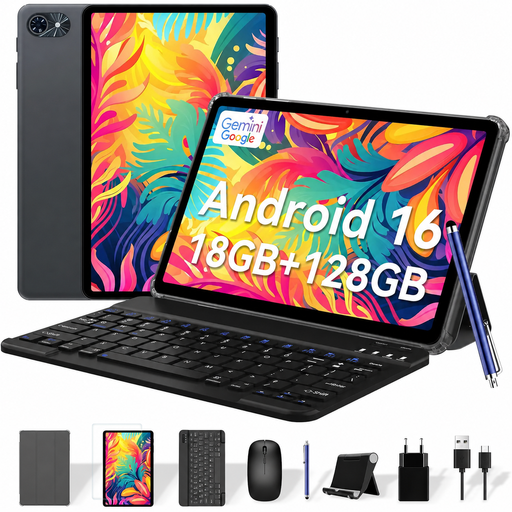
TABWEE T80 Tablet 6GB RAM + 128GB ROM
Why we love it: It's the perfect solution for anyone looking for a complete bundle and an affordable tablet without sacrificing the essentials. Ideal for browsing the web, checking emails, watching shows, and light office work.
The bundle is incredibly complete: a keyboard, mouse, stylus, case, and even a glass screen protector are included. With its 6 GB of real RAM and a 6,000 mAh battery, it provides a solid and reliable foundation for daily use.
All-in-one package: Everything is in the box, ready to go.
Up-to-date connectivity: Wi-Fi 5 and Bluetooth 5.0 for a fast and stable connection.

TABWEE T20 10.1-Inch Tablet 24GB (8+16) RAM + 256GB ROM
Why we love it: This is the quintessential student tablet. It's powerful enough for note-taking, research, and multitasking, yet compact enough to slip into any bag. Its large storage capacity is a real bonus for archiving all your courses and documents.
With its 8 GB of physical RAM and Octa-Core processor, it delivers real performance with no gimmicks. The bundle includes all the accessories you need to be productive from the very first minute.
Solid performance: The processor/physical RAM combo guarantees flawless fluidity.
Massive storage: 256 GB internally, expandable up to 2 TB. Enough to last for years to come.
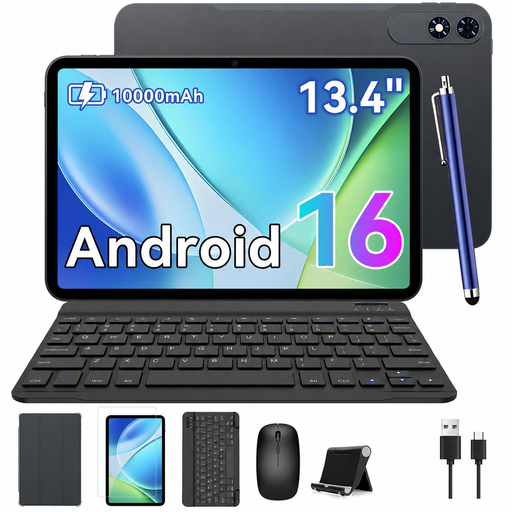
TABWEE T60Pro 13.4" Tablet 24GB RAM + 256GB ROM
Why we love it: For those looking for a large-screen tablet that can go head-to-head with a laptop. Its superb 13.4-inch 2K 120 Hz display offers exceptional visual comfort for working, streaming, or even gaming.
Here, there's no compromise on battery life, thanks to a colossal 10,000 mAh battery with 18W fast charging support. The 120 Hz screen and 8 GB of physical RAM ensure perfect fluidity, light-years ahead of entry-level tablets.
Spectacular display: A 13.4-inch 2K panel with a 120 Hz refresh rate for absolute smoothness.
Marathon battery life: The 10,000 mAh battery will let you forget your charger for days with moderate use.
Need More Options?
We have curated a complete selection of tablets that meet our quality criteria and European safety standards.
Your Questions, Our Answers
Can a 2-in-1 tablet really replace a laptop for a student?
Absolutely. For the vast majority of student tasks (note-taking, writing, research, presentations, video calls), a good tablet with a keyboard is a fantastic alternative. It's lighter, more versatile, and often more affordable. However, for very demanding software (4K video editing, 3D modelling, complex coding), a laptop will still have the edge.
What is the average lifespan of an Android tablet?
It all depends on the build quality and how you use it. On average, a well-maintained mid-range model will remain pleasant to use for 3 to 5 years. On the software side, manufacturers typically provide major Android updates for 2 to 3 years.
How do I connect the keyboard and mouse to the tablet?
It couldn't be simpler: almost all included accessories connect via Bluetooth. Just enable Bluetooth on the tablet, put the keyboard or mouse into "pairing" mode (usually with a small button), and then select it from the list of devices detected by the tablet. Once paired, the connection will be re-established automatically each time you use it.