
Ultra-Lightweight Wireless Gaming Mice: The Peak Performance Guide
In the competitive gaming arena, every millisecond counts. The right equipment can be the difference between victory and defeat, and the mouse is often the deciding weapon. An ultra-lightweight wireless gaming mouse is no longer a luxury, but a true extension of your hand, combining speed, responsiveness, and comfort for surgical precision. But when faced with a jungle of models and obscure spec sheets, how do you make the right choice?
This guide is here to decode the key features and present our selection of the best mice on the market, built for demanding gamers and FPS enthusiasts.
The Essential Criteria for Choosing Your Ultra-Lightweight Gaming Mouse
Before jumping on a model, it's crucial to understand what defines a competition-grade mouse.
Weight: The Hunt for Grams, The Sub-60g Goal
The "ultra-lightweight" criterion is paramount. A mouse weighing less than 60 grams is a game-changer: it reduces inertia and muscle fatigue during long gaming sessions. In practice, this translates to more explosive movements, more instinctive micro-adjustments, and total control. A decisive advantage in games where every reflex matters.
Sensor and Connectivity: The Precision and Responsiveness Duo
A mouse's raw performance comes down to its sensor and the reliability of its connection. Here's the jargon you need to master:
- DPI (Dots Per Inch): This is the sensor's sensitivity indicator. A high-DPI gaming mouse allows you to cross the screen with a minimal wrist movement. Be careful, though—more isn't always better! Pros often adapt this value to their style, sometimes preferring lower DPI for finer aiming control.
- Polling Rate: Measured in Hertz (Hz), it defines how often the mouse sends its coordinates to the computer. An 8000?Hz gaming mouse does this 8,000 times per second, resulting in perfectly smooth cursor tracking without the slightest stutter.
- Wireless Connectivity: Forget the old clichés about latency. Today's 2.4?GHz technology guarantees a low-latency wireless mouse, offering responsiveness identical to wired models. It's now the standard for any pro gaming mouse worth its salt.
Ergonomics and Customisation: A Mouse That Fits You
The best mouse in the world is useless if it's not comfortable. Its shape must perfectly match your grip style (palm, claw, or fingertip) and your hand. An ambidextrous gaming mouse, with its symmetrical shape, is an excellent solution for left-handers as well as some right-handers. Also, consider the extra buttons: a programmable gaming mouse allows you to assign macros or shortcuts, a significant advantage for optimising your in-game actions.
Recommended Pro Gaming Mice
From theory to practice. Here are three models that tick all the boxes for performance and have captured our full attention.
GravaStar Mercury X Pro 49g Wireless Gaming Mouse
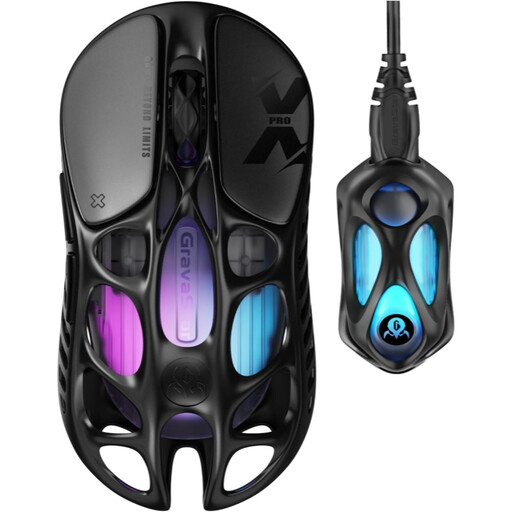
Why It Stands Out: The Mercury X Pro makes no compromises. It shatters the 50-gram barrier with a record-breaking weight of 49 grams, achieved through its bold, hollowed-out magnesium alloy shell. This feather-light weight is paired with cutting-edge technologies, including an 8K dongle that boosts its polling rate to 8,000?Hz for absolute responsiveness.
Key Features:
- Weight: 49 g
- Sensor: PAW 3950 (up to 32,000 DPI)
- Polling Rate: Up to 8,000?Hz (with included 8K dongle)
- Connectivity: Tri-mode (2.4 GHz / Bluetooth 5.1 / Wired)
- Buttons: 5 programmable buttons
Who Is It For? Gram-chasers and ultimate performance seekers looking for a mouse with a radical design that will turn heads.
ASUS ROG Harpe Ace Aim Lab Edition
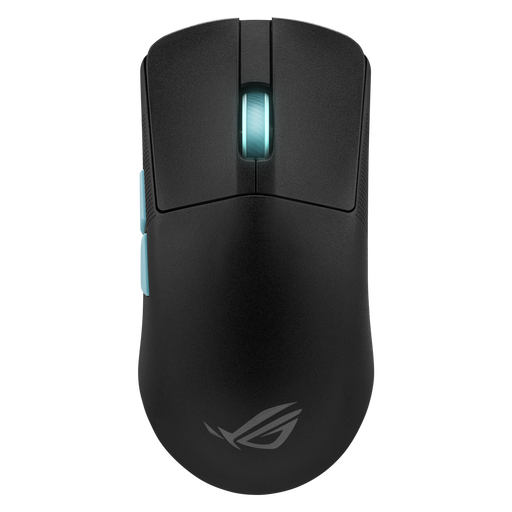
Why It Stands Out: Born from a collaboration with the experts at Aim Lab, this mouse is a true aim coach. Its exclusive software, the Aim Lab Settings Optimizer, analyses your gaming habits to suggest the perfect settings for you. A scientific approach to transform your skill.
Key Features:
- Weight: 54 g
- Sensor: ROG AimPoint (up to 36,000 DPI)
- Unique Feature: Aim Lab Settings Optimizer
- Connectivity: Tri-mode (2.4 GHz SpeedNova / Bluetooth / Wired)
- Battery Life: Up to 119 hours in 2.4 GHz mode
Who Is It For? Competitive players who want to surgically optimise their performance through data analysis, while enjoying an ultra-popular shape and a flawless sensor.
Razer Viper V3 Pro
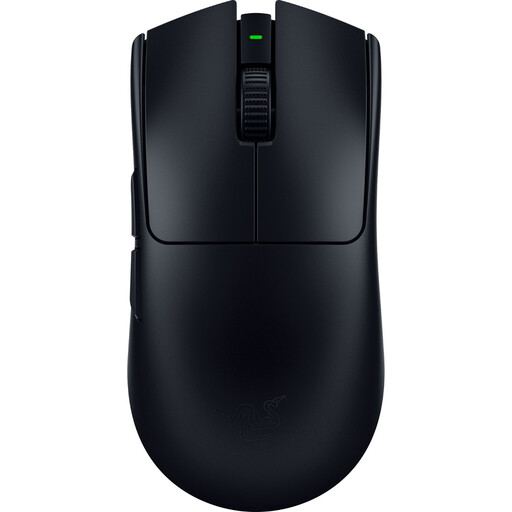
Why It Stands Out: Razer's Viper line is a true esports legend. The V3 Pro honours this legacy with a lean weight of 54 grams and Razer HyperPolling 8K Hz technology. Its Focus Pro Gen-2 optical sensor ensures flawless tracking on almost any surface, even glass.
Key Features:
- Weight: 54 g
- Sensor: Razer Focus Pro 35K Gen-2 (up to 35,000 DPI)
- Polling Rate: Up to 8,000?Hz (with included HyperPolling dongle)
- Ergonomics: Ambidextrous shape
- Switches: Razer Optical Gen-3 (90-million click lifespan)
Who Is It For? Competitors and fans of FPS gaming mice who trust the classics. Here they'll find a symmetrical shape proven on the biggest stages and the best of Razer's technology.
What If Your Perfect Mouse Is Elsewhere?
Your playstyle is unique, and your mouse should be too. If our selection doesn't match your grip or if you prefer a specific right-handed ergonomic design with more side buttons, don't worry!
Explore our complete collection of gaming mice with side buttons to find the hidden gem that will lead you to victory.
Frequently Asked Questions (FAQ)
1. Is an 8000?Hz gaming mouse really useful? Yes, if you have a keen eye and the right monitor. On a high-refresh-rate monitor (240?Hz and above), an 8000?Hz polling rate provides noticeably smoother and more responsive tracking. The difference is subtle, but for a competitive player, it can translate into a more direct connection feel with the cursor. Note that this requires a reasonably powerful PC setup.
2. Does a mouse's weight have a real impact on performance? Absolutely. Especially in FPS games. A lighter mouse has less inertia, allowing for faster flick shots and more precise aim corrections. The result? Less wrist and arm fatigue, and increased agility during long sessions.
3. Who is an ambidextrous gaming mouse for? It's the default choice for left-handed players, of course. But many right-handers also adopt it, particularly those who use a "claw" or "fingertip" grip. Its symmetrical shape offers a balance and control that some find superior to classic ergonomic shapes.