
USB-C Hub Buying Guide: Expand Your Mac or PC’s Ports
By the Joybuy Editorial Team, July 28, 2026
Modern laptops, whether a MacBook or a PC, prioritise slim designs and portability, often at the expense of connectivity. Finding yourself with only one or two USB-C ports to connect an external display, a mouse, a keyboard, and charge your device is a real challenge for many professionals, creatives, and students.
A USB-C hub is the solution to transform a single port into a true Swiss Army knife of connectivity. However, the market is flooded with models offering a wide variety of features. This guide is here to help you see things more clearly and choose the adapter that will precisely meet your needs, without drowning you in technical jargon.
The Essential Criteria for Choosing Your USB-C Hub
Before you take the plunge, let's review a few key points to ensure you choose a hub that is compatible with your hardware and perfectly suited to your use case.
1. The Number and Type of Ports
The first question to ask is simple: what ports do you need?
- Video (HDMI, DisplayPort): To connect one or more external monitors, a USB-C to HDMI hub is essential. Be sure to check the supported resolution and refresh rate. A 4K USB-C adapter at 60Hz will provide a much smoother image than a model limited to 30Hz; the difference is night and day for graphic design or video playback.
- Data (USB-A, USB-C): Essential for connecting USB drives, external hard drives, mice, or keyboards. USB 3.0 ports (or higher) ensure fast file transfers.
- Network (Ethernet): If you need a stable and high-performance wired internet connection, opt for a USB-C Ethernet hub. A Gigabit port (1000 Mbps) is the standard today for optimal speeds.
- Card Readers (SD, microSD): The small feature that makes all the difference for photographers and videographers who want to quickly transfer their photos and videos from a memory card.
2. Charging and Power (Power Delivery)
The Power Delivery (PD) feature allows the hub to charge your laptop while powering your other peripherals. A dedicated USB-C PD port on the hub receives power from your original charger and redistributes it to your computer. This is a critical factor if your machine has only one USB-C port. Make sure the hub's power output (expressed in watts, W) is sufficient for your device, especially for more power-hungry machines like the MacBook Pro.
3. Hub or Docking Station: What's the Difference?
Although the terms are often used interchangeably, there is a nuance. A USB-C hub is generally compact, powered by the computer, and designed for portability. A USB-C docking station is more comprehensive, often has its own AC power supply, and is intended for a stationary workstation with multiple displays and peripherals. The choice will therefore depend on your use case: mobile or stationary.
Our Recommended USB-C Hubs
To get you started, here are three models that meet different needs, from the most comprehensive to the most portable.
Anker USB-C Hub (14-in-1, Triple Display)
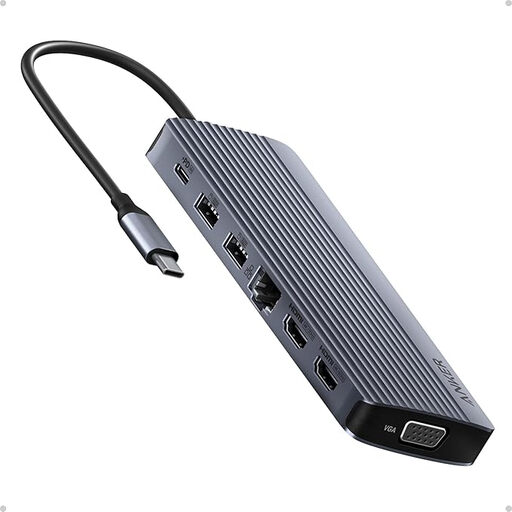
What sets it apart: An extensive array of ports to turn a laptop into a true multi-screen workstation. With its 14 ports, it covers almost every possible use case.
Highlights:
- Multi-Display Support: Capable of driving up to three external displays via two 4K HDMI ports and one 1080p VGA port.
- Absolute Connectivity: Includes a Gigabit Ethernet port, high-speed USB ports, SD/microSD card readers, and a USB-C Power Delivery port.
- Broad Compatibility: Compatible with Windows 10 (and newer) and macOS 12 (and newer) devices.
Who is it for? Stationary or remote professionals and creatives who need to connect a myriad of peripherals and multiple screens simultaneously. It blurs the line with a true USB-C docking station.
Apple USB-C Digital AV Multiport Adapter
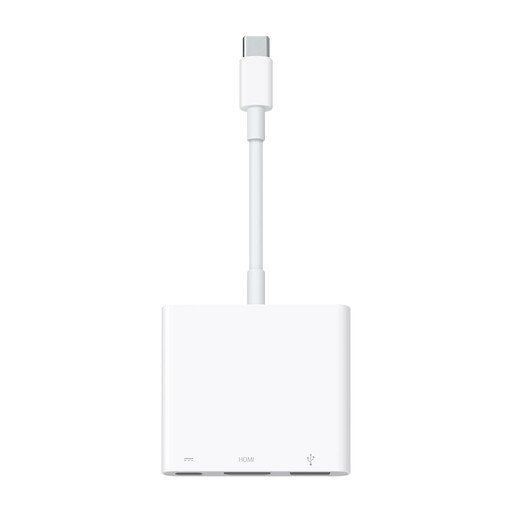
What sets it apart: Perfect integration and simplicity for fans of the Apple ecosystem. It focuses on the three most essential connections: video, data, and charging.
Highlights:
- Optimised for Apple: Ensures flawless compatibility and performance with Mac, iPad, and iPhone models equipped with a USB-C port.
- High-Quality Video: Manages video mirroring up to 4K at 60Hz on compatible devices, guaranteeing optimal image fluidity.
- Compact and Portable: Its minimalist design makes it a discreet travel companion for presentations or working on the go.
Who is it for? Users of Apple devices (MacBook, iPad Pro) looking for an official, simple, and reliable solution to connect an HDMI display and a USB-A peripheral while charging their device.
Verbatim USB-C Multiport HUB (49142)
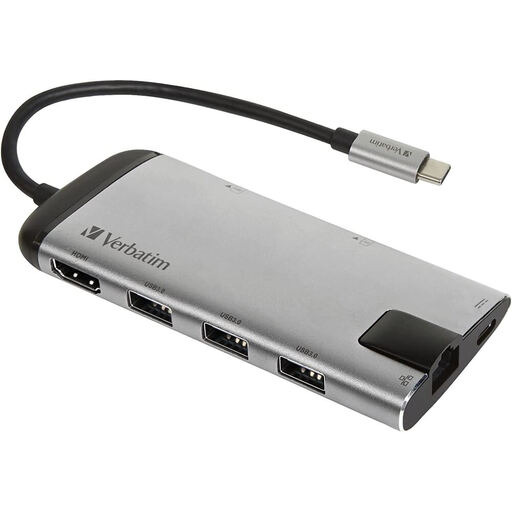
What sets it apart: An excellent balance of versatility, portability, and design. It offers the most useful ports in a compact and elegant form factor.
Highlights:
- 8-in-1 Solution: Features a 4K HDMI port, three USB 3.0 ports, a Gigabit Ethernet port, SD/microSD card readers, and a USB-C PD port.
- Designed for Portability: Its brushed metal casing is both sturdy and lightweight (around 70g), perfect for taking it anywhere.
- Pass-Through Charging: The USB-C Power Delivery port allows you to charge your laptop while using all the other ports.
Who is it for? Mobile professionals and remote workers looking for a versatile and easy-to-carry solution to connect essential peripherals (display, wired network, external storage) wherever they are.
Looking for other options?
Don't see a model that fits your needs? Looking for a very specific combination of ports?
Explore our full range of USB hubs and adapters to find the perfect model for your setup.
Frequently Asked Questions About USB-C Hubs
What is the difference between a USB-C hub and a USB-C docking station?
To put it simply, a USB-C hub is a compact, portable accessory powered directly by the computer's port. It's designed to expand connectivity on the go. A USB-C docking station, on the other hand, is larger, often has its own external power supply, and offers many more ports. It's intended for creating a stationary workstation.
My USB-C hub gets hot. Is this a sign of a malfunction?
It's normal for a USB-C hub to get slightly warm during use, especially when it's simultaneously handling charging (Power Delivery), a 4K display, and data transfers. This heat simply comes from energy conversion. However, excessive heat to the point where you can't touch it could be a sign of a malfunction. Be sure to use it in a well-ventilated area.