
Which USB-C Smart Power Strip Should You Choose?
Tangled cables behind your desk, chargers monopolising wall outlets, a laptop that struggles to charge... These frustrations are a real headache in our living and working spaces. The solution? A well-designed USB-C smart power strip, capable of bringing order to the chaos, controlling your electricity consumption, and integrating your devices into your smart home ecosystem.
In this guide, we break down the essential criteria and present our selection of the best models, whether you're working from home or are a savvy technophile.
How to Choose Your Smart Power Strip?
To avoid making the wrong choice, let's review the criteria that truly make a difference. Here are the key points to check to find the perfect model for your needs.
1. Connectivity and Remote Control
What makes a smart power strip so appealing is, of course, remote control. A WiFi smart power strip connects to your home network and gives you the power to turn outlets on or off from an app on your smartphone, wherever you are.
For even finer control and targeted energy savings, opt for a power strip with individual switches. This feature allows you to cut power to a single device without affecting the others. Also, remember to check for compatibility with voice assistants: an Alexa-compatible surge protector or one that works with Google Home can be controlled simply by voice, a real everyday convenience.
2. Power and Charging Ports (USB-C and GaN)
The era of bulky chargers is over. A modern power strip must include direct charging options for your mobile devices. The USB-C port with Power Delivery (PD) is now a must-have for fast charging smartphones, tablets, and even some laptops.
For demanding users, a 65W GaN power strip is the ideal solution. GaN (Gallium Nitride) technology allows for smaller, more efficient chargers that generate less heat while delivering high power. Such a power strip becomes a true desktop charging station, capable of simultaneously powering a laptop, a phone, and other peripherals.
3. Advanced Features and Safety
Beyond simple power delivery, some power strips go further by integrating thoughtful features. A power strip with an energy meter gives you a real-time overview of the energy used by your devices. This helps you identify the most power-hungry ones and adjust your habits to save money.
Safety is non-negotiable. Ensure the model you choose has protection against power surges (surge protector) and overloads, as well as child safety features for unused outlets. The quality of the materials, particularly the use of fire-retardant plastic, is also a guarantee of durability and peace of mind.
Recommended USB-C Smart Power Strips
Here is our selection of models that stand out from the crowd, each with its own strengths.
Dewenwils 6-Outlet Power Strip with Individual Switches
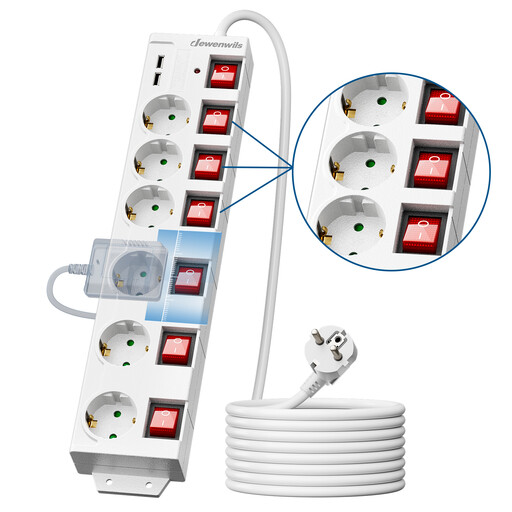
What sets it apart: Precise, outlet-by-outlet control and great installation flexibility.
This model from Dewenwils is a formidable solution for those who want to manage the power of each device with pinpoint control. With six outlets, each with its own switch, plus a master switch, it makes it easy to track and eliminate standby power consumption. Its long 5-meter cable and mounting holes offer maximum placement freedom, whether on the floor, a wall, or under a desk.
Pros:
- Six individual switches for precise energy management.
- Long 5-meter cable for flexible installation.
- Two integrated USB-A ports for charging your mobile devices.
- Built-in overload protection and child safety features.
- Spaced and 90°-oriented outlets to effortlessly plug in even the bulkiest adapters.
Who is it for? Perfect for the home office or the TV/Hi-Fi corner where peripherals (computer, monitor, printer, etc.) accumulate. A must-have if individual control and cable length are your main criteria.
KYF In-Wall Smart Outlet with Energy Meter and USB/USB-C Ports
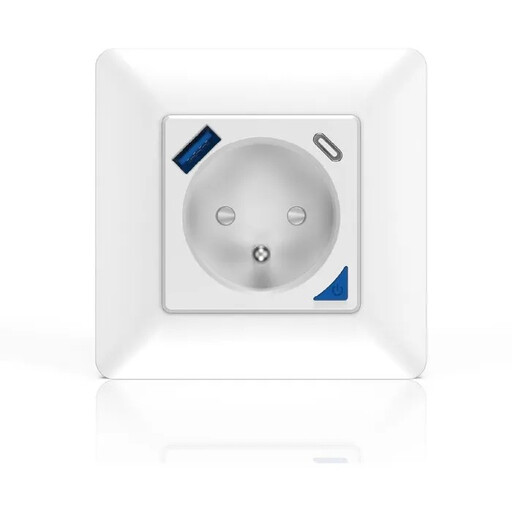
What sets it apart: A seamless and discreet integration into your wall, with consumption tracking.
This solution from KYF replaces a standard wall outlet to offer smart features with complete discretion. It allows you to control the connected device remotely via the Smart Life/Tuya app and even tracks its real-time electricity consumption. The addition of a USB-A port and a USB-C port (20W total) lets you charge your devices directly without an adapter.
Pros:
- Real-time energy consumption monitoring (kWh).
- In-wall installation for a clean look with no trailing cables.
- Remote control via Wi-Fi and compatibility with Alexa and Google Home.
- Integrated USB-A and USB-C charging ports (20W combined output).
- Enhanced safety with overload protection and a safety shutter.
Who is it for? Perfect for smart home enthusiasts and those who prefer a minimalist aesthetic. It's an excellent option for modernising an outlet in a strategic location, like near a sofa or a bedside table. Warning: Installation must be performed by a qualified electrician.
Baseus PowerCombo Digital PowerStrip 65W GaN
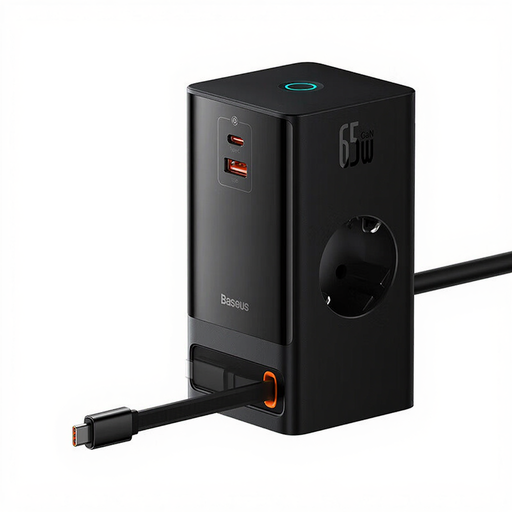
What sets it apart: A powerful and compact all-in-one charging station, thanks to GaN technology.
The Baseus PowerCombo is the ultimate solution for professionals and tech enthusiasts. It combines two AC outlets, USB-A and USB-C ports, and even a 15W wireless charger. The main USB-C port, based on GaN II technology, delivers up to 65W, enough to quickly power and charge most laptops. Its compact design and retractable power cord make it the ideal accessory for a minimalist desk or for travel.
Pros:
- 65W GaN technology for fast, efficient charging in a compact form factor.
- 6-in-1 solution: 2 AC outlets, 1 USB-A, 1 USB-C, 1 retractable USB-C cable, and a 15W wireless charger.
- Elegant and space-saving design, ideal as a desktop charging station.
- Touch control to turn the entire unit on/off.
- Multiple safety features, including shutters for the AC outlets.
Who is it for? The ideal companion for the remote professional, creative, or digital nomad looking for a single solution to charge everything (including a powerful laptop) without juggling multiple power bricks.
Looking for Other Options?
These models don't check all your boxes? Don't worry. The market is full of solutions with different numbers of outlets, cable lengths, and features. To find the hidden gem that will perfectly fit your setup, feel free to explore our complete collection.
? Discover our full range of power strip adapters
Frequently Asked Questions (FAQ)
What's the difference between a smart power strip and a regular one?
A regular power strip simply distributes power. A smart model goes much further: connected to your Wi-Fi, it can be controlled from a mobile app. This allows you to turn your devices on or off remotely, create schedules (for example, cutting all power at night), use voice commands via an assistant, and even, on some models, track your electricity consumption in real time.
Do I need a power strip with GaN technology?
GaN (Gallium Nitride) technology is a real advantage if you want to quickly charge power-hungry devices, like a laptop, via a USB-C port. GaN chargers are more compact, more efficient, and generate less heat than traditional silicon chargers. For charging only smartphones or tablets, standard USB ports will do the job perfectly well.
How can a smart power strip help save energy?
It tackles the "phantom" power consumption of devices on standby. With remote control and scheduling, you can cut power to your TV, game console, or chargers with a single tap when you're not using them (at night, when leaving home, etc.). Models with individual switches or consumption monitoring give you even finer tools to reduce your electricity bill.