
Wireless Gaming Mouse Buyer’s Guide: Top Picks and Buying Tips
Gaming without the restriction of a cable, but with rock-solid responsiveness? That's the dream for many gamers. A good wireless gaming mouse can be a game-changer, offering complete freedom of movement. But between the different technologies, sensors, and designs, making a choice can quickly become overwhelming.
This guide is here to help you cut through the noise and find the perfect wireless gaming mouse for your hand and playstyle, all without the unnecessary marketing jargon.
How to Choose the Right Wireless Gaming Mouse
Before diving into our top picks, let's review the essential criteria that will guide your choice.
Connectivity: 2.4 GHz, Bluetooth, or Both?
This is the heart of the matter.
- A 2.4 GHz connection (via a USB dongle) is the absolute gold standard for competitive gaming. It ensures near-zero latency, indistinguishable from that of a wired mouse. This is the preferred choice for fast-paced games like FPS.
- A Bluetooth gaming mouse focuses primarily on versatility. It connects to a wide range of devices (laptops, tablets, some consoles) without tying up a USB port with a dongle. It's a practical option for on-the-go or mixed use, even if its latency remains a step behind.
- Dual-connectivity models combine the best of both worlds, letting you switch from high-performance 2.4 GHz at home to the simplicity of Bluetooth on the move.
Sensor and DPI: Aim for Precision
The sensor is the engine of the mouse. DPI (Dots Per Inch) measures its sensitivity. Be careful, a gaming mouse with a very high DPI is not necessarily a guarantee of performance. A high value simply means the cursor will travel further across the screen for the same hand movement. In fact, most pro players set their mice between 800 and 1600 DPI. The key is to choose a precise sensor, without hardware acceleration, that allows you to adjust the DPI to your liking.
Ergonomics, Weight, and Buttons: The Winning Trio
Comfort is non-negotiable, especially during long gaming sessions.
- Ergonomics: An ergonomic gaming mouse is sculpted to fit the palm of the hand (most often for right-handers). Ambidextrous models, on the other hand, are suitable for everyone. Your grip style—palm, claw, or fingertip grip—will also be a deciding factor.
- Weight: The trend is clearly towards lightweight designs. A lightweight gaming mouse, often under the 80-90 gram mark, facilitates wide, rapid movements while reducing fatigue.
- Buttons: A programmable gaming mouse with extra buttons is a major asset. It allows you to assign macros or shortcuts, which is a life-changer in MMOs and RPGs, but also for office work.
Top Wireless Gaming Mouse Picks
Here are the models that caught our eye, catering to different types of players.
THE G-LAB Kult Krypton
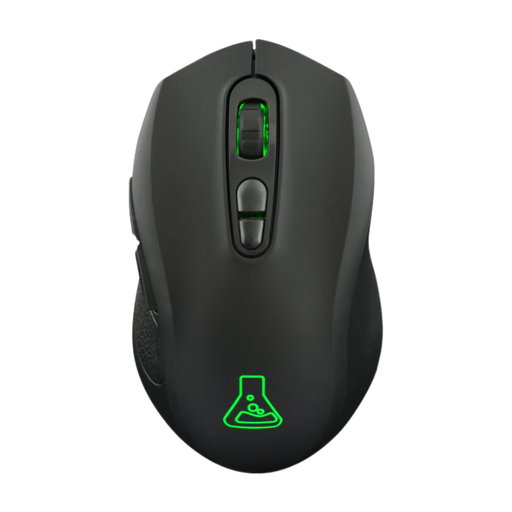
What sets it apart: Its dual 2.4 GHz and Bluetooth connectivity makes it an ultra-versatile model, capable of juggling between a gaming PC, a console, and a laptop with incredible ease.
Key Features:
- Dual Wireless Connectivity: Total flexibility to switch between the ultra-responsive 2.4 GHz mode and the convenience of Bluetooth gaming mouse mode.
- Adjustable Optical Sensor: Sensitivity can be adjusted up to 6400 DPI to match any playstyle.
- Ambidextrous Design: Its symmetrical shape and modest weight of 95g make it comfortable for all hands, including left-handers.
- Solid Battery Life: The battery lasts up to 15 hours of gameplay with the RGB gaming mouse lighting on, and climbs to 100 hours once it's turned off.
Who is it for? For gamers looking for an accessible, effective, all-around solution, perfect for switching between platforms (PC, console, Mac) without any hassle.
Razer Basilisk V3 Pro 35K
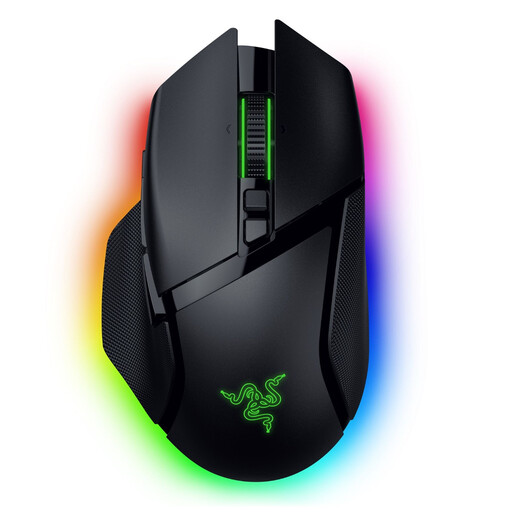
What sets it apart: This is a true powerhouse of technology, equipped with a smart scroll wheel and deep customisation options for the most demanding gamers.
Key Features:
- Cutting-Edge Optical Sensor: The Razer Focus Pro 35K DPI sensor promises formidable tracking accuracy, even on glass according to the brand.
- HyperScroll Tilt Wheel: It offers three scrolling modes (tactile, free-spin, or smart-reel) to juggle between web browsing and weapon switching in-game.
- Extreme Customisation: With 13 programmable buttons and 13-zone RGB gaming mouse lighting, you can fine-tune it to perfection.
- Ergonomic Right-Handed Design: Its shape has been engineered to ensure maximum comfort, even during marathon gaming sessions.
Who is it for? For enthusiasts and pro gaming mouse level players who demand absolute control over their hardware and seek innovative features to optimise their gameplay.
Asus ROG Gladius III Wireless Aimpoint
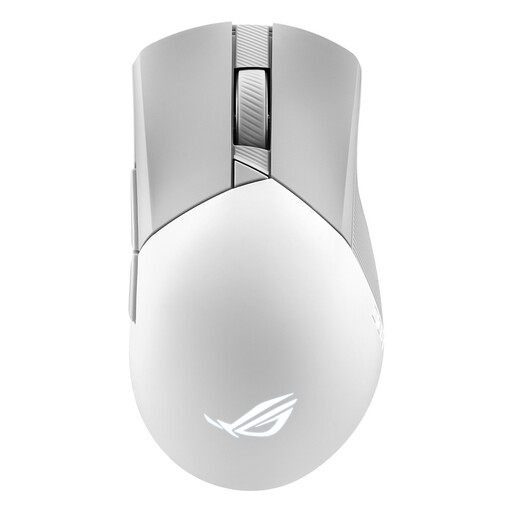
What sets it apart: Engineered for pure performance, this mouse combines a feather-light weight, an ultra-precise sensor, and hot-swappable switches. A winning combination for durability and customisation.
Key Features:
- Competition-Grade Precision: The ROG AimPoint optical sensor goes up to 36,000 DPI with a CPI deviation of less than 1% (according to Asus), ensuring unwaveringly reliable motion tracking.
- Feather-Light Weight: At only 79 grams on the scale, it allows for swift and controlled movements without the slightest effort.
- Tri-Mode Connectivity: It offers the choice between 2.4 GHz (via ROG SpeedNova technology), Bluetooth, and the good old USB cable.
- Hot-Swappable Switches: The Push-Fit Switch Socket II system allows you to swap out switches on the fly to customise the click feel or simply extend the mouse's lifespan.
Who is it for? For competitive gamers, especially FPS fans, for whom lightness, responsiveness, and absolute precision are non-negotiable. The ability to change switches will also appeal to tinkerers and those who want hardware that's built to last.
Can't Find Your Perfect Match?
If none of these models catch your eye, don't worry: there are dozens of other options out there. After all, every gamer has unique needs when it comes to grip, weight, or features.
? Explore our full range of USB Wireless Mice to discover more models.
FAQ: Your Questions About Wireless Gaming Mice Answered
Is a wireless gaming mouse really as fast as a wired one?
Yes, without a doubt. With modern 2.4 GHz technology, the difference in latency has become imperceptible to the average person. Today's wireless gaming mice boast response times of 1 ms, putting them on the exact same level as the best wired models.
What's the difference between a gaming mouse and a standard office mouse?
A gaming mouse is like the Formula 1 of computer mice. It stands out on several points: a much more precise and responsive sensor (high and adjustable DPI), a higher polling rate for perfectly smooth tracking, programmable buttons, a more robust build to withstand thousands of clicks, and often, a more aggressive look with RGB lighting.
How do I choose the right DPI setting?
This is a very personal question: there's no magic setting! A low DPI (between 400 and 800) requires more arm movement but offers ultra-precise control, often favoured in FPS games. A higher DPI (1600 and up) allows for lightning-fast reactions with simple wrist movements. Our advice: start with a medium value (around 1000 DPI) and gradually fine-tune it until you find the sensitivity that feels most natural and effective for you in-game.