
How to Choose the Right Wireless Gaming Mouse
The wireless gaming mouse market is a jungle of technical jargon and marketing promises that can quickly turn your purchase into a headache. Between the race for higher DPI, the quest for ultra-lightweight designs, and dizzying polling rates, it's easy to get lost and end up with an unsuitable model. As the Head of Product Recommendations at Joybuy, my role is to help you cut through the noise so you can choose THE model that truly fits your needs, without falling for the common pitfalls.
The 3 Pitfalls to Avoid When Buying a Gaming Mouse
Before diving into the spec sheet, it's crucial to know how to see through marketing claims that often hide design flaws or superfluous features.
- The Myth of Outrageous DPI: Many brands tout astronomical DPI (Dots Per Inch) figures, exceeding 30,000. In practice, most gamers, including pros, use sensitivities between 400 and 3,200 DPI. A very high number is no guarantee of quality; the precision and reliability of the optical sensor are far more important.
- The Obsession with Lightness at All Costs: A lightweight gaming mouse can improve movement speed, but an ultra-light design (under 60 grams) often comes at the expense of durability, battery life, or comfort for larger hands. The ideal weight primarily depends on your playstyle and grip.
- The Often-Overhyped Polling Rate: A high polling rate, like that of an 8K Hz mouse, means the mouse reports its position to the computer more frequently, thereby reducing latency. While this can offer a marginal advantage in high-level competitive gaming, the difference between 1,000 Hz and 8,000 Hz is imperceptible to most players and can over-tax your PC's resources.
Essential Criteria for an Informed Choice
To make the right purchase, focus on the features that directly impact your performance and comfort.
Optical Sensor and Sensitivity (DPI)
The sensor is the heart of your mouse. Reputable models like PixArt sensors (e.g., PAW3395 or PAW3950) are a guarantee of precise tracking, without the unwanted hardware acceleration you want to avoid at all costs. Instead of aiming for the highest DPI, look for a model with a wide adjustment range and customisable steps. This will allow you to adapt the sensitivity for any situation, whether it's for surgical precision in an FPS or for swift movements on the desktop.
Weight and Ergonomics
Comfort is non-negotiable, especially during long gaming sessions. The choice depends on three factors:
- Your Grip Style:Palm grip, claw grip, or fingertip grip. A larger, more contoured mouse is better suited for a palm grip, while a smaller, lighter model will be more suitable for other styles.
- Your Hand Size: An ergonomic gaming mouse should fit the shape of your hand to reduce fatigue.
- The Weight: Mice under 65g are considered lightweight and promote fast movements. Those between 70g and 90g offer an excellent balance of agility and stability.
There are also models specifically designed for left-handed users, like the left-handed gaming mouse from Bluestork, which offers perfectly adapted ergonomics.
Connectivity and Battery Life
Most modern wireless gaming mice offer triple connectivity:
- 2.4 GHz RF: The gold standard for gaming, offering near-zero latency via a USB dongle.
- Bluetooth: Convenient for office work or on a laptop, this connection is more power-efficient but has higher latency. A Bluetooth gaming mouse is therefore a good choice for versatility.
- Wired (USB-C): Allows you to charge the mouse while continuing to play.
Battery life is another crucial point. Check the advertised duration (usually with RGB lighting turned off) and look for a mouse with a charging dock for maximum convenience.
Top Wireless Gaming Mouse Picks
Here are a few models that stand out for their well-balanced design, catering to specific user profiles.
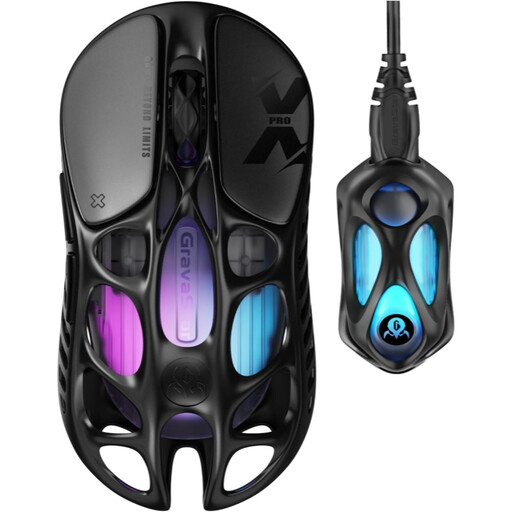
GravaStar Mercury X Pro 49g Wireless Gaming Mouse
The Ideal User: Competitive FPS players seeking absolute responsiveness. Its feather-light 49g weight and magnesium alloy shell allow for ultra-fast, precise movements, while its 8K Hz dongle promises near-zero latency.
It doesn't just boast a high DPI figure; it pairs it with a top-tier sensor (PAW 3950) and a functional, feather-light weight (magnesium alloy) that doesn't sacrifice structural rigidity.
The combination of a 49g weight and an 8,000 Hz polling rate for exceptional smoothness and speed. Unique hollowed-out design.
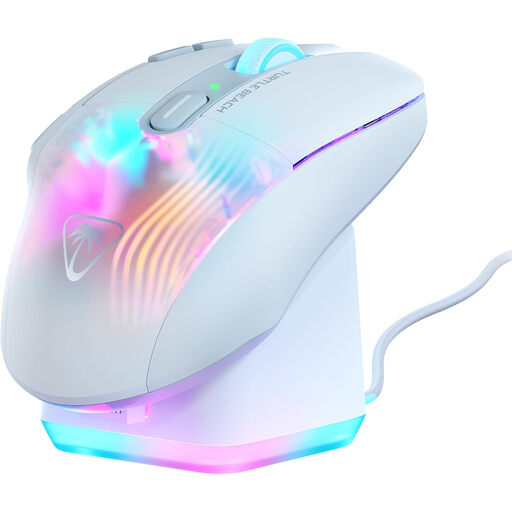
Turtle Beach Kone XP Air Gaming Mouse
The Ideal User: MMO or RPG players and content creators who need maximum shortcuts at their fingertips. Its ergonomics and charging dock make it the perfect ally for marathon gaming or work sessions.
Instead of aiming for extreme lightness, it focuses on thoughtful ergonomics and extended functionality with its multiple buttons, addressing a tangible need that goes far beyond the spec sheet.
29 programmable functions via Easy-Shift[+] technology. Includes a rapid RGB charging dock for maximum convenience and up to 100 hours of battery life.
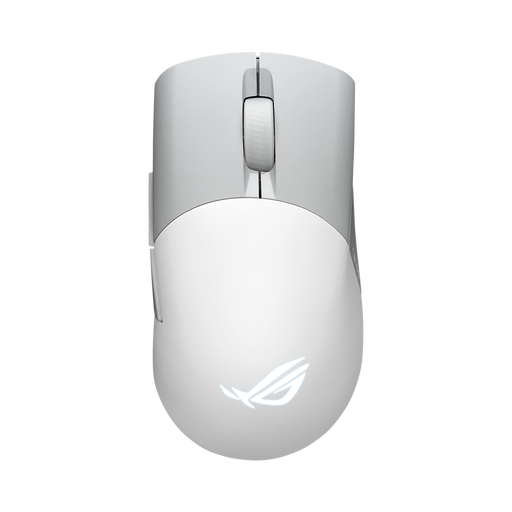
ASUS ROG Keris Wireless Aimpoint Gaming Mouse
The Ideal User: Versatile and on-the-go gamers. Its tri-mode connectivity (2.4 GHz, Bluetooth, wired) offers total flexibility for switching between a desktop and a laptop. Its 75g weight is an excellent compromise between agility and stability.
It offers a perfect balance: a moderate 75g weight for stability, versatile connectivity, and a high-performance sensor (ROG AimPoint), all without falling for marketing hype.
Tri-mode connectivity (2.4 GHz RF, Bluetooth, USB) and hot-swappable switch sockets (Push-Fit II) to customise click feel and extend the mouse's lifespan.
Looking for other options?
If these models don't check all your boxes, especially if you need more programmable buttons, explore our full selection of products that meet the same high standards.
Frequently Asked Questions
What is the real-world battery life of a wireless gaming mouse?
Battery life varies enormously from one model to another, ranging from 30 hours to over 150 hours on a single charge. This duration depends on the use of RGB lighting and the polling rate. Most product pages specify the battery life with and without lighting. Models with a charging dock greatly simplify daily recharging.
Is an 8,000 Hz polling rate really useful?
For the vast majority of gamers, a 1,000 Hz rate is more than sufficient and is the standard for a smooth, responsive gaming experience. An 8,000 Hz rate can theoretically offer lower latency, but the difference is often imperceptible under real-world conditions and requires a powerful PC to be utilised without harming in-game performance. This type of hardware is therefore aimed almost exclusively at the e-sports elite.
How do I choose between a lightweight and a heavier mouse?
The choice of weight is highly personal.
- Lightweight mice (under 70g): Ideal for fast-paced games like FPS, where large, swift arm movements are necessary. They reduce fatigue over long sessions.
- Medium-weight mice (70g - 90g): They offer an excellent compromise between agility and control, making them very versatile for most game genres.
- Heavy mice (over 90g): They provide a greater sense of stability and precision, perfect for players who make micro-adjustments primarily with their wrist.