
Buyer's Guide: Which Wireless Gaming Mouse Should You Choose?
Choosing a new gaming mouse can be a real jungle. Between spec sheets loaded with jargon and lofty marketing promises, it's not easy to find your way. Our mission: to give you simple, concrete tips to hunt down the perfect wireless gaming mouse for you, whether you're a casual gamer or an e-sports pro.
How to Choose the Right Gaming Mouse
Before you jump into our selection, let's review the essential criteria that make all the difference.
1. Connectivity: Versatility and Responsiveness
The era when wireless meant compromise is long gone. Today's best models feature tri-mode connectivity:
- 2.4?GHz: The gold standard for gaming. This mode uses a USB dongle for an ultra-low latency connection, as responsive as a wired model.
- Bluetooth: Ideal for office work and juggling multiple devices (laptop, tablet, etc.), this mode is also the most energy-efficient.
- Wired (USB-C): A reliable backup. It allows you to charge the mouse while continuing to play and ensures a connection free from any interference. A welcome fallback option.
A model that combines these three options guarantees unbeatable versatility, no matter how you use it.
2. Precision and Customisation: DPI, Sensors, and Buttons
What really matters is the mouse's ability to translate your every move with absolute fidelity.
- DPI (Dots Per Inch): This indicator measures the sensor's sensitivity. A high-precision mouse offers a wide DPI range, letting you adjust cursor speed on the fly. Perfect for switching from a wide, sweeping motion in an FPS to a micro-adjustment in Photoshop.
- Programmable Buttons: A programmable gaming mouse is your best ally for assigning macros or shortcuts to its extra buttons. A decisive advantage in MMOs or MOBAs, where every action counts.
3. Ergonomics and Design: Comfort and Style
A gaming session can easily drag on. Comfort isn't a luxury; it's a necessity.
- Shape and Weight: An ergonomic gaming mouse should fit the palm of your hand to reduce fatigue. At the same time, the trend is toward feather-light designs: a lightweight gaming mouse makes wide, rapid movements effortless.
- RGB Lighting: More than just a cosmetic gimmick, an RGB gaming mouse lets you personalise your setup. Some games even use it to display notifications, like a health bar or low ammo.
Recommended Gaming Mice unerquicklich
Enough theory, let's get practical! Here are three models that caught our eye, designed for different types of gamers.
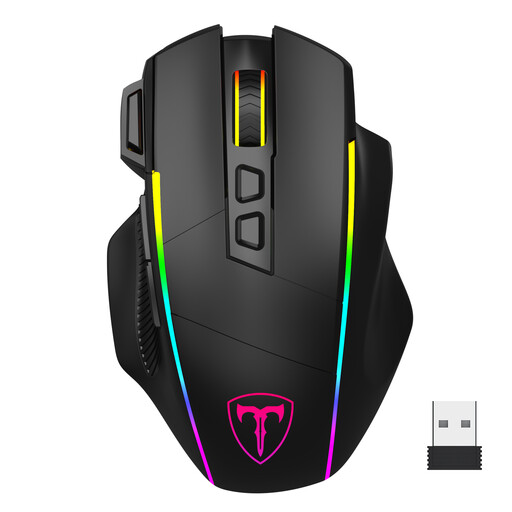
ET Wireless Gaming Mouse: Customisable Versatility
Why it stands out
This model is a true Swiss Army knife. Its tri-mode connectivity (2.4G, Bluetooth, USB-C) allows it to switch effortlessly from an intense game on your desktop to a work session on your laptop. With its 8 programmable buttons (including a rapid-fire key) and customisable Chroma RGB lighting, it adapts to any playstyle.
Strong points
- Connectivity: Tri-mode (2.4G / Bluetooth / Wired USB-C).
- Precision: Up to 10,000 DPI adjustable across 6 levels.
- Customisation: 8 programmable buttons with macro support.
- Design: RGB lighting with 7 dynamic effects.
Who is it for?
For gamers on the go or those who juggle multiple devices. It's the sensible choice for anyone looking for a complete, responsive, and customisable mouse, all at an excellent value.
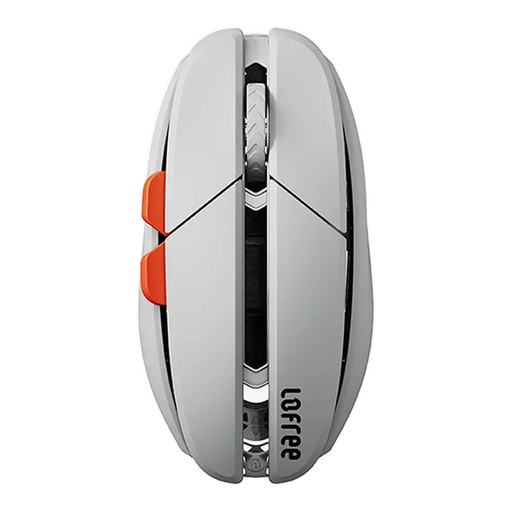
Lofree Hypace OE923: Ultra-Lightweight Performance
Why it stands out
The Lofree Hypace plays in the big leagues, with one motto: lightness and precision. Its internal magnesium alloy chassis allows it to hit a feather-light weight of just 47 grams. A dream for FPS players who chain together rapid flicks. Under the hood, the cutting-edge PAW3950 laser sensor ensures tracking with surgical precision.
Strong points
- Weight: Ultra-light at only 47g.
- Sensor: High-performance PAW3950 laser (up to 40,000 DPI via software).
- Materials: Internal magnesium alloy chassis for optimal rigidity.
- Connectivity: Tri-mode (2.4G / Bluetooth / Wired USB-C).
Who is it for?
For competitors and enthusiasts of premium hardware who want a lightweight gaming mouse that is ultra-precise, without any compromise on component performance.
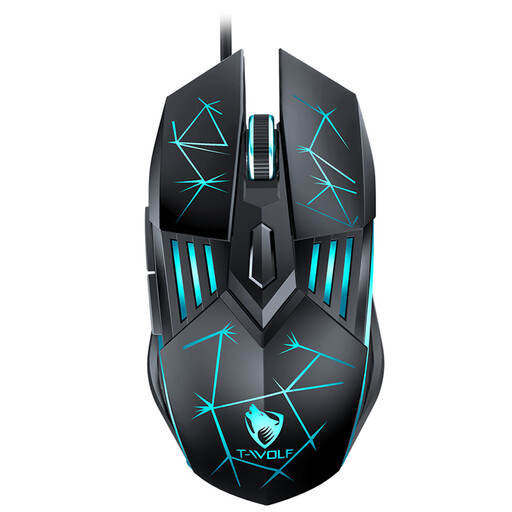
Rexsun G560: Accessible Wired Reliability
Why it stands out
Even in the wireless era, a good wired mouse remains a safe bet for many gamers. The Rexsun G560 gets straight to the point: it's a simple and effective solution. Its ergonomic design, 6 buttons, and adjustable DPI (up to 3,600 DPI) cover the essentials for gaming and office work, with the reliability of a plug-and-play USB connection.
Strong points
- Simplicity: Plug-and-play wired USB connection, no drivers required.
- Ergonomics: Designed for comfortable, prolonged use.
- Covers the essentials: 4-level adjustable DPI and navigation buttons.
- Budget-friendly price: Perfect for beginners or for a second setup.
Who is it for?
For gamers just starting out, those on a tight budget, or simply the purists who swear by the reliability and zero latency of a wired connection.
Not convinced? Discover other models
Our selection is just a taste of what's available on the market. To explore a wider range of mice, with designs, brands, and features for every taste, take a look at our full catalogue.
? Discover all our gaming mice
Frequently Asked Questions (FAQ)
1. What's the difference between a gaming mouse and a regular mouse?
A gaming mouse differs from a standard office model on several key points: a more precise sensor (higher and adjustable DPI), a faster response time, additional programmable buttons, and a more robust and ergonomic design built for long sessions.
2. Is DPI really that important?
Yes, but be wary of the race for the highest numbers. A stratospheric DPI is not a guarantee of absolute performance. The most important thing is to have a comfortable adjustment range. FPS players often prefer a low DPI for precision, while a high DPI is useful for navigating large screens. It's this flexibility that makes all the difference.
3. Is a wireless gaming mouse as responsive as a wired one?
Absolutely. Thanks to 2.4?GHz technology, today's best wireless mice have latency times so low (around 1?ms) that they are imperceptible in use and easily rival wired models. For competitive gaming, 2.4?GHz mode is therefore a safe bet.