
Wireless Gaming Mouse for Competitive Play: Buyer's Guide
For a competitive gamer, every millisecond and every gram counts. That's why the choice of a wireless gaming mouse should never be left to chance. But this freedom of movement must never come at the cost of responsiveness or precision. Faced with an overwhelming number of options and spec sheets that read like gibberish, it can be a challenge to find the right one.
To help you make an informed decision, we've broken down the technical specifications and selected the models that will make a difference in 2026. The goal? To arm you with the right information to find the mouse that perfectly matches your playstyle and ambitions.
The Essential Criteria for a Competition-Grade Mouse
Before diving into our selection, let's review the features that directly impact your in-game performance.
Weight: The Race to Be Lighter
The trend is toward lighter designs. A lightweight gaming mouse, often weighing under 60 grams, allows for quicker movements and reduces fatigue during long sessions. In FPS games, where constant repositioning and precise flicks are the norm, a feather-light weight is an undeniable advantage. It translates to better manoeuvrability and less strain over time.
Sensor and Polling Rate: The Winning Duo for Precision
Two technical terms come up constantly: DPI and polling rate (or report rate).
- DPI (Dots Per Inch): This refers to the sensor's sensitivity. A high DPI means the cursor travels further on the screen for the same physical movement. Contrary to popular belief, pros often prefer moderate values (between 400 and 1600 DPI) for optimal control.
- Polling Rate: Expressed in Hertz (Hz), this indicates how often the mouse reports its position to the computer. A 1000 Hz rate equals 1,000 reports per second (or 1 ms of latency). The latest high-performance wireless mice can go up to 8000 Hz, making latency virtually imperceptible.
Shape and Grip: Ergonomics, the Key to Comfort and Performance
The best mouse is one that feels like an extension of your hand and adapts to your grip. There are three main grip types:
- Palm Grip: The entire palm rests on the mouse. Often associated with larger, ergonomic mice.
- Claw Grip: The palm touches the back of the mouse, but the fingers are arched like a claw.
- Fingertip Grip: Only the fingertips are in contact with the mouse. Ideal for small, lightweight mice.
Ambidextrous models, suitable for both right- and left-handed users, are often perfect for claw or fingertip grips. Ergonomic mice, on the other hand, are typically designed for right-handed users and are contoured to the hand for maximum comfort in a palm grip.
Recommended Wireless Gaming Mice
Here is our selection. These models were chosen for their cutting-edge performance and are built for the most demanding players.
Razer Viper V3 Pro Wireless
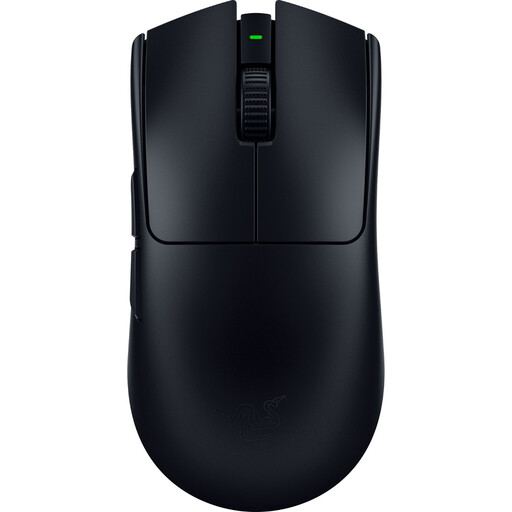
Why It Stands Out: A true benchmark in the esports world, the Viper V3 Pro is the weapon of choice for players seeking absolute speed. Its feather-light weight (54g) and symmetrical ambidextrous shape make it a precision scalpel for the quickest movements. It features Razer's HyperPolling technology, which pushes the wireless polling rate to 8000 Hz for near-zero latency.
Highlights:
- Feather-light 54g weight for extreme manoeuvrability.
- Razer Focus Pro 35K DPI Gen-2 optical sensor for surgically precise tracking.
- 8K Hz HyperPolling wireless technology for cutting-edge responsiveness.
- Razer Optical Mouse Switches Gen-3 designed for rock-solid durability.
Who Is It For?FPS competitors who use a claw or fingertip grip and for whom every gram and millisecond counts. Its ambidextrous shape makes it a universal fit.
Razer DeathAdder V4 Pro Wireless
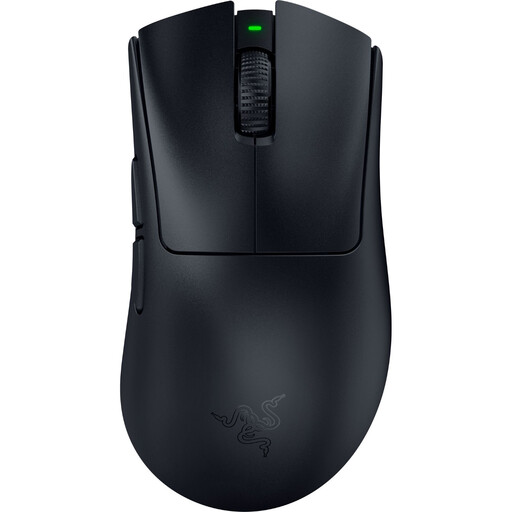
Why It Stands Out: The DeathAdder line is an icon, acclaimed for its legendary ergonomics designed for right-handed users. The V4 Pro continues this legacy while bringing it up to date: a weight of just 56g and top-tier performance. It combines the comfort of a natural grip with the cutting-edge technology required for competition, featuring a powerful sensor and an 8000 Hz polling rate.
Highlights:
- Ergonomic shape for right-handed users, acclaimed for palm grip comfort.
- Optimised weight of 56g.
- Focus Pro 45K Gen-2 optical sensor for formidably precise tracking.
- Up to 8000 Hzpolling rate via HyperSpeed Wireless technology.
- Up to 150 hours of battery life (at 1000 Hz).
Who Is It For? Right-handed gamers seeking absolute comfort for long sessions without compromising on performance. A top-tier choice for palm grip users looking for a versatile competition-grade mouse.
Asus ROG Harp Ace Aim Lab Edition Wireless
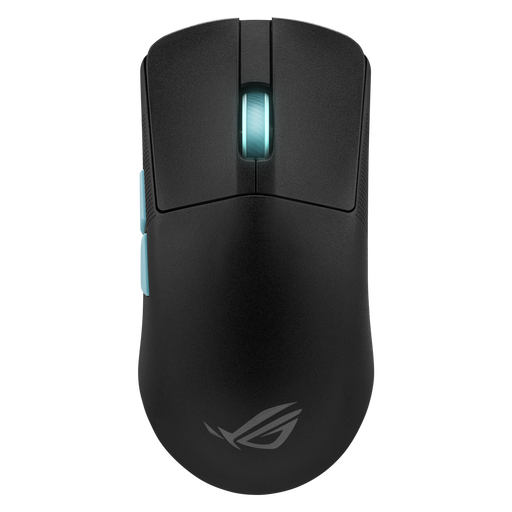
Why It Stands Out: Born from a collaboration with the experts at Aim Lab, the ROG Harp Ace stands out for its almost scientific approach to performance. Through the Armoury Crate software, an exclusive feature analyses your grip and movements to suggest the perfect settings (DPI, sensitivity, etc.). At 54 grams and with an ambidextrous shape, it's a personal coach disguised as a mouse.
Highlights:
- Feather-light 54g weight and ambidextrous shape.
- Exclusive Aim Lab Settings Optimizer feature for tailored settings.
- ROG AimPoint optical sensor with 36,000 DPI.
- Tri-mode connectivity: 2.4 GHz SpeedNova, Bluetooth, and wired USB-C.
Who Is It For? FPS players who love to analyse their stats and fine-tune their settings to gain every possible advantage. Its light weight and versatile connectivity make it a first-rate choice for tryhards who want to optimise every detail of their game.
What About MMOs or MOBAs?
Our selection focuses on light weight and raw performance, ideal for FPS games. But for MMOs or MOBAs, the game changes: an arsenal of programmable buttons to cast spells and macros becomes essential.
If your favourite games require an avalanche of shortcuts, take a look at our selection of 12-button PC gaming mice, which are much better suited for that purpose.
Frequently Asked Questions (FAQ)
What's the difference between DPI and polling rate?
To put it simply, DPI (Dots Per Inch) measures sensitivity: the higher the DPI, the faster the cursor moves on screen. The polling rate (or report rate), measured in Hz, is the communication frequency with the PC. A high rate (1000 Hz, 8000 Hz) reduces latency, which is the delay between your physical movement and its appearance on screen.
Is a wireless gaming mouse really as responsive as a wired model?
Yes, without a shadow of a doubt. Modern 2.4 GHz wireless technologies (like Razer HyperSpeed or ASUS ROG SpeedNova) now offer latency that is completely indistinguishable from a wired model. The proof? They are used by the majority of professional players in competition. A cable is no longer a guarantee of performance.
How do I choose the ideal weight for my esports mouse?
This is a very personal choice. Generally, a lightweight gaming mouse (under 60g) is preferred for FPS games: it facilitates large, sweeping movements and limits fatigue. However, some players prefer slightly heavier models (70-80g) for a greater sense of stability. There's no golden rule: it all depends on your strength, your playstyle, and, most importantly, your personal feel.