
Wireless Gaming Mouse Buying Guide for Competitive Play
In competitive gaming, every millisecond and every gram counts. The era of choosing a wireless gaming mouse at the expense of performance is long gone. Today's technologies deliver lightning-fast responsiveness, putting them on par with their wired counterparts. But between polling rates, DPI, sensor types, and weight, it's easy to get lost in the jungle of tech specs. Yet, these are the very features that will forge your in-game precision and endurance.
This guide is here to decode the jargon and present our selection of the best mice to help you shine in 2026, no matter your playstyle or budget.
Key Criteria for Choosing Your Wireless Gaming Mouse
Before diving into our top picks, here's a reminder of the three key points that will make all the difference once you're in the game.
Weight and Ergonomics?: The Winning Duo for Agility
For players of FPS and other fast-paced titles, weight has become a major factor. A lightweight gaming mouse, ideally under 70 grams, allows for more explosive movements and reduces fatigue during long gaming sessions. To achieve this, manufacturers are outdoing each other with ingenious designs like perforated ("honeycomb") shells or premium materials such as magnesium alloy. The shape is just as crucial: an ergonomic design will perfectly fit a right-hander's palm, while an ambidextrous mouse, with its symmetrical form, will suit everyone.
Sensor, DPI, and Polling Rate?: The Performance Trio
The sensor is the heart of the beast. Market leaders, like the PAW3950 sensor, are renowned for their flawless tracking, never spinning out even during the most abrupt accelerations. Sensitivity, expressed in DPI (Dots Per Inch), defines the cursor's speed on the screen. Be warned, a high DPI number is not a guarantee of quality! Most pros set their mice between 400 and 1600 DPI to prioritise control and precision.
Finally, the polling rate, measured in Hertz (Hz), is the number of times per second the mouse reports its position to the computer. While 1000?Hz is the standard, the new 8KHz mice (8000?Hz) push the concept to its absolute limit, offering near-zero latency.
Battery Life and Connectivity?: Freedom Without Compromise
Wireless means battery-powered. Good battery life is therefore crucial to avoid running out of power mid-game. It varies greatly depending on usage and whether the RGB lighting is activated. Keep an eye on the advertised duration and charging time. For connectivity, 2.4?GHz via a USB dongle remains the king for minimal latency, although Bluetooth and wired mode are often offered as backup options.
Top Wireless Gaming Mouse Picks
Let's get down to business. Here are the models that particularly caught our attention.
GravaStar Mercury X Pro
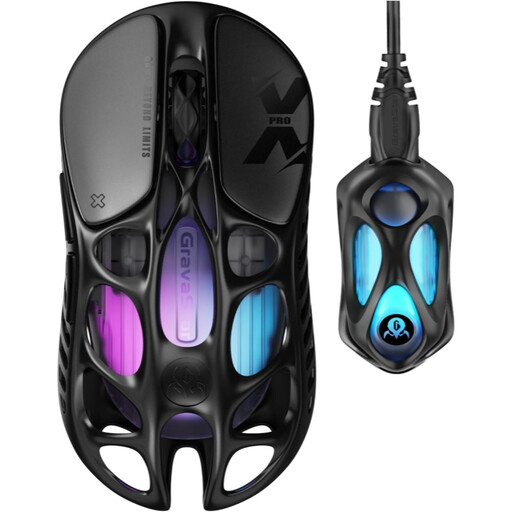
Why it stands out?: Built for raw performance, the Mercury X Pro is a true Formula 1 car. Its hollowed-out magnesium alloy chassis allows it to hit a record-breaking featherlight weight of 49 grams. Paired with its 8KHz dongle and the PAW3950 sensor, it promises near-instantaneous responsiveness for gamers who leave nothing to chance.
Pros:
- Ultra-lightweight at 49?g for maximum manoeuvrability.
- Wireless polling rate up to 8000?Hz for minimal latency.
- PAW3950 optical sensor with sensitivity up to 32,000 DPI.
- Triple-mode connectivity: 2.4?GHz, Bluetooth 5.1, and wired USB-C.
- Magnesium alloy structure for enhanced rigidity.
Who is it for?? For the e-sports competitor and the hardcore PC gamer looking to gain every possible technical advantage through minimal weight and absolute responsiveness.
THE G-LAB Kult Caesium
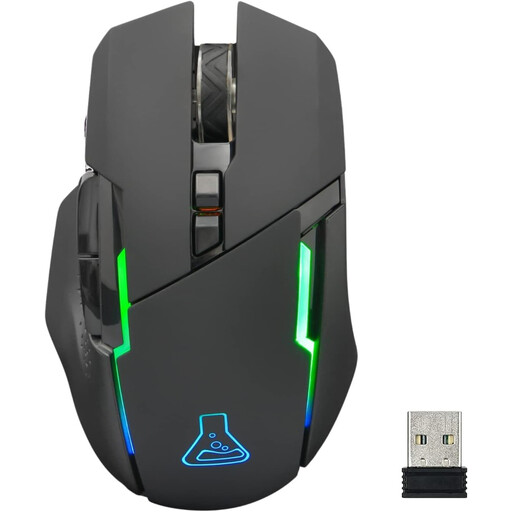
Why it stands out?: The Kult Caesium positions itself as a smart, balanced, and accessible choice. It checks all the boxes for a good wireless gaming mouse: reliable 2.4?GHz connection, adjustable sensitivity, and RGB lighting, all with very decent battery life, especially if you turn off the lights.
Pros:
- Adjustable sensitivity up to 7200 DPI across 5 levels.
- Battery life of up to 32 hours with RGB lighting disabled.
- Ergonomic right-handed design with a soft-touch coating.
- Broad compatibility (PC, PS4, Xbox One, Mac).
- 6 buttons and 5 memory profiles.
Who is it for?? For regular gamers who want a versatile and effective model for both PC and console, without necessarily needing the extreme specs (and price) of competition-grade models.
RAPOO VT9Pro 4K
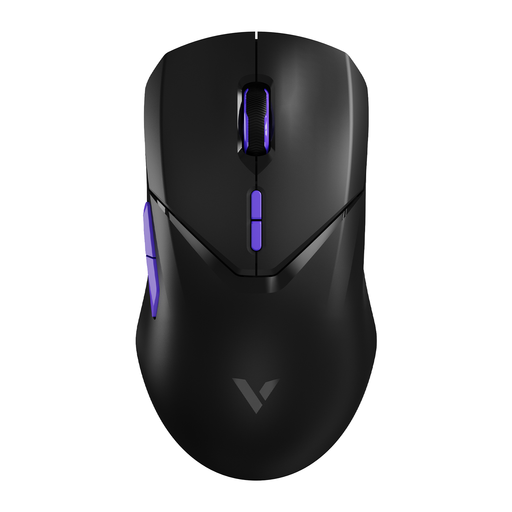
Why it stands out?: The RAPOO VT9Pro 4K offers a smart compromise between lightness, performance, and battery life. Weighing in at 68 grams and featuring a 4000?Hz polling rate, it ensures excellent responsiveness. Its ambidextrous design and, above all, its marathon 180-hour battery life make it a prime ally for sessions that go on and on.
Pros:
- 4000?Hz wireless polling rate for excellent responsiveness.
- Low weight of 68?g and an ambidextrous design.
- Extremely long battery life of up to 180 hours.
- High-performance PAW 3398 optical sensor up to 26,000 DPI.
- 10 programmable buttons for advanced customisation.
Who is it for?? For the versatile gamer who wants a light and responsive mouse, but for whom record-breaking battery life and a symmetrical shape are priorities.
What About MMO/MOBA Games??
If your daily gaming life is spent in MMOs or MOBAs, you probably need more shortcuts under your thumb. A mouse equipped with multiple side buttons will be far more suitable for launching your macros, spells, and abilities at lightning speed.
? Discover our selection of gaming mice with 4 or more side buttons
Frequently Asked Questions About Wireless Gaming Mice
Is a wireless gaming mouse really as fast as a wired one??
Yes, without a shadow of a doubt. For the vast majority of gamers, including at the professional level, the difference is imperceptible. Current 2.4?GHz wireless technologies, with a polling rate of 1000?Hz (and even higher on an 8KHz mouse), offer a latency of about 1?ms. The gain in freedom of movement is so significant that it sweeps away this tiny technical difference.
What exactly is DPI, and how much do you need??
DPI (Dots Per Inch) measures the mouse's sensitivity. The higher the number, the faster the cursor will move on the screen for the same hand movement. There's no magic setting: it all depends on your screen resolution and, most importantly, your personal preference. For reference, most FPS players prefer a fairly low DPI (between 400 and 1600) for maximum aiming control.
Does the weight of a mouse really make a difference??
Absolutely. Weight has a direct impact on manoeuvrability and fatigue. A lightweight gaming mouse is easier to flick and stop on a dime, a crucial advantage for flick shots in shooting games. It also reduces strain on the wrist and arm over time. Conversely, some players prefer the stable feel of a slightly heavier mouse. It's primarily a matter of preference and playstyle.