
Wireless Lavalier Microphone: How to Choose the Right Model for Your Videos
A wireless lavalier microphone can significantly improve voice clarity in a vlog, interview or live stream. The trouble is, product listings often lump together theoretical range, noise reduction and compatibility. To avoid a disappointing purchase, focus primarily on the connector, battery life and your actual usage conditions.
The Pitfalls to Avoid Before You Buy
1. Confusing Advertised Range with Usable Range
A range of 100 metres is usually measured in open space, without walls or interference. In a flat, classroom or busy street, the distance you can actually rely on may be far less. With a microphone for smartphone, connection stability is often more important than the maximum figure on the box.
2. Believing All Noise Reduction Preserves a Natural Voice
A microphone with noise reduction can dampen ventilation, traffic or wind noise. But overly aggressive processing can also alter the tone, cut certain syllables or make the voice sound artificial. Adjustable modes are therefore valuable for tailoring the output to your environment.
3. Overlooking the Connector and What's in the Box
A wireless lavalier microphone with a USB-C connector doesn't plug in the same way as a wireless Lightning microphone. Check the port on your phone, tablet, camera or computer, and make sure a compatible receiver is included. If you're filming two people, also ensure the box contains two transmitters.
The Key Criteria to Check
Compatibility: USB-C, Lightning or Camera
Before placing your order, identify exactly which device will be recording the sound.
- A wireless USB-C mic generally works with devices that have a USB-C port supporting audio input.
- A wireless Lightning microphone is for Apple devices that still have this connector.
- For a camera or audio device with an analogue input, check the receiver type and the cable supplied.
- On a computer, verify that the system recognises the receiver and that it's selected in your video conferencing or streaming software.
Recent smartphones may also require you to grant microphone access or manually select the audio source within the app you're using.
Battery Life and Charging
For occasional recording, a few hours may be enough. For a full day of filming, however, a charging case is far more convenient. Compare the stated battery life for each transmitter, the charging time and whether you can use the system while it's charging.
Actual battery life varies depending on recording volume, noise reduction and the distance between transmitter and receiver. Allow a margin, especially for streaming, interviews or online classes.
Transmission Quality and Environment
Sample rate and bit depth tell you about audio capture, but they don't predict the final result. Microphone placement, rustling against clothing and wind are often the deciding factors.
For a microphone for vlogging, prioritise a secure clip and a wind muff. For a microphone for interviews, look above all for a reliable connection and, if possible, two transmitters. For streaming, a mute button and a clearly visible on-screen indicator can make life much easier.
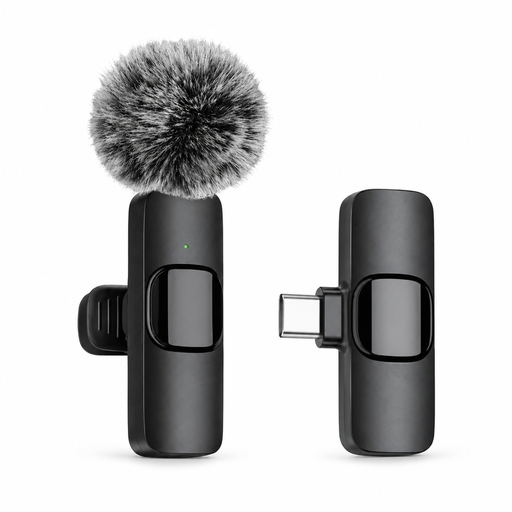
Verbex K9-Black Microphone Live Microphone Wireless
Why this model might suit you: Its compact size and Type-C interface can get you started with short videos, video calls or on-the-go recordings.
The listing mentions noise reduction and a wind muff. Still, double-check the exact compatibility with your phone and what's included in the box before buying.
Type-C interface, compact design and a stated battery life of 3 to 6 hours according to the product listing.
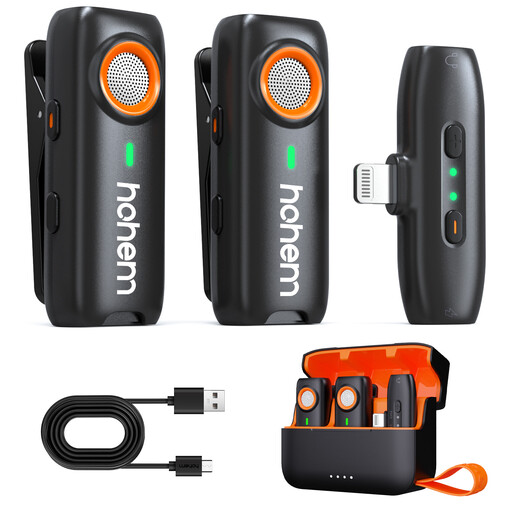
hohem Wireless Lavalier Microphone
Why this model might suit you: Its DSP settings and charging case are aimed at creators who switch between indoor shoots, outings and interviews.
The three levels of noise reduction let you adjust the processing rather than relying on a single setting.
Stated range up to 100 metres in open space, 48 kHz/16-bit audio and total battery life stated at up to 20 hours with the case.
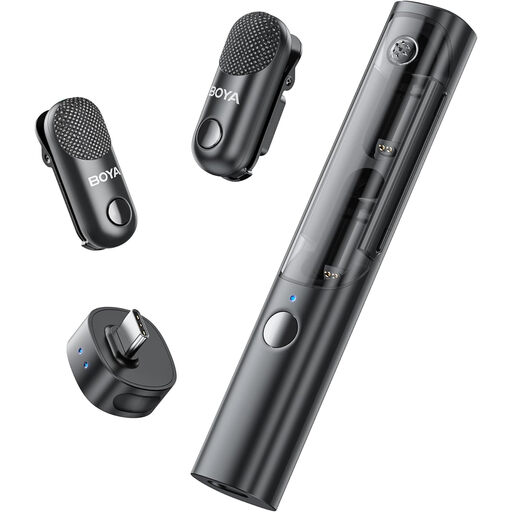
BOYA Magic-05 USB-C AI-Powered Transformable Wireless Lavalier Microphone
Why this model might suit you: With its two transmitters and receiver, this kit is ideal for interviews, two-person conversations and regular productions on a USB-C device.
The safety information notes that noise reduction may slightly alter the tone in a very quiet environment: disable it if you prefer a natural sound.
Configuration with 2 transmitters and 1 receiver, charging case and stated compatibility with recent iPhones, Android devices and computers.
Looking for more options?
We've curated a comprehensive, real-time updated list of products that meet these demanding criteria and European safety regulations.
Installation and Everyday Use
- Charge the transmitter and receiver before you start filming.
- Plug the receiver into your smartphone or camera, then pair them following the instructions in the manual.
- Clip the microphone near your collar, without placing it directly against wrinkled fabric.
- Do a short test recording and check for any rustling noises.
- Outdoors, use the supplied wind muff and avoid tucking the transmitter under a thick jacket.
- Store the modules in their case, away from moisture and extreme temperatures.
Frequently Asked Questions About Wireless Lavalier Microphones
Will a wireless lavalier microphone work with all smartphones?
No. The connector, operating system and audio input support all need to be compatible. A Lightning model doesn't automatically replace a USB-C one. Also check whether an adaptor is required.
What battery life should I plan for a shoot?
For occasional use, a battery life of 3 to 6 hours may be enough. Creators who record all day are better off choosing a charging case or a model with several extra hours of battery life.
Is noise reduction essential for an interview?
It can be useful in a busy environment, but it won't compensate for poor microphone placement. In a quiet setting, test the different modes and stick with the one that reproduces the voice most naturally.