
How to Choose the Right Wireless Mechanical Gaming Keyboard
A clean desk, free from the eternal tangle of cables, while still enjoying rock-solid responsiveness for your gaming sessions?: it's the dream of many a gamer. The wireless mechanical gaming keyboard has become the must-have accessory for those who refuse to compromise on performance or aesthetics. But with a jungle of form factors, switch types, and connectivity options, finding your way can be a real headache.
This guide is here to help you make sense of it all. We'll break down the essential criteria and present a selection of models that tick all the boxes for PC and console gamers.
How to Choose the Right Gaming Keyboard??
Before you take the plunge, let's go over a few key concepts. These are the factors that will make all the difference, whether you're in the middle of a game or using it for daily tasks.
1. Form Factor?: TKL, 65?%, and Space for Your Mouse
The number one advantage of a compact gaming keyboard?? The space it frees up on your desk. This is far from a minor detail for FPS players who use low sensitivity settings, for whom every square inch is precious.
- TKL (TenKeyLess) Form Factor?: This layout does away with the number pad, making it about 20?% more compact than a standard model. You still get the dedicated arrow keys and the navigation cluster (Insert, Delete, etc.).
- 65?% Form Factor?: Even more minimalist, this layout keeps the arrow keys but sacrifices the function row (F1-F12) and the navigation cluster. These are still accessible via a combination with the Fn key. A 65?% mechanical keyboard is a particularly popular option for a clean, high-performance setup.
2. Mechanical Switches?: The Typing Feel
Unlike membrane keyboards, a mechanical model features an independent switch under each key. The result?? Far superior precision, durability, and typing feel. It's the type of switch that defines this famous under-finger sensation.
For competitive gaming, red switches (known as linear) are often the top choice. These switches offer perfectly smooth travel with no tactile bump or audible click, ideal for rapid-fire actions (spamming). This is a decisive advantage in fast-paced games that demand flawless responsiveness.
3. Connectivity?: Wireless for Freedom
Fear not—wireless technology has made giant leaps, banishing the old demons of latency.
- 2.4?GHz?: This connection, via a USB dongle, offers extremely low latency that is virtually imperceptible compared to a wired connection. It's the preferred connection for competitive gaming.
- Bluetooth?: A Bluetooth mechanical keyboard shines with its versatility, allowing you to easily connect to multiple devices (PC, tablet, etc.) without a dongle. The latency may be slightly higher, but it's more than sufficient for the majority of games.
More and more models are also compatible with next-gen consoles, making them an excellent choice as a wireless keyboard for PS5 or Xbox Series.
Gaming Keyboard Recommendations
To help you cut through the noise, here are a few models that stand out from the crowd, each with its own strengths to suit your playstyle.
THE G-LAB Keyz Titanium WL?: The Compact, Wireless Option
Why It Stands Out
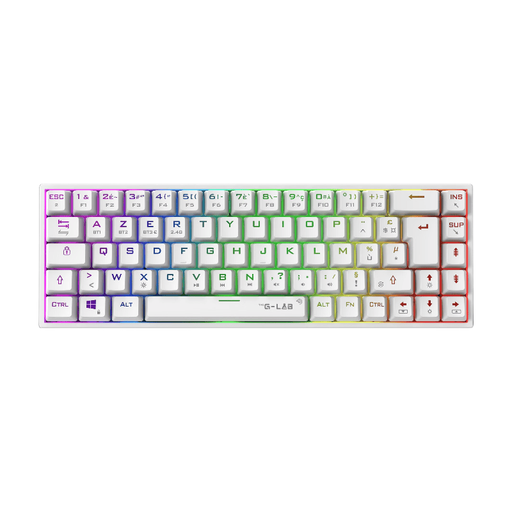
The Keyz Titanium from The G-Lab ticks all the boxes for demanding gamers. Its 65?% AZERTY form factor frees up precious desk space, while its white gaming keyboard design and customisable RGB lighting give it a particularly polished look. Equipped with Outemu Red switches (linear), it delivers the essential responsiveness for fast-paced games. Its dual wireless connectivity (2.4?GHz and Bluetooth) gives it formidable versatility.
Highlights
- Ultra-compact 65?% form factor, ideal for gaming.
- Linear mechanical switches (Red) for maximum responsiveness.
- Dual wireless connectivity?: 2.4?GHz (low-latency) and Bluetooth.
- Compatible with PC, PS4, PS5, and Xbox.
- Dedicated software to customise macros and RGB lighting.
Who Is It For?? This keyboard is aimed at gamers looking for a peripheral that is high-performance, compact, and stylish to optimise their setup. It will naturally find its place on minimalist desks and will delight FPS players who need maximum space for wide mouse movements.
See THE G-LAB Keyz Titanium WL
THE G-LAB Keyz Caesium TKL?: The Wired TKL Alternative
Why It Stands Out
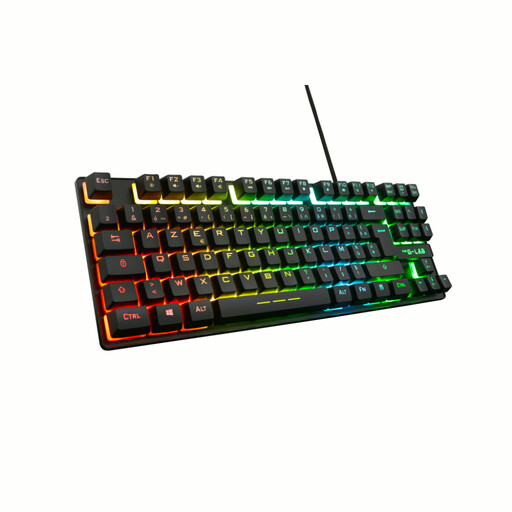
Admittedly, it's neither mechanical nor wireless. Nevertheless, the Keyz Caesium TKL is an interesting alternative for those primarily seeking a compact form factor and a quiet typing experience. This is a wired membrane keyboard with a TKL layout. It's more compact than a standard model but retains the valuable arrow key cluster and navigation keys. Its keystrokes are designed to be both responsive and silent, a significant plus if you share your gaming or workspace.
Highlights
- Compact TKL form factor to free up space.
- Discreet and silent membrane keystrokes.
- RGB backlighting with 11 lighting effects.
- 26-key anti-ghosting to prevent input errors.
- Compatible with PC and consoles (PS4, PS5, Xbox).
Who Is It For?? This model is aimed at gamers on a tighter budget, or those who prefer the quietness of a membrane keyboard. It's an excellent entry point for getting a compact keyboard with a gaming aesthetic, without the characteristic noise of mechanical switches.
See THE G-LAB Keyz Caesium TKL
Want a Look That's Out of the Ordinary??
Because a setup's look is above all a matter of taste, you might be looking for a design that breaks the mould. Pastel colours, original shapes... if that's you, you'll love our dedicated selection.
Take a look at our category dedicated to the cute wireless mechanical keyboard to find the rare gem that will elevate your desk.
Frequently Asked Questions
What is the advantage of a mechanical keyboard for gaming?? First, its durability?: mechanical switches are designed to withstand tens of millions of keystrokes. Second, the feel and precision are unparalleled. Technologies like anti-ghosting and N-Key Rollover (NKRO) complete the package, ensuring that every action, no matter how frantic, is registered perfectly.
Is a wireless gaming keyboard as responsive as a wired one?? Absolutely. With today's technology, the difference has become negligible. A 2.4?GHz wireless connection via a USB dongle provides latency so low that it's imperceptible to the vast majority of gamers, even in competitive play. A modern RGB wireless gaming keyboard therefore offers the best of both worlds?: wireless freedom and wired performance.
Can you use a wireless gaming keyboard for the PS5?? Yes, most wireless keyboards are compatible with the PS5. The connection is made by simply plugging the 2.4?GHz USB dongle into one of the console's ports. However, be sure to check the exact compatibility on the spec sheet for the model you're interested in before you check out.