
How to Choose a Wireless Mechanical Keyboard for Performance
In the world of PC peripherals, a quiet revolution is underway: the wireless mechanical keyboard is no longer a compromise, but a top-tier choice for tech enthusiasts, gamers, and professionals alike. Gone are the days of choosing between wireless freedom and the responsiveness of a wired connection. Today, you can finally achieve a clean desk setup without sacrificing performance or typing feel.
With an overwhelming number of options on the market, it can be tough to know where to start. This guide is here to help you navigate the choices, decode the key criteria, and discover our selection of models designed for specific needs—from competitive gaming and programming to building your very own custom mechanical keyboard.
How to Choose the Right Wireless Mechanical Keyboard
Before you dive in, let's review the essential points to consider to make the right choice.
1. Form Factor: Compact or Full-Size?
The size of the keyboard directly impacts your ergonomics and the amount of desk space it occupies.
- Full-size (104/105-key): The classic layout with a number pad, perfect for data entry and office work.
- 96% or 98%: An excellent compromise that integrates the number pad into a more compact chassis.
- TKL (Tenkeyless, 80%): A very popular form factor that omits the number pad to free up maximum space for your mouse.
- 75%: A compact keyboard that keeps the function keys (F1-F12) and arrow keys in a very dense layout. A format favoured by developers and gamers alike.
2. Customisation at the Heart of the Experience: Hot-swap and Gasket Mount
What makes modern mechanical keyboards so exciting is the ability to customise them to your liking.
- Hot-swappable keyboard: This feature allows you to change the switches without any soldering. You can experiment with different switch types (linear, tactile, clicky) to find your ideal typing feel, or simply replace a faulty switch.
- Gasket Mount: This is an assembly technique where the plate supporting the switches is "suspended" between silicone or Poron gaskets. The result is a softer typing feel, a more muted sound (the famous thock), and a significant reduction in chassis vibrations. This is a highly sought-after feature for a premium typing experience.
3. Connectivity and Other Refinements
A good wireless mechanical keyboard must be versatile. Most recommended models offer "tri-mode" connectivity:
- 2.4 GHz: For an ultra-low-latency wireless connection, essential for any wireless gaming keyboard worth its salt.
- Bluetooth: For broad compatibility with laptops, tablets, and other devices, often with the ability to switch between multiple sources.
- Wired (USB-C): To charge the keyboard while in use and ensure a rock-solid connection.
RGB backlighting has also become a standard, offering per-key customisation for either style or highlighting specific shortcuts.
Wireless Mechanical Keyboard Recommendations
Here are a few options that stand out for their technical features and design.
RAPOO V700DIY 96% Mechanical Tri-Mode Keyboard
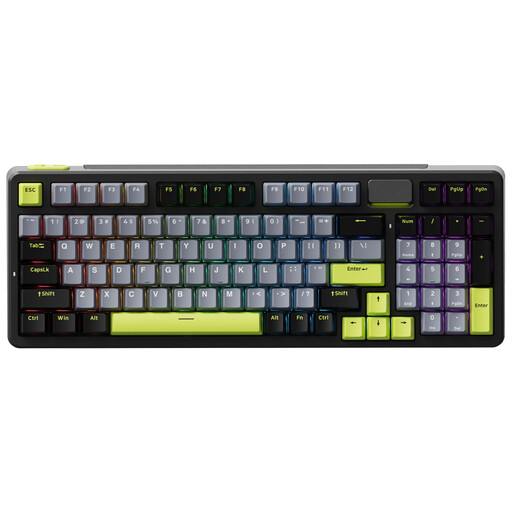
Why it stands out: The V700DIY is an excellent entry point into the world of custom mechanical keyboards. Its 96% layout is a smart compromise, offering nearly all the keys of a full-size board in a smaller footprint.
Key Features:
- Compact 96% layout with 100 keys, including a number pad.
- Gasket Mount structure for a comfortable typing feel and refined acoustics.
- Fully hot-swappable for easy switch customisation.
- Tri-mode connectivity (2.4 GHz, Bluetooth, USB-C).
- 4000 mAh battery for solid battery life.
Who is it for? Professionals and versatile users who can't live without a number pad but want to optimise their desk space.
See price and details on Joybuy.fr
AULA F75 75% Mechanical Wireless Keyboard
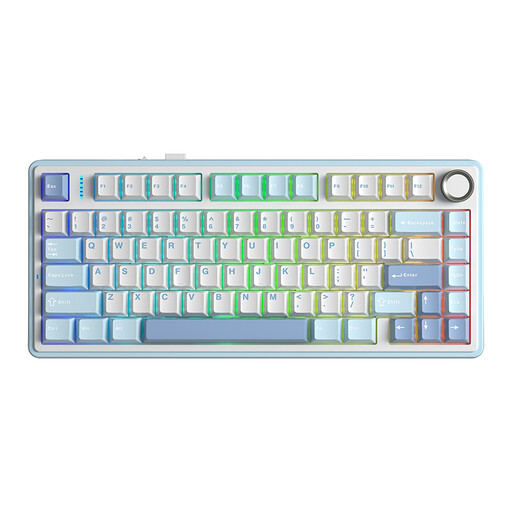
Why it stands out: The AULA F75 is often cited for its unbeatable value. It packs high-end features, like a Gasket Mount, into a very popular 75% form factor, all at a very aggressive price point.
Key Features:
- Ultra-efficient 75% layout for gaming and productivity.
- Gasket Mount structure combined with multiple layers of sound-dampening foam.
- Factory pre-lubed Graywood V3 (linear) switches for exceptional smoothness.
- Hot-swappable PCB compatible with both 3-pin and 5-pin switches.
- Per-key RGB backlighting.
Who is it for? Gamers and keyboard enthusiasts looking for a premium typing experience and thocky acoustics without breaking the bank.
See price and details on Joybuy.fr
AJAZZ AK980 V2 Wireless Mechanical Keyboard

Why it stands out: The AK980 V2 is notable for its 98% layout and the inclusion of a customisable TFT screen and a control knob. Its extra-large battery makes it an endurance champion.
Key Features:
- 98% layout with a metal volume knob and a TFT screen for system info or animated GIFs.
- Gasket Mount structure with five layers of foam for advanced acoustic insulation.
- Very high-capacity battery (up to 10,000 mAh depending on the version).
- Tri-mode connectivity and hot-swappable PCB.
- Standard US QWERTY layout for broad keycap compatibility.
Who is it for? Power users and creatives who will appreciate the additional features like the screen and knob for quick system control.
See price and details on Joybuy.fr
Ajazz AK820 Pro 75% Mechanical Tri-Mode Keyboard
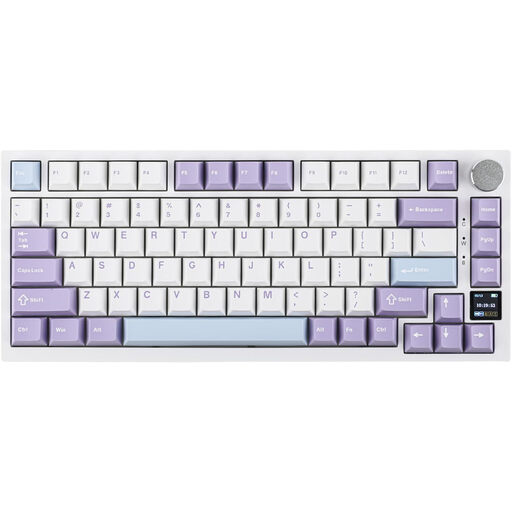
Why it stands out: The AK820 Pro combines the highly sought-after 75% layout with an interactive TFT colour screen, offering a level of customisation and visual feedback rarely seen at this price point.
Key Features:
- TFT colour screen to display the time, connection mode, battery life, or custom animations.
- Compact keyboard 75% layout with a multimedia control knob.
- Gasket Mount structure with a "flex-cut" plate and PCB for increased typing flexibility.
- 4000 mAh battery and tri-mode connectivity.
- Native Mac/Windows compatibility with layout switching directly from the screen.
Who is it for? Techies and gamers who want a wireless gaming keyboard that is powerful, compact, and packed with cutting-edge features like the customisable screen.
See price and details on Joybuy.fr
Can't Find What You're Looking For?
This selection highlights models with very specific features, but it's just a glimpse of what's possible. The wireless mechanical keyboard market is vast, offering a multitude of layouts, designs, and switch types. If these options don't perfectly match your needs, many other gems are out there.
Explore our full collection of wireless keyboards to discover other form factors and features.
Frequently Asked Questions About Wireless Mechanical Keyboards
Is a wireless mechanical keyboard responsive enough for gaming?
Yes, without a doubt. Modern models using a 2.4 GHz connection with a USB dongle offer imperceptible latency, comparable to that of a wired keyboard. Many professional gamers now use a wireless gaming keyboard for the freedom of movement it provides.
What is a hot-swappable keyboard?
A hot-swappable keyboard is one where the mechanical switches can be removed and replaced without any soldering. This makes it very easy to customise the typing feel by trying out different types of switches or to repair a faulty key yourself.
What is the difference between a mechanical and a membrane keyboard?
The fundamental difference lies in the mechanism beneath each key. A membrane keyboard uses a rubber dome that, when pressed, makes contact with a printed circuit board. A mechanical keyboard, on the other hand, uses an individual switch for each key, complete with its own spring-loaded mechanism. The benefit is threefold: greater precision, much better durability, and a range of typing feels (linear, tactile, clicky) that is simply unattainable with a membrane keyboard.