
How to choose a wireless Xbox controller for Xbox Series and PC with confidence
A wireless Xbox controller for Xbox Series and PC can be used to play on Xbox Series X|S, Xbox One, Windows computers and, in some cases, mobile devices. However, product listings often focus on colour, design or claims of “precision”, without explaining the features that really make a difference in everyday use.
Before you buy, three potential pitfalls deserve your attention: compatibility limited to certain devices, battery life quoted without specifying the type of batteries and connectivity that is too limited for using a headset or playing in wired mode. Here are the criteria to consider when choosing a Bluetooth Xbox controller that suits your equipment and playing habits.
Common buying pitfalls
1. Confusing Xbox compatibility with PC compatibility
An Xbox Series X|S controller is not necessarily compatible with every device. Check the supported connection methods: Xbox Wireless, Bluetooth and USB-C do not meet exactly the same needs.
- Xbox Wireless is designed for compatible consoles.
- Bluetooth makes pairing with a Windows PC or compatible mobile device easier.
- USB-C connectivity generally lets you play in wired mode, but the cable may be sold separately depending on the model.
If you play on Xbox One, also make sure the listing explicitly mentions this console. This simple check will help you avoid buying a wireless PC controller that does not meet your expectations on console.
2. Treating theoretical battery life as guaranteed usage time
Battery life varies depending on the type of batteries, vibration intensity, headset use and session frequency. A claim such as “up to 40 hours” applies to specific conditions, not to an identical duration for every player.
A Microsoft Xbox controller that uses AA batteries has the advantage of being put back into action quickly with a spare set. If you prefer rechargeable power, you will need to plan for a suitable solution, such as a compatible battery pack or a USB-C cable.
3. Overlooking ergonomics and secondary controls
A comfortable grip does not depend solely on the overall shape. Examine the texture of the triggers, bumpers and rear casing, as well as the type of directional pad. In racing, shooting or sports games, finger stability can matter more than the exterior finish.
The Share button also lets you quickly record a screenshot or video clip without navigating through several menus. It is a particularly useful feature for players who regularly share their gameplay.
Technical criteria to check
Connection and supported devices
For versatile use, look for a combination of Xbox Wireless, Bluetooth and USB-C. This covers several scenarios: playing wirelessly on a console, connecting to a computer or mobile device via Bluetooth, then switching to wired mode when you want to avoid interruptions caused by batteries.
However, compatibility with Android and iOS should be clearly stated in the product listing. Some features may also vary depending on the operating system, game and app being used.
Battery life and power
A controller with a compartment for two AA batteries lets you replace depleted batteries quickly. Check the following points:
- the number and type of batteries required ;
- whether batteries are included in the box ;
- whether you can play using a USB-C cable ;
- whether or not an integrated charging system is provided.
In a household with several controllers, this choice can also make it easier to manage accessories and spare batteries.
Audio, customisation and precision
A 3.5 mm headset jack lets you connect a compatible headset directly to the controller, so you can enjoy game audio and voice chat. Also check whether remappable controls are available if you switch between several game genres.
On some models, the official app lets you change button assignments, adjust stick sensitivity and create profiles. These features make it easier to adapt the controls, but you should still check compatibility with your console or PC.
Our selection for different user profiles
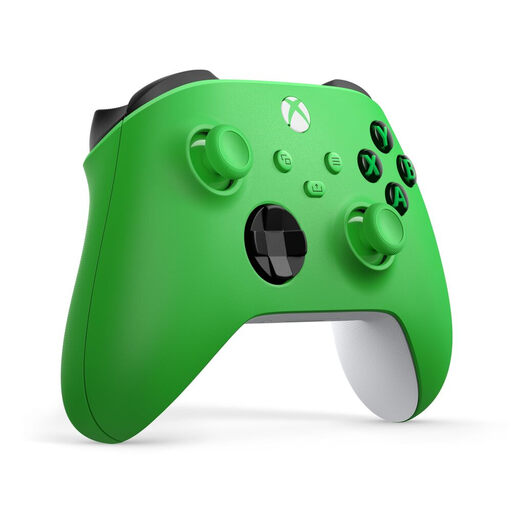
Xbox Wireless Controller for Xbox Series/PC – Velocity Green
Why this choice suits this profile : This Velocity Green Xbox controller combines the features you need to play on Xbox Series X|S, Xbox One, Windows PC, Android and iOS, with a familiar grip and several connection options.
The listing details compatibility, Bluetooth, USB-C, AA batteries and the 3.5 mm headset jack. You can therefore check the essential features before buying.
Up to 40 hours of quoted battery life with two AA batteries included, Share button, hybrid directional pad and textured grips.
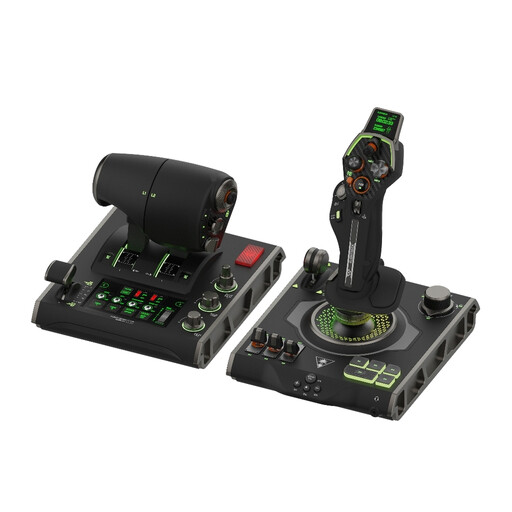
Turtle Beach VelocityOne Flightdeck Universal Simulation System Wired HOTAS
Why this choice suits this profile : This system is designed for Windows gamers looking for an advanced simulation setup rather than a conventional Xbox controller.
The listing specifies that it is wired and intended for Windows 10/11 only. This prevents it being confused with a versatile Bluetooth Xbox controller.
15 axes, 139 programmable functions, two throttle controls and a customisable OLED display.
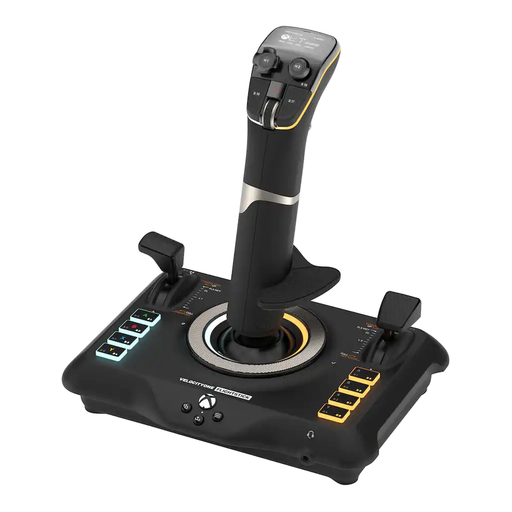
Turtle Beach VelocityOne Flightstick Universal Simulation Controller Wired
Why this choice suits this profile : This wired joystick is suitable for flight simulation on Xbox Series X|S, Xbox One and Windows PC, when specialised controls matter more than portability.
The 3-metre wired USB-C connection is clearly stated. You should therefore not buy it expecting a wireless Xbox controller.
Eight axes, 27 programmable buttons, OLED display and contactless sensors as stated in the listing.
Setup and everyday use
To pair the controller with a console, press the Xbox sync button, then hold down the controller’s Pair button until the Xbox button starts flashing. On a PC or mobile device, switch on Bluetooth and select “Xbox Wireless Controller” from the list of available devices.
When using a wired connection, use a USB-C cable that supports data transfer, rather than one intended only for charging. To customise the controls, the Xbox Accessories app may, depending on the model, let you remap buttons, adjust sensitivity and create profiles.
Finally, keep the controller away from moisture, extreme temperatures and sources of interference. Remove the batteries if storing it for an extended period, and take electrical equipment and batteries to a suitable collection point.
Frequently asked questions
Does an Xbox Series controller work with Xbox One and PC?
Compatibility depends on the model. The Xbox Wireless Controller Velocity Green listing states that it is compatible with Xbox Series X|S, Xbox One and Windows 10/11, as well as Android and iOS. Always check the list of supported devices before placing your order.
Can you play with a wireless Xbox controller when the batteries are low?
Yes, if the model supports a wired USB-C connection. You can then connect the controller to the console or PC, provided you use a suitable cable. With AA batteries, keep a spare set close at hand to avoid interruptions.
Do all Xbox controllers include a headset jack?
No. The presence of a 3.5 mm jack should be stated in the specifications. It lets you connect a compatible headset directly to the controller, but audio settings may depend on the console, PC and headset being used.