
Xbox Wireless Controller: How to Choose the Right Model for Your Needs
Choosing a wireless Xbox controller might seem straightforward: the overall shape is similar from one model to the next, the connection is cable-free, and compatibility often spans several devices. However, certain details have a big impact on comfort, battery life, and everyday ease of use. A controller that looks great on paper can quickly become frustrating if its batteries aren't included, if the wireless connection requires an adaptor, or if its extra buttons don't suit your habits.
This guide helps you decide between an Xbox Series X|S controller, an Xbox controller for PC, or a Bluetooth Xbox controller, without getting distracted by colour and price alone.
Pitfalls to Avoid Before You Buy
1. Don't Confuse Bluetooth with Xbox Wireless
Bluetooth makes it simple to connect to a PC, tablet, or compatible smartphone. On an Xbox console, you'll generally want to use Xbox Wireless technology. Some third-party accessories rely instead on a 2.4 GHz dongle that plugs into the console or computer.
Before you place your order, check the following:
- compatibility with Xbox Series X|S and Xbox One;
- whether Bluetooth is present for an Xbox controller for PC;
- whether a wireless adaptor might be needed;
- whether you can play via USB-C when the battery is low.
2. Don't Rely Too Heavily on the Stated Battery Life
A battery life quoted as "up to 40 hours" depends on the setup and the type of power source. Standard Xbox controllers often run on two AA batteries, whereas a rechargeable Xbox controller has a built-in battery or accepts a rechargeable pack sold separately.
AA batteries have the advantage of being replaceable in seconds. For frequent gamers, though, the cost can add up over time. A built-in battery avoids this hassle, but it's generally not designed to be replaced by the user.
3. Don't Pay for Features You Won't Use
A customisable Xbox controller can include profiles, rear paddles, adjustable triggers, or interchangeable components. These features really come into their own in shooting games, racing games, or competitive sessions. However, they also add weight, extra settings, and a higher price tag.
For occasional gaming, a standard controller with a headphone jack, vibration, and a share button will often be the better choice. Regular gamers, on the other hand, can make the most of customisation to tailor the controls to different game genres.
Technical Specs to Check
Compatibility and Connection Type
A controller compatible with Xbox Series X|S, Xbox One, and Windows PC offers genuine versatility. The Bluetooth Xbox controller is particularly handy with a laptop or mobile device. For more consistent latency, especially in a shooting game, a USB-C connection is also a great backup option.
The mention of an Xbox controller with USB-C doesn't necessarily mean a cable is included. Check the box contents before you buy. The cable can be used for wired play, to power the controller, or to charge a compatible battery.
Power and Battery Life
Compare the following points carefully:
- whether AA batteries are included or not;
- built-in rechargeable battery;
- cable included or sold separately;
- stated battery life and test conditions;
- whether you can continue playing while it charges.
A rechargeable Xbox controller will suit users who play several times a week and want to avoid buying batteries regularly. A battery-powered model is still a good option if you want to get back to gaming immediately after swapping the power source, without waiting for a recharge to finish.
Ergonomics, Audio, and Controls
A 3.5 mm headphone jack lets you plug a compatible headset directly in for sound and voice chat. Textured surfaces on the triggers, bumpers, and back improve grip, but they won't make up for a shape that doesn't fit your hands well.
For racing games, take a look at the trigger travel. In FPS games, short-travel triggers or rear buttons can help reduce finger movement. An Xbox Elite controller or a professional model may also be heavier – something to bear in mind during long sessions.
Which Controller for Your Profile?
The recommendations below are based on the features stated in the product listings: connectivity, power, customisation, and included accessories.
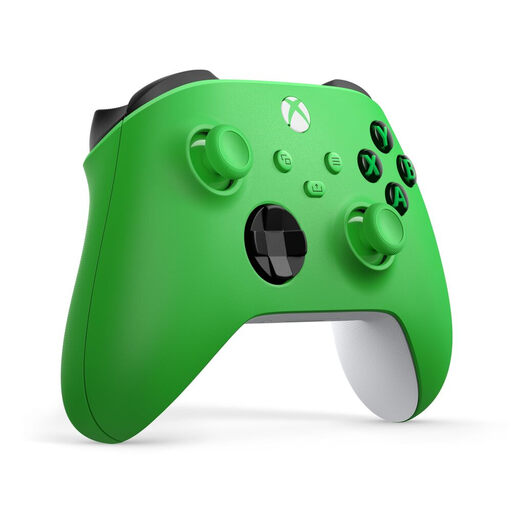
Xbox Wireless Controller for Xbox Series/PC – Velocity Green
Why this choice suits this profile: this controller offers Xbox Wireless, Bluetooth, and USB-C, with a headphone jack and console-PC compatibility. Its AA battery power means you can play straight away, without waiting for a recharge.
The listing details the connection modes, AA battery power, and the stated battery life of up to 40 hours. That helps limit any nasty surprises.
Share button, hybrid D-pad, textured surfaces, and customisation via the Xbox Accessories app.
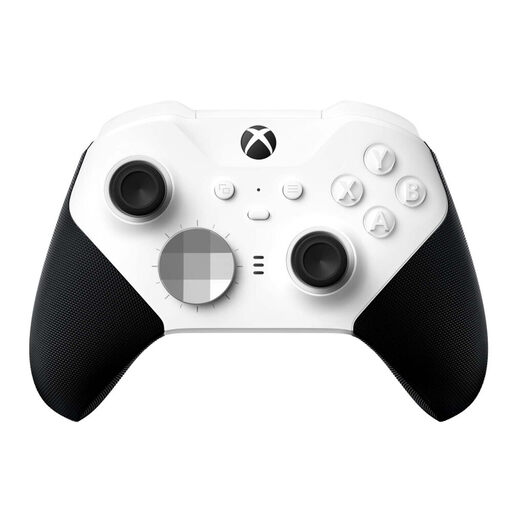
Xbox Elite Series 2 Core Wireless Controller for Xbox Series/PC – White
Why this choice suits this profile: this rechargeable model is designed for gamers who want to save multiple configurations and adjust their play style depending on the title.
The built-in battery means you're not reliant on AA batteries. The app also lets you remap buttons and store up to three profiles.
Adjustable triggers, rubberised side grips, Xbox Wireless, Bluetooth, and USB-C connections.
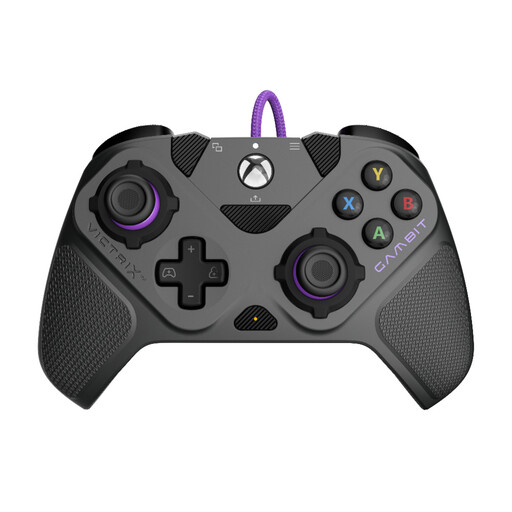
Turtle Beach Victrix Pro BFG Reloaded Wireless E-Sports Controller
Why this choice suits this profile: its modular design is aimed at FPS and racing gamers, as well as those who want to change the control layout regularly.
The advertised features are clearly detailed: four programmable rear buttons, five-level triggers, and twelve interchangeable components.
2.4 GHz wireless or USB-C connection, Victrix Control Hub app, and a storage case for the various components.
Frequently Asked Questions About Wireless Xbox Controllers
Does a wireless Xbox controller work on PC?
Yes, as long as the model states PC compatibility and offers Bluetooth, Xbox Wireless, or USB-C. On a desktop computer, an adaptor may be needed depending on the technology used.
Which power option should I choose for an Xbox controller?
AA batteries are easy to replace and practical for occasional use. A rechargeable battery will suit regular gamers better, provided you check the included cable and the charging time.
How long can an Xbox controller last?
It all depends on how often you use it, knocks, humidity, and how well you maintain the joysticks and buttons. Store it away from dust, clean it with a soft cloth, and avoid forcing the connectors. For models with a lithium-ion battery, follow the safety instructions and dispose of the controller at a suitable collection point at the end of its life.