
Gaming controller: how to choose the right model for your console and playing style
A gaming controller may seem easy to choose… until the first problems arise: incompatibility with your console, limited battery life, uncomfortable triggers or extra controls you will never use. Product listings often focus on lighting, vibration or the number of features, without always explaining the conditions under which they are actually available.
Before buying a PS5 controller, a Nintendo Switch controller, a PC controller or a mobile controller, first check its compatibility, connection type and ergonomics. These three criteria will have far more influence on your everyday comfort than a design covered in lights.
Common pitfalls before buying
1. Confusing advertised compatibility with full compatibility
A Bluetooth controller can connect to several devices without offering the same functions on each one. The Sony DualSense’s adaptive triggers and haptic feedback, for example, are associated with the PS5 and certain compatible games. On PC, Mac, iOS or Android, the connection may work, but the experience depends on the system, game and software being used.
For an Xbox, a Windows PC or a mobile device, check the supported platform, connection mode and any accessories required. A controller designed for the Nintendo Switch should not be considered a universal model.
2. Paying for features you will not use
A pro controller or an eSports controller may include customisable profiles, rear paddles, adjustable triggers or interchangeable modules. These options make sense in competitive games, FPS titles or fighting games. For occasional gaming, they mainly increase the price and can make the controller more complicated to use.
RGB lighting, Turbo mode and programmable buttons will never replace a precise D-pad or sticks suited to the size of your hands.
3. Underestimating the limitations of wired and wireless models
A wireless controller gives you more freedom, but it needs to be recharged or used with batteries, depending on the model. Also check its range and the technology used: Bluetooth, a 2.4 GHz receiver or both.
A wired controller avoids recharging and can reduce transmission delay, but its cable may make your setup more awkward or cause the controller to fall if someone trips over it. Its length matters too: 2.43 m or 3 m will suit a console positioned near the sofa, whereas a shorter cable will quickly become restrictive.
Technical criteria to check
Compatibility and connection system
Start by identifying the device you will mainly use for gaming:
- PS5: choose a model explicitly designed for the console, such as the DualSense or DualSense Edge.
- Nintendo Switch, Switch OLED or Switch Lite: check exact compatibility, as some wired controllers only work with the console or its dock.
- Xbox and PC: check support for Xbox Series X/S, Xbox One and Windows, as well as whether a USB receiver is included.
- Smartphone and tablet: check the connector, the device’s maximum dimensions and compatibility with iOS or Android.
A Lightning mobile controller will not be suitable for a phone with a USB-C port. In this case, choose a USB-C or Bluetooth mobile controller instead.
Sticks, triggers and Hall effect
Hall effect sticks use magnetic sensors rather than a conventional mechanical contact. Manufacturers generally say that they offer better resistance to wear and a lower risk of stick drift. However, you should still check the warranty, adjustment software and maintenance requirements.
Analogue triggers let you control the level of acceleration or pressure. A shorter trigger travel favours quick reactions, while a longer travel is often more comfortable in racing or adventure games.
Ergonomics, weight and button layout
Weight directly affects fatigue during long gaming sessions. A compact controller may suit smaller hands, while a larger model will offer more space for players used to full-size console controllers. Also look at the texture of the grips, the position of the D-pad and access to the rear buttons.
For fighting games, a precise D-pad, six front buttons and micro-switches may be more useful than vibration. In shooting games, pay closer attention to stick sensitivity, adjustable triggers and programmable buttons.
Our selection based on your profile
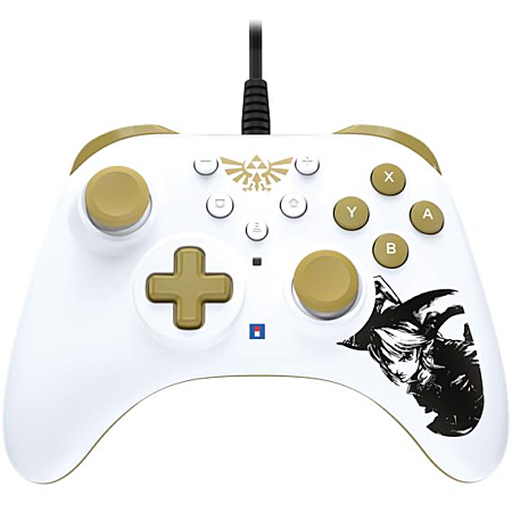
Hori Horipad Turbo wired controller for Switch – Zelda edition
Why this choice suits this profile : its wired connection and 3 m cable will suit players who want to avoid recharging and use their Nintendo Switch controller directly with the dock.
The listing clearly states that vibration and motion sensors are not included, so you know exactly which features you are buying.
Advertised weight of 218 g, responsive triggers and adjustable Turbo function.
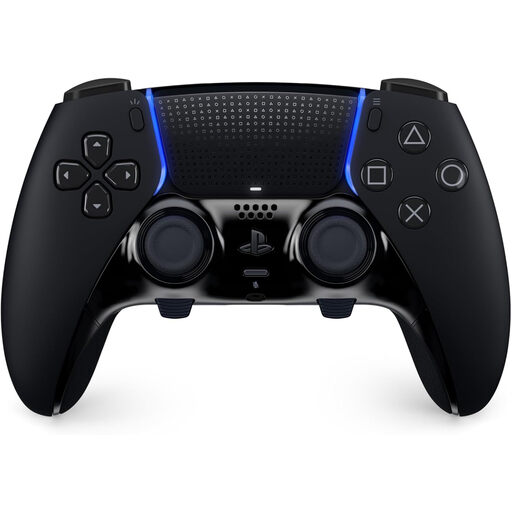
PlayStation DualSense Edge wireless controller for PS5 – Midnight Black
Why this choice suits this profile : this PS5 model is aimed at players who want to customise their controls and keep several profiles for different games.
The available settings are clearly detailed: profiles, programmable buttons, three types of sticks and removable triggers.
Bluetooth or USB-C connection, haptic feedback, adaptive triggers and included case.
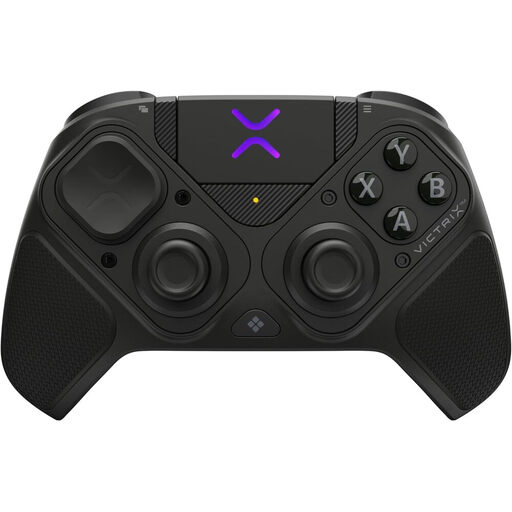
Turtle Beach Victrix Pro BFG Reloaded modular wireless eSports controller
Why this choice suits this profile : its modular design is aimed at PC and Steam Deck players who switch between FPS titles, fighting games and long gaming sessions.
The interchangeable components, four rear paddles and software settings are clearly specified, rather than hidden behind a simple eSports claim.
Hall effect sticks and triggers, six-button Fightpad module, and 2.4 GHz or USB-C connection.
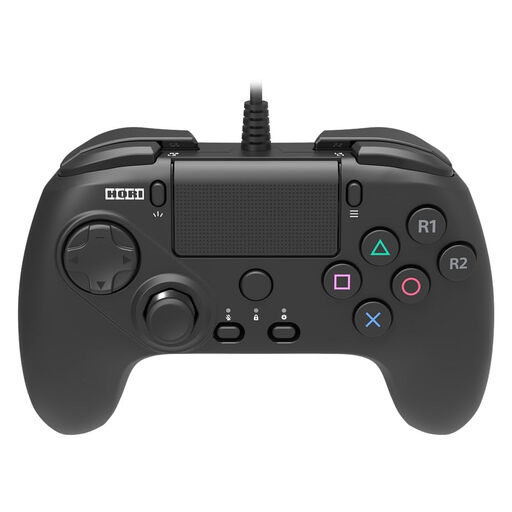
Hori Fighting Commander Octa wired controller for PC/PS4/PS5
Why this choice suits this profile : its six-button front layout and adjustable D-pad are designed for fighting games on PS5, PS4 and PC.
This product does not try to do everything: it is wired, has no vibration and is clearly intended for fighting games.
3 m braided cable, headset socket, micro-switch buttons and up to four profiles via the dedicated app.
Looking for more options ?
We have put together a complete, real-time updated selection of products that meet these demanding criteria while complying with European safety regulations.
Which controller should you choose for a smartphone or tablet?
A mobile controller with a direct connection can be very practical for cloud gaming, remote play or titles that support a controller. The Backbone ONE Gen 2 Lightning plugs directly into certain iPhones and offers a headset socket as well as pass-through charging. For an Android device or one fitted with a USB-C port, the GameSir G8 Galileo Type-C features Hall effect sticks, two rear buttons and a customisation app.
Always check your phone’s connector, dimensions and whether it has a case. A thick case may prevent the controller from being inserted correctly.
Gaming controller FAQ
Is a wireless controller better than a wired controller?
It all depends on your setup. Wireless is particularly convenient in the living room and with mobile devices, while wired avoids recharging and suits players positioned close to their PC or console. For competitive gaming, focus on comparing the technology used rather than relying solely on the words “wireless”.
How long can a gaming controller last?
Lifespan depends on how intensively it is used, knocks, maintenance and wear to the sticks or buttons. A Hall effect model may reduce certain problems associated with conventional sensors, but it does not guarantee that every component will last as long. Store your controller away from moisture and use a compliant cable or charger.
How much should you budget for a gaming controller?
The price varies depending on the platform and the features offered. A basic wired controller may be perfectly suitable for beginners, while a premium model often adds profiles, modules, rear paddles or advanced settings. Compare the features you will genuinely use in your games before paying for purely decorative options.